


Edit Event Dialog
In this dialog, you can add a new event, or you can edit an existing one for the selected build.
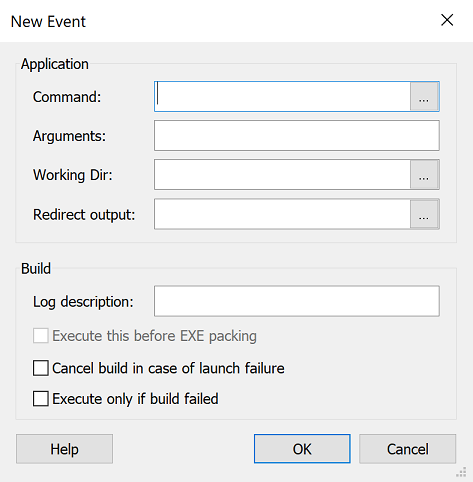
Application
Command
The command to run. Use button to browse for an external file. This field is of PseudoFormatted Type and can be edited using Smart Edit Control.
Arguments
Specify arguments for the command to run. This field is of PseudoFormatted Type and can be edited using Smart Edit Control.
 It is important to enclose the paths in quotation
marks (" ") otherwise the operations might not be
executed correctly or will return an error code. This usually happens
when the folder, file name contains spaces or more than 8
characters.
It is important to enclose the paths in quotation
marks (" ") otherwise the operations might not be
executed correctly or will return an error code. This usually happens
when the folder, file name contains spaces or more than 8
characters.
Working Dir
Specify working directory for the command to run. This field is of PseudoFormatted Type and can be edited using Smart Edit Control.
Redirect output
Specify the full path of the file where you want the output of the executed application to be redirected. This field is of PseudoFormatted Type and can be edited using Smart Edit Control.
Build
Log Description
Specify the text showed in the build log when the event is executed. This field is of PseudoFormatted Type and can be edited using Smart Edit Control.
Execute this before EXE packing
If this option is enabled the event will be executed before the MSI package will be inserted into the final EXE file. This option makes sense only if the Create EXE setup file option is enabled in the Configuration Tab; otherwise, it will act as a normal Post-Build event.
 This option can be used only for Post-Build Events,
because this is the only moment when an event can be scheduled
after the creation of the MSI file and
before the EXE file is generated.
This option can be used only for Post-Build Events,
because this is the only moment when an event can be scheduled
after the creation of the MSI file and
before the EXE file is generated.
Cancel build in case of a launch failure
Enable this option for the build process to be interrupted if the specified command returns with an error.
Execute only if build failed
This option ensures the execution of the post-build event only in case the build failed.