


Edit Filters Dialog
In this dialog, you can edit the filters that allow you to select which files will be added from the synchronized folder to the package.
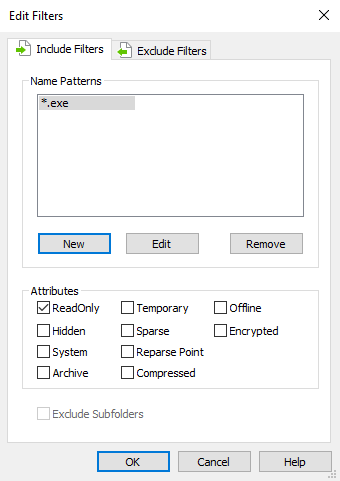
Include Filters
Specify what files (or types of files) should be added to the project.
Name Patterns
You can specify what files will be added to the package. Use the [ New ], [ Edit ] and [ Remove ] buttons to do that.
Attributes
You can specify the attributes of the files that will be added to the package.
 The include filters are applied only to files. They are not
taken into consideration for folders.
The include filters are applied only to files. They are not
taken into consideration for folders.
Exclude Filters
Specify what files (or types of files) should be left out of the project. The exclude filters can be configured so they apply only to files, only to folders or both.
 Folders can be excluded only by using an exclude filter.
Exclude sub-folders
Enable the “Exclude Sub-folders” check-box if you don't want to include the synchronized folder's sub-folders in your project.
Topics
- Edit Pattern Dialog
Edit a filter pattern.