


Package Validation
The validation tool checks your project for compliance with each of the internal consistency evaluators (ICEs). The files containing these ICEs are those installed with the MsiVal2.msi tool (part of the Microsoft Windows Installer Platform SDK) to validate the installation and merge module packages for Windows logo compliance. Advanced Installer will not install those files by default, it will automatically detect them if they are installed. However if the MsiVal2.msi tool is not installed but present on your computer Advanced Installer will automatically prompt you to install it. If this tool is not present on your computer you need to manually browse for the ICE files. The predefined Microsoft ICE evaluation files detected by Advanced Installer are:
- Full MSI Validation Suite - Runs darice.cub, it performs up to 99 checks to ensure that the installation databases are internally consistent.
- Merge Module Validation Suite - Runs mergemod.cub, used to test the internal consistency of merge modules.
- Windows XP Logo Program Suite - Runs XPlogo.cub, which is part of Microsoft Windows XP logo verification program. The tests in XPlogo.cub are a subset of the tests in darice.cub.
- Windows Vista Logo Program Suite - Runs Vstalogo.cub, which is part of Microsoft Windows Vista logo verification program. The tests in Vstalogo.cub are a subset of the tests in darice.cub.
 To benefit from the newly internal consistency evaluators it is
recommended to have installed the newest MsiVal2.msi tool.
To benefit from the newly internal consistency evaluators it is
recommended to have installed the newest MsiVal2.msi tool.
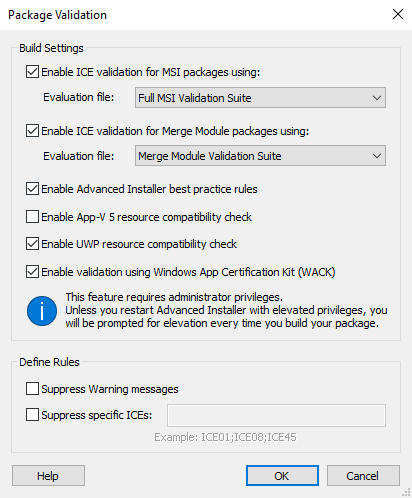
Build Settings
Enable ICE validation for Msi packages
Run selected ICE evaluation file at the MSI package build time. If no predefined evaluation files are detected use the button to locate the evaluation file.
Enable ICE validation for Merge Module packages
Run selected ICE evaluation file at the Merge Module package build time. If no predefined evaluation files are detected use the button to locate the evaluation file.
Enable Advanced Installer best practice rules
Run the Advanced Installer Best Practice evaluators at build time.
Enable App-V 5 resource compatibility check
By enabling this option you will get an "Issue List" with resources that don't meet the App-V 5 standards. The compatibility check will be performed at build time and it will include Drivers, Scheduled tasks and Firewall settings.
Enable UWP resource compatibility check
Verifies that the package resources and settings are attuned to Universal Windows Platform best practices. The check is performed at build time and all detected compatibility issues are shown in the "Issue List" pane.
Enable validation using WACK
Uses appcert.exe from the Windows App Certification Kit to validate an MSI or UWP AppX build. If you build your project via command line, you have to be aware that by enabling WACK, the uninstall process will not be silent. The validation will provide an output log as well as a more user-friendly HTML log.
To run these validation tests requires you to install Windows SDK.
Define Rules
Suppress Warning messages.
No validation warnings will be displayed to the user.
Suppress specific ICEs.
The ICEs you specify separated by ";" character will not run.
The validation result is displayed as information in the build log
and will not affect the build result. After the build operation is
finished the validation result is displayed in the Issue
Pane list allowing user to locate the problem in Advanced
Installer UI (if possible).