We’re moving our forums to a new platform.

You can still browse and search existing topics, but you can no longer create new topics or post replies.

For questions, technical issues, or feature requests, please don’t hesitate to contact our support team at support@advancedinstaller.com.

Thank you for your understanding!

AquaComm
Posts: 67
Joined: Wed May 06, 2020 3:25 am

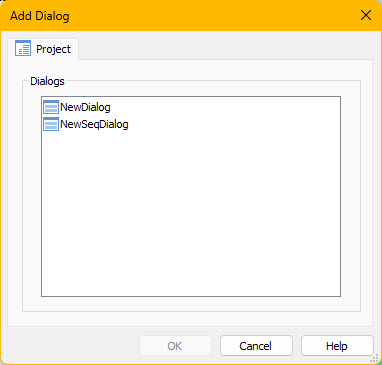
Repository dialogs not displayed

2024-05-16_16-55-07.jpg
2024-05-16_16-55-07.jpg (23.72 KiB) Viewed 3286 times
The repository exists at c:\ProgramData\Caphyon\Advanced Installer\Repository\Dialogs\ and contains several custom dialogs. The Tab doesn't even show.
I have had to remove the registry settings for another issue.
How can I get the Tab to display?
AquaComm
Posts: 67
Joined: Wed May 06, 2020 3:25 am

Re: Repository dialogs not displayed

The Repositories Tab displays correctly in the "Add Dialog" folder but not in the "Add Dialog In Sequence" folder. :oops:
Liviu
Posts: 1420
Joined: Tue Jul 13, 2021 11:29 am
Contact: Website

Re: Repository dialogs not displayed

Hello,

Thank you for your followup on this.

Let us know if you have any other questions.

Best regards,
Liviu
________________________________________
Liviu Sandu - Advanced Installer Team
Follow us: Twitter - Facebook - YouTube

Return to “Common Problems”