AllanW
Posts: 20
Joined: Thu Feb 18, 2010 11:42 pm

Problem with dialogs when using large system font

I hope you can help with this problem we've just discovered. When we run an install on a system that is configured to use a font that is larger than default, the dialogs and text scale to suite the font but all background images remain fixed, resulting in something that looks like the image below. The dialog box uses the default theme with no modifications other than to select a different background image out of those provided with AI.
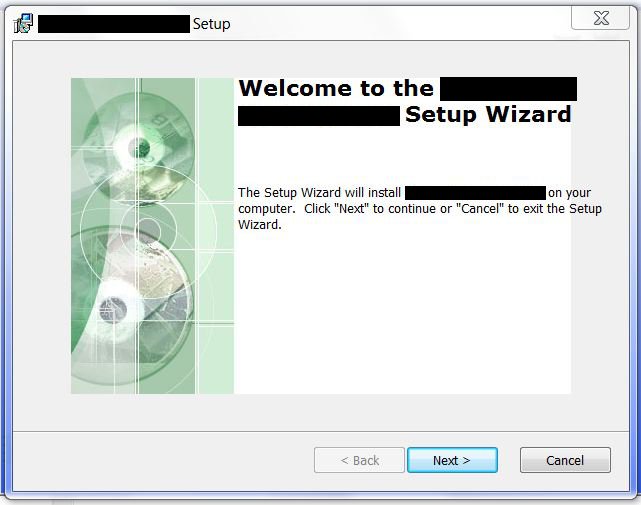
InstallScreen.JPG
InstallScreen.JPG (40.49 KiB) Viewed 4599 times
It seems that I can fix this by going into each dialog box and changing the "Fixed Size" attribute for the image to False but it seems that scaling the images to fit the dialog when the dialog size is controlled by the system font and/or screen resolution is something that should probably be handled automatically (or maybe that attribute should be True as default).

Is there something I can do to fix this problem that doesn't require changing each dialog box of each install we build? Might it be possible to modify AI in an upcoming version to handle this behavior better?

Thanks for the help.

Allan
GabrielBarbu
Posts: 2146
Joined: Thu Jul 09, 2009 11:24 am
Contact: Website

Re: Problem with dialogs when using large system font

Hi Allan,

On the themes page->Settings tab simply make sure the "Stretch images to fit their controls" option is selected. This should fix the issue.

Best regards,
Gabriel
Gabriel Barbu
Advanced Installer Team
http://www.advancedinstaller.com/
AllanW
Posts: 20
Joined: Thu Feb 18, 2010 11:42 pm

Re: Problem with dialogs when using large system font

Thanks. I forgot to check the "Themes" page for settings. That's definitely better than my original plan of changing the "Fixed size" setting for the background image on each dialog box. Unfortunately, since the default is "Use individual control stretch settings" it means that that change will be necessary for each installer we build. Is there a way (for me or you) to change the program's default to "Stretch images...", so that new installs will behave properly without having to make the change for each one?

Thanks again for the help.

Allan
GabrielBarbu
Posts: 2146
Joined: Thu Jul 09, 2009 11:24 am
Contact: Website

Re: Problem with dialogs when using large system font

Hi Allan,

In your Advanced Installer folder, look for the templates directory. In it, you will find template.aip. Simply add the following code above the ending </DOCUMENT> tag:

Code: Select all

<COMPONENT cid="caphyon.advinst.msicomp.MsiControlComponent">
    <ATTRIBUTE name="FixedSizeBitmaps" value="1"/>    
</COMPONENT>
This will set the default to your desired setting.

Best regards,
Gabriel
Gabriel Barbu
Advanced Installer Team
http://www.advancedinstaller.com/
AllanW
Posts: 20
Joined: Thu Feb 18, 2010 11:42 pm

Re: Problem with dialogs when using large system font

Great! Thanks very much for that. That change should make life a little easier as I continue to develop installers for our products.

Allan

Return to “Common Problems”