We’re moving our forums to a new platform.

You can still browse and search existing topics, but you can no longer create new topics or post replies.

For questions, technical issues, or feature requests, please don’t hesitate to contact our support team at support@advancedinstaller.com.

Thank you for your understanding!

kjullion
Posts: 176
Joined: Mon Nov 11, 2013 9:02 pm

Updater user interface options

Hello,
I am finding that the Updater is working well for me overall. However, I would like some help to see if I can improve the way in which the user is being informed about the update process.

For example, with a "download and install now" option I call the updater with these params:

Code: Select all

updater.exe /silentall -nofreqcheck
What that seems to do is minimize the Updater UI down to the Notifications area where it stays active for a minute or so, then it "hides" which makes it looks like it's completed, when it hasn't. And this means they have to have noticed and clicked the "up" arrow of the notifications area to see if it is still downloading and/or installing.
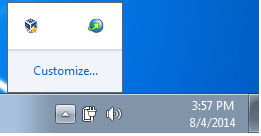
updater ui part 1.png
updater ui part 1.png (14.93 KiB) Viewed 9153 times
What I would prefer for the user to see would be for them to see this screen (which is what they see if they double click on the updater icon in the notifications area) so that they have a better understanding of where the updater is in it's procssing.
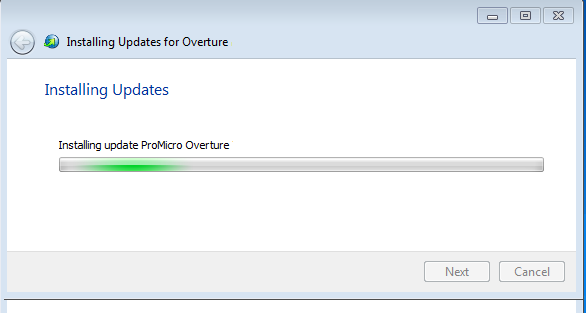
updater ui part 2.png
updater ui part 2.png (13.54 KiB) Viewed 9153 times
Is this possible? Please keep in mind that we require that the UI be zero user interaction, because it's a near-silent automatic upgrade that we are trying to achieve here.

Thanks.
Dan
Posts: 4530
Joined: Wed Apr 24, 2013 3:51 pm

Re: Updater user interface options

Hello Kevin,

When you install your updates without elevation, all .MSI updates will be executed silently with the /qn command switch.
This is happening because you are using the Support Service to install updates without elevation, thus, the UI will not be shown because the updater runs as a service, so there is no UI.

If you have other questions, please let us know.

Best regards,
Dan
Dan Ghiorghita - Advanced Installer Team
Follow us: Twitter - Facebook - YouTube
kjullion
Posts: 176
Joined: Mon Nov 11, 2013 9:02 pm

Re: Updater user interface options

Hi Dan,
I guess what you are saying is that "silent" means "no UI", which is a fair answer, if that is the case. But I was hoping there might be an option that requires no user interaction (no mouse clicks, no prompts, etc.) but at the same time gives the user some feedback about what is occurring.

Because my whole "download & install now" process takes 3-5 minutes, that seems like a very long time for the user to have to wait when they don't know what the status of the process is. User's will definitely be frustrated not knowing when it will finish or how far along it is already.

Can the updates w/o elevation be configured to be executed with /passive command switch? Or possibly the /qr or /qb switch? Or a way to un-minimize the progress screen (as shown in my "updater ui part 2.png" screen shot)?

Basically, I am hoping to give my users a progress bar.

Thanks!
Dan
Posts: 4530
Joined: Wed Apr 24, 2013 3:51 pm

Re: Updater user interface options

Hi Kevin,
I guess what you are saying is that "silent" means "no UI", which is a fair answer, if that is the case. But I was hoping there might be an option that requires no user interaction (no mouse clicks, no prompts, etc.) but at the same time gives the user some feedback about what is occurring.
Yes, silent means no User Interface.
Can the updates w/o elevation be configured to be executed with /passive command switch? Or possibly the /qr or /qb switch? Or a way to un-minimize the progress screen (as shown in my "updater ui part 2.png" screen shot)?
As long as your updates are installed through the updater which runs as a service (to be able to perform installs without elevation), you cannot have user interface, so your updates will be installed silent.

Best regards,
Dan
Dan Ghiorghita - Advanced Installer Team
Follow us: Twitter - Facebook - YouTube
kjullion
Posts: 176
Joined: Mon Nov 11, 2013 9:02 pm

Re: Updater user interface options

Hi Dan,
Ok, thanks for the explanation.

I wonder if you can put in a request on our behalf to do a small enhancement to this area. When the updater is doing the "downloading" phase and/or the "installing..." phase it would be GREAT if the UI/screen/form did not auto-minimize itself to the notification area; that is, it would be nice to (optionally) override this behavior so that the user sees how far along their progress is via the progress bar that is available if they double-click on the icon in the notification area as in my "updater ui part 2.png" image in this thread.

Thanks!
Dan
Posts: 4530
Joined: Wed Apr 24, 2013 3:51 pm

Re: Updater user interface options

Hello,

This improvement has been added in version 11.5 of Advanced Installer released on September 25th, 2014.

Best regards,
Dan
Dan Ghiorghita - Advanced Installer Team
Follow us: Twitter - Facebook - YouTube
kjullion
Posts: 176
Joined: Mon Nov 11, 2013 9:02 pm

Re: Updater user interface options

Hi Dan,
This looks VERY good to me so far in my early testing.
What I have started to test is the "-reducedgui" flag when calling the "updater.exe /silentall". Is that what I was supposed to use to get my desired outcome as described in this thread?

Thanks.
Dan
Posts: 4530
Joined: Wed Apr 24, 2013 3:51 pm

Re: Updater user interface options

Hi Kevin

Yes, you should get the described behavior in this thread using the related command line options.

The -reducedgui command line switch means installing the updates with basic user interface (simple progress and error handling). Used with the /silentall command line option, the Updater will search silently for updates and automatically install all updates.

If you have other questions, please let us know.

Best regards,
Dan
Dan Ghiorghita - Advanced Installer Team
Follow us: Twitter - Facebook - YouTube
kjullion
Posts: 176
Joined: Mon Nov 11, 2013 9:02 pm

Re: Updater user interface options

Hi,
Testing of the "-reducedgui" is continuing to go very well. I do have one small cosmetic change request, if it's easy to do.

If you look at this screen shot
Installing vs Downloading.png
Installing vs Downloading.png (6.15 KiB) Viewed 8923 times
the user could get a little freaked-out if they are expecting only the download phase to happen, and the caption of the window says "Installing Updates for [Product Name]".

Would it be possible to change the caption of this window to match the action that appears just above the progress bar. In other words if it is in the "downloading phase" the caption for this form should say "Downloading Updates for [Product Name]" and if it's in the "installing phase" the caption for this form should say "Installing Updates for [Product Name]"

Thanks.

Return to “Common Problems”