Hi,
I am seeing sporadic errors that I rarely can reproduce. Our installer calls custom actions written in C#, following the guide at
http://www.advancedinstaller.com/user-g ... rp-ca.html. I have Advanced Installer 12.0, Visual Studio 2012 and Wix Toolset 3.9.1208.0 installed. The problem is that sometimes after an installation has been run, an error dialog is shown:
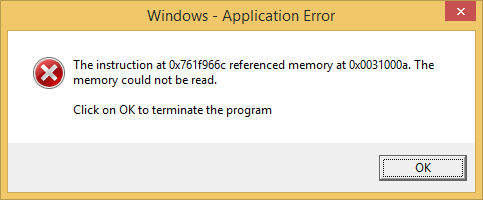
- example error dialog in English
- installer memory ref error.png (7.38 KiB) Viewed 3243 times
Here is another example in Swedish:
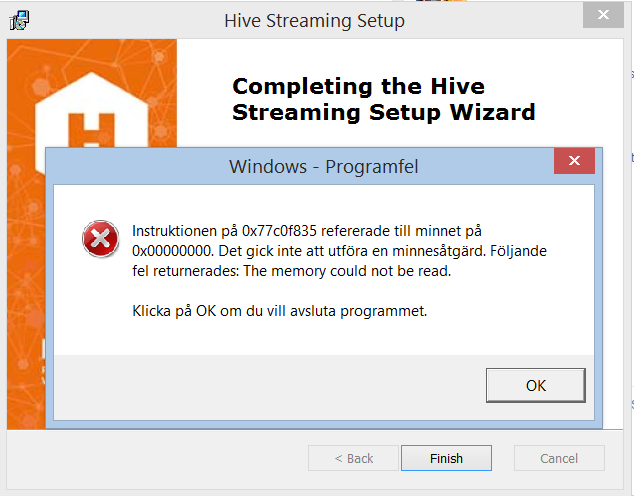
- example error dialog in Swedish
- Image.png (73.22 KiB) Viewed 3243 times
When the error occurs, the installation already appears to have completed successfully. We have traced the dialog back to the csrss.exe process, which is a standard Windows process (
http://www.processlibrary.com/en/direct ... rss/26031/). Once we were also able to attach a debugger and get the following call stack:
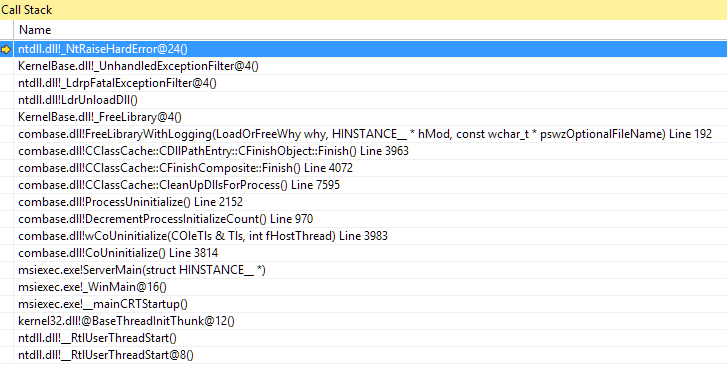
- call stack
- installer ref error call stack.png (33.99 KiB) Viewed 3243 times
Judging from this call stack, it appears that the error occurs when a library is being freed, as part of the cleanup process when msiexec.exe is preparing to exit(?). The problem is that the error occurs so seldom, and I can never reproduce it at will, so it is very hard to debug. If the problem is indeed related to our C# custom actions, then I'm guessing that it could be a problem with the handling of managed code. As I understand it, Wix provides a library that acts as a proxy between msiexec and the C# assembly, but I have been unable to find any error reports related to this error and Wix.
Any help how to solve this would be very appreciated!
Thanks,
Magnus


FOLLOW US
Get the latest news in Application Packaging