We’re moving our forums to a new platform.

You can still browse and search existing topics, but you can no longer create new topics or post replies.

For questions, technical issues, or feature requests, please don’t hesitate to contact our support team at support@advancedinstaller.com.

Thank you for your understanding!

aaronclawrence
Posts: 9
Joined: Wed Aug 01, 2018 10:39 pm

Dialog when Windows version is not supported

When someone tries to install on a Windows version that isn't selected in the requirements, the dialog that comes up is really unhelpful.
Instead of saying "You need at least Windows 8.1" it lists every single Windows that ISN'T supported but gives the user no clue what IS supported.

Image

(please could you upgrade your forum to support putting images in easier, e.g. paste)

I have Advanced Installer 11.6.1 - is it any better in newer version?
Catalin
Posts: 7853
Joined: Wed Jun 13, 2018 7:49 am

Re: Dialog when Windows version is not supported

Hello,
it lists every single Windows that ISN'T supported but gives the user no clue what IS supported.
If something is not in the NON-supported list, it means that it is supported.

For instance, if from (a,b,c) "a" and "b" are not supported, it means that "c" is supported.

Though, if you do not like the message, you can use the "Table Editor" feature (available starting with our Enterprise suite) and modify the message. To do so, you can go to "Table Editor" page --> "LaunchCondition" table --> modify the launch condition description.

However, please keep in mind that in this case, you should first configure your launch conditions and then change the description accordingly. Also, everytime you modify a launch condition, you will need to modify the description as well.

Hope this helps somehow.

Best regards,
Catalin
Catalin Gheorghe - Advanced Installer Team
Follow us: Twitter - Facebook - YouTube
aaronclawrence
Posts: 9
Joined: Wed Aug 01, 2018 10:39 pm

Re: Dialog when Windows version is not supported

Hi Catalin,

I understand the technical situation, all I am concerned about is the user friendliness.

Thank you for the suggestion.

I will change our message to:
"[ProductName] requires Windows 8.1 or higher, 64 bit."

I think it would be better if this message were available for editing right in the "Supported Operating Systems" Launch Conditions page, since the automatically generated message is not very user friendly.

Thanks
Aaron
aaronclawrence
Posts: 9
Joined: Wed Aug 01, 2018 10:39 pm

Re: Dialog when Windows version is not supported

Well, I tried this. It seemed to have no effect.
I also tried changing the Description inside <COMPONENT cid="caphyon.advinst.msicomp.MsiLaunchConditionsComponent">
but also no effect.
I'm confused now.
Catalin
Posts: 7853
Joined: Wed Jun 13, 2018 7:49 am

Re: Dialog when Windows version is not supported

Hello,

This is strange.

I have tested this scenario using the 11.6.3 version of Advanced Installer (the closes I could find to 11.6.1) and everything worked as expected on my side.

After changing the description from "Table Editor" page, did you rebuild the project?
1.png
1.png (45.51 KiB) Viewed 7070 times
2.png
2.png (47.37 KiB) Viewed 7070 times
3.png
3.png (26.11 KiB) Viewed 7070 times
4.png
4.png (55.14 KiB) Viewed 7070 times

Additionally, please make sure you are changing the description for the right launch condition
I also tried changing the Description inside <COMPONENT cid="caphyon.advinst.msicomp.MsiLaunchConditionsComponent">
Please keep in mind that changing the XML file is not recommended as it can lead to unwanted behavior which is pretty hard to track and resolve.

Hope this helps.

Best regards,
Catalin
Catalin Gheorghe - Advanced Installer Team
Follow us: Twitter - Facebook - YouTube
aaronclawrence
Posts: 9
Joined: Wed Aug 01, 2018 10:39 pm

Re: Dialog when Windows version is not supported

Hi Catalin,

Thanks, I'm impressed you went back and tried on an old version!

I changed the description for all launch condition rows...
TableEditor.png
TableEditor.png (26.73 KiB) Viewed 7058 times
My error has a different title bar, is that significant?
error.png
error.png (10.64 KiB) Viewed 7058 times
I feel like there is a different setup here?
We are using the EXE format, not a plain MSI..
Catalin
Posts: 7853
Joined: Wed Jun 13, 2018 7:49 am

Re: Dialog when Windows version is not supported

Hello Aaron,
Thanks, I'm impressed you went back and tried on an old version!
You are always welcome. It's always my pleasure to try and help. :)

I have retested this scenario and I may have found the culprit.

The "Launch Conditions" table (from the "Table Editor" page) indeed refers to the MSI's launch conditions.

The problem here comes from the "Check predefined launch conditions before searching for the prerequisites" option from "Prerequisites" page.

As you may know, pre-install prerequisites are handled by our .EXE bootstrapper. The .EXE bootstrapper is simply an extra layer over the .MSI whose purpose is to handle what the .MSI can not (e.g. pre-install prerequisites).
explanation.png
explanation.png (21.26 KiB) Viewed 7053 times


As you may imagine, the .EXE is custom built by us and mostly every message related to it is designed from the code. Unfortunately, that can not be changed from within your project (.AIP file).

To avoid this, the only solution would be to disable the "Check predefined launch conditions before searching for prerequisites" option.

Best regards,
Catalin
Catalin Gheorghe - Advanced Installer Team
Follow us: Twitter - Facebook - YouTube
Catalin
Posts: 7853
Joined: Wed Jun 13, 2018 7:49 am

Re: Dialog when Windows version is not supported

Hello,

As a followup to my last response:

After further investigations, I think I may have found another way in which this can be achieved. However, unfortunately, this requires a newer version of Advanced Installer to make it work.

The solution is a custom one (using a custom action). Basically, a launch condition spawns a message box and fails the installer if a condition is evaluated as true.

We can replicate such a behavior using the "ErrorMessage" custom action. This custom action enables the stopping of the installation process if some condition is satisfied or not. An error message will be displayed to let the user know what happened.

Unfortunately, this is not possible in older versions of Advanced Installer, as the bootstrapper dialogs were not editable:
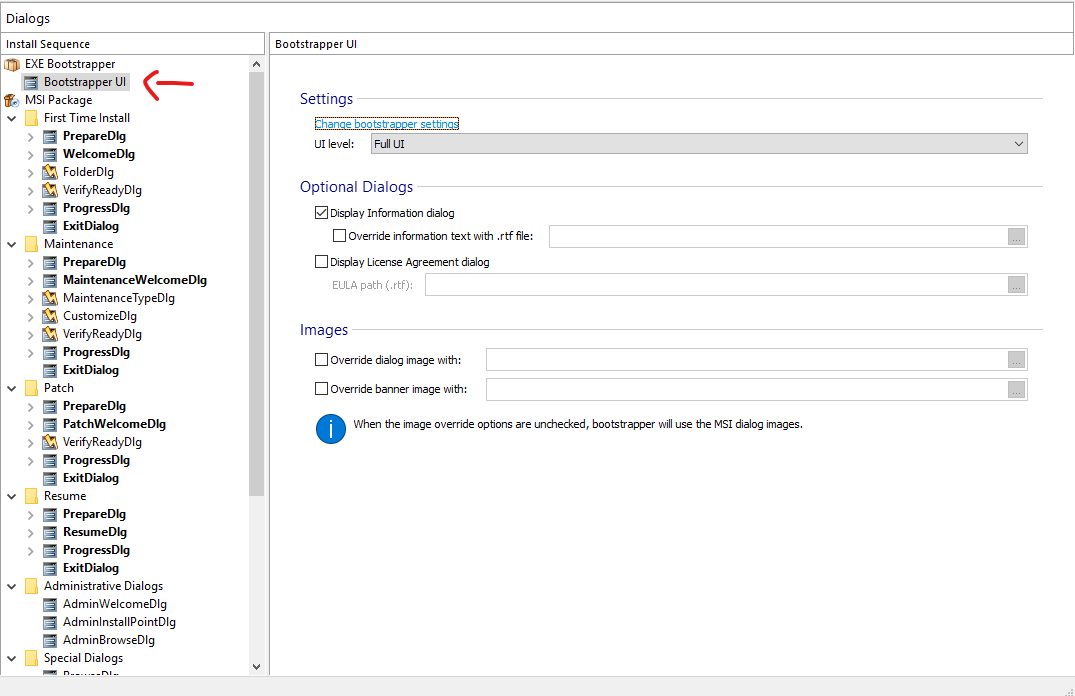
old.png
old.png (65.7 KiB) Viewed 7053 times

as opposed to the newer versions, where this is possible:
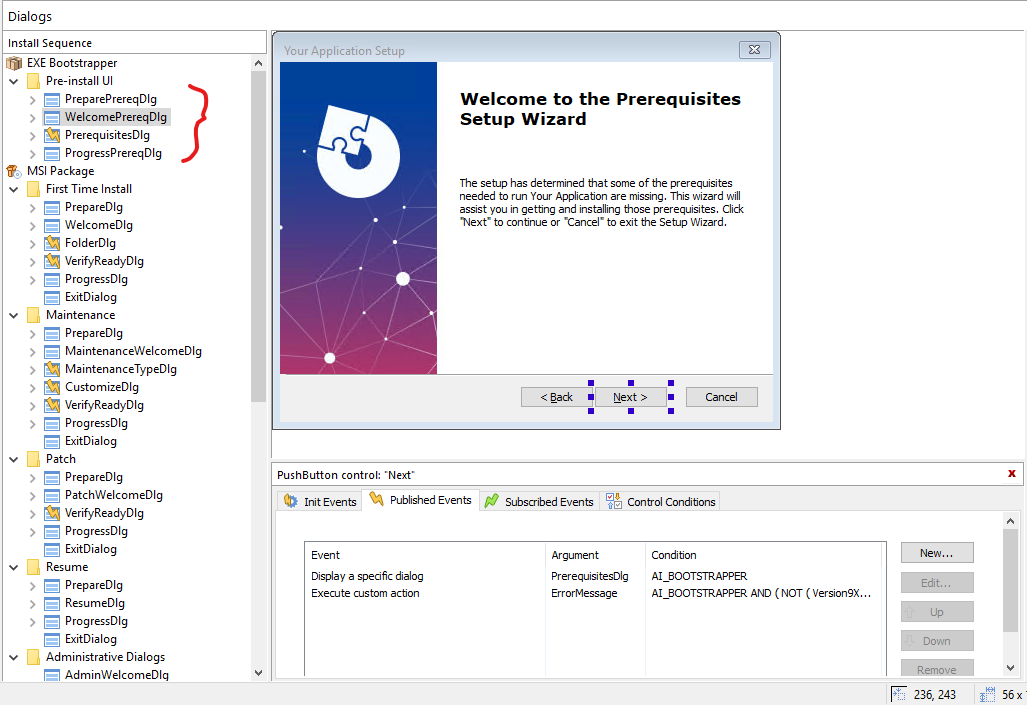
new.png
new.png (129.36 KiB) Viewed 7053 times

Here is how you can achieve what you want using the method I've proposed above:

- first of all, you need to define the conditions in the "Launch Conditions" page

- now please go to "Table Editor" page --> "Launch Conditions" table and copy the generated condition (the condition is generated when you specify different settings in the "Launch Conditions" page)

- now please go to "Custom Actions" page and add an "ErrorMessage" custom action, without sequence (so we can trigger it from a dialog event - more specifically from a control that is part of the boostrapper dialogs). Configure the custom action message as you desire.

- now please go to "Dialogs" page and select the "WelcomePrereqDlg" dialog. Select the "Next" button and under "Published Events", please add an event as it follows:
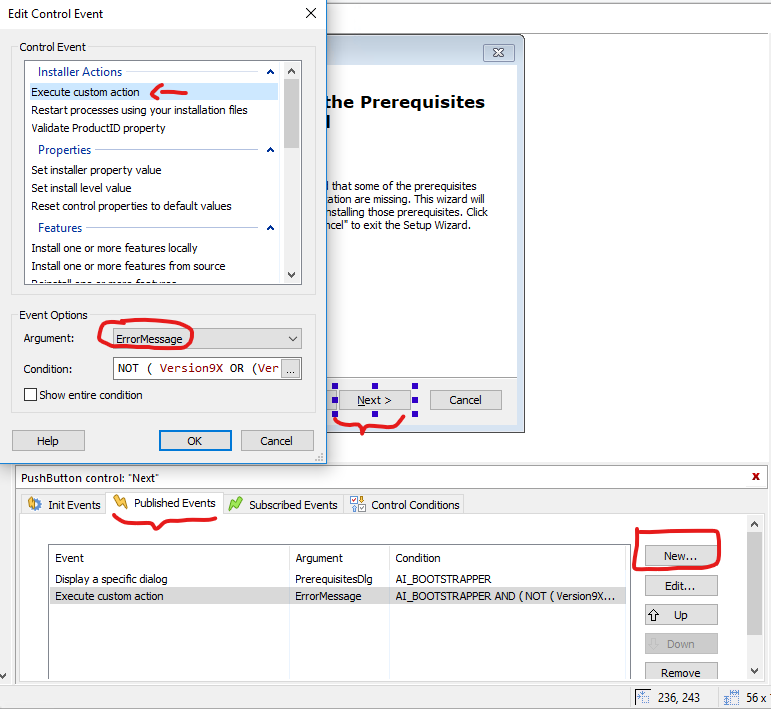
ca.png
ca.png (54.14 KiB) Viewed 7053 times

- in the "Condition" field, please use the condition you have earlier copied, but negated:

Code: Select all

NOT Your_Condition
Now, when the dialogs are spawned, when the user will press the "Next" button, the custom action will be executed and your desired message will be spawned.

Hope this helps somehow.

Best regards,
Catalin
Catalin Gheorghe - Advanced Installer Team
Follow us: Twitter - Facebook - YouTube
aaronclawrence
Posts: 9
Joined: Wed Aug 01, 2018 10:39 pm

Re: Dialog when Windows version is not supported

Wow, super comprehensive answers!

So if I unchecked "Check predefined launch conditions before searching for prerequisites"
it might unnecessarily install the prerequsites, before telling the user that it can't actually run on this Windows?

Would be pretty annoying I guess..

We do hope to upgrade soon, for other reasons, so that might be an option.
Catalin
Posts: 7853
Joined: Wed Jun 13, 2018 7:49 am

Re: Dialog when Windows version is not supported

Hello Aaron,
Wow, super comprehensive answers!
Thank you for your kind words!
So if I unchecked "Check predefined launch conditions before searching for prerequisites"
it might unnecessarily install the prerequsites, before telling the user that it can't actually run on this Windows?
Yes, that is pretty much what would happen. The prerequisite(s) would be installed and then, if the launch condition would not be satisfied, the main setup would fail.
We do hope to upgrade soon, for other reasons, so that might be an option.
If you require any assistance with the upgrade process, please do not hesitate to contact me and I will be glad to assist.

Best regards,
Catalin
Catalin Gheorghe - Advanced Installer Team
Follow us: Twitter - Facebook - YouTube

Return to “Building Installers”