We’re moving our forums to a new platform.

You can still browse and search existing topics, but you can no longer create new topics or post replies.

For questions, technical issues, or feature requests, please don’t hesitate to contact our support team at support@advancedinstaller.com.

Thank you for your understanding!

flycast
Posts: 24
Joined: Thu Jul 25, 2019 10:31 pm

Having issues with registering a dll

I have an Add in that I have created for SolidWorks. The add in installation is pretty simple. It needs to have two registry entries created and the dll needs to be registered. I am having issues getting SolidWorks to "see" my dll. The process for SolidWorks is to create two registry entries. One entry allows Solidworks to see the add in, the second is where SolidWorks keeps track of if the add in is enabled. The entries look like this:

HKEY_LOCAL_MACHINE\SOFTWARE\SolidWorks\AddIns\{77c0691d-47d7-4113-b440-c90676a038eb}
HKEY_CURRENT_USER\Software\SolidWorks\AddInsStartup\{77C0691D-47D7-4113-B440-C90676A038EB}

I know that the registry entries are getting created but SolidWorks will not "see" the add in. I suspect it is because the dll is not registering properly or with the correct GUID. Solidworks will get the GUID from the registry entry and match that with the GUID of the dll. If it does not find it the add in will not get used.

I have made sure that the GUID entered in the following locations matches the GUID I have set in "Assembly Information" in Visual Studio. I have used that GUID at the following places in Advanced Installer:

Product Details -> Product ID's -> Product code.
My two registry entries

I have set Install Parameters -> Installation Type to 64 bit package for x64 processors.

When I go to Organization I see that there is a mismatch between the GUID's there and what my dll GUID is in Visual Studio:
Image

In "Files and Folders -> Properties -> Registration" I have selected "Auto Register" with the default choices.

What am I doing wrong?
Catalin
Posts: 7853
Joined: Wed Jun 13, 2018 7:49 am

Re: Having issues with registering a dll

Hello,

From what you are saying, it indeed seems that the DLL is not correctly registered (inputs a wrong GUID in the registries), otherwise the SolidWorks should be able to "detect" it.
I have made sure that the GUID entered in the following locations matches the GUID I have set in "Assembly Information" in Visual Studio. I have used that GUID at the following places in Advanced Installer:

Product Details -> Product ID's -> Product code.
To be fully honest with you, I am not quite sure this is required. You do not need to set the ProductCode to be the same as your DLL GUID.
In "Files and Folders -> Properties -> Registration" I have selected "Auto Register" with the default choices.
Here, could you please let me know what the default choice is?

Additionally, in order to make sure the problem is the one you have mentioned (the DLL not being registered with the right GUID), could you please try the following:

- search the regedit.exe for the GUILD of your .DLL

- do not register the DLL with Advanced Installer, register it outside of Advanced Installer. After doing so, once again, please check the regedit.exe to see if the file was correctly registered. In addition to this, also check if now the SolidWorks is able to detect the AddIn.

Best regards,
Catalin
Catalin Gheorghe - Advanced Installer Team
Follow us: Twitter - Facebook - YouTube
flycast
Posts: 24
Joined: Thu Jul 25, 2019 10:31 pm

Re: Having issues with registering a dll

I found my GUID in the following registry entries. I am woefully ignorant of what is what in the registry so I don't understand what 99% of these do or if any of them are not supposed to be there.

All the registry results (Keys, Values and Data):

Code: Select all

HKEY_CLASSES_ROOT\Interface\{56968551-8C95-3690-B95B-4A8D237445C0}\TypeLib\(Default)\{77C0691D-47D7-4113-B440-C90676A038EB}
HKEY_CLASSES_ROOT\TypeLib\{77C0691D-47D7-4113-B440-C90676A038EB}
HKEY_CLASSES_ROOT\WOW6432Node\Interface\{56968551-8C95-3690-B95B-4A8D237445C0}\TypeLib\(Default)\{77C0691D-47D7-4113-B440-C90676A038EB}
HKEY_CLASSES_ROOT\WOW6432Node\TypeLib\{77C0691D-47D7-4113-B440-C90676A038EB}
HKEY_CURRENT_USER\Software\Caphyon\Advanced Installer\PackageCodes\{77C0691D-47D7-4113-B440-C90676A038EB}\DefaultBuild:{B75C3386-7F7C-4DDE-BCD5-5CE54BCEB2A2} 
HKEY_CURRENT_USER\Software\SolidWorks\AddInsStartup\{77C0691D-47D7-4113-B440-C90676A038EB}
HKEY_LOCAL_MACHINE\SOFTWARE\Caphyon\Advanced Installer\LZMA\{77C0691D-47D7-4113-B440-C90676A038EB}
HKEY_LOCAL_MACHINE\SOFTWARE\Classes\Interface\{56968551-8C95-3690-B95B-4A8D237445C0}\TypeLib\(Default)\{77C0691D-47D7-4113-B440-C90676A038EB}
HKEY_LOCAL_MACHINE\SOFTWARE\Classes\TypeLib\{77C0691D-47D7-4113-B440-C90676A038EB}
HKEY_LOCAL_MACHINE\SOFTWARE\Classes\WOW6432Node\Interface\{56968551-8C95-3690-B95B-4A8D237445C0}\TypeLib\(Default)\{77C0691D-47D7-4113-B440-C90676A038EB}
HKEY_LOCAL_MACHINE\SOFTWARE\Classes\WOW6432Node\TypeLib\{77C0691D-47D7-4113-B440-C90676A038EB}
HKEY_LOCAL_MACHINE\SOFTWARE\Microsoft\Windows\CurrentVersion\Installer\UserData\S-1-5-18\Components\2CD147EF14B1E6E4A83F2AE120087980\D1960C777D7431144B049C60670A83BE\22:\Software\SolidWorks\AddIns\{77c0691d-47d7-4113-b440-c90676a038eb}\Title
HKEY_LOCAL_MACHINE\SOFTWARE\Microsoft\Windows\CurrentVersion\Installer\UserData\S-1-5-18\Components\30368841F5F4B27428C26A9AABC92CA8\D1960C777D7431144B049C60670A83BE\21:\Software\SolidWorks\AddInsStartup\{77c0691d-47d7-4113-b440-c90676a038eb}\Description
HKEY_LOCAL_MACHINE\SOFTWARE\Microsoft\Windows\CurrentVersion\Installer\UserData\S-1-5-18\Components\4418463C16D0A7847998A81F17D494C1\D1960C777D7431144B049C60670A83BE\21:\Software\SolidWorks\AddInsStartup\{77c0691d-47d7-4113-b440-c90676a038eb}\Title
HKEY_LOCAL_MACHINE\SOFTWARE\Microsoft\Windows\CurrentVersion\Installer\UserData\S-1-5-18\Components\5AE4F3E36ECE22C409263A1C30EB5A7B\D1960C777D7431144B049C60670A83BE\22:\Software\SolidWorks\AddIns\{77c0691d-47d7-4113-b440-c90676a038eb}\
HKEY_LOCAL_MACHINE\SOFTWARE\Microsoft\Windows\CurrentVersion\Installer\UserData\S-1-5-18\Components\5FF4B26BA73CE01469868B3136FA536C\D1960C777D7431144B049C60670A83BE\22:\Software\SolidWorks\AddIns\{77c0691d-47d7-4113-b440-c90676a038eb}\Description
HKEY_LOCAL_MACHINE\SOFTWARE\Microsoft\Windows\CurrentVersion\Installer\UserData\S-1-5-18\Components\965D088965E2CF143B91E5E18B1CDD3D\D1960C777D7431144B049C60670A83BE\21:\Software\SolidWorks\AddInsStartup\{77c0691d-47d7-4113-b440-c90676a038eb}\
HKEY_LOCAL_MACHINE\SOFTWARE\Microsoft\Windows\CurrentVersion\Installer\UserData\S-1-5-18\Components\AA943314E46FAF34A8DE13800765ED06\D1960C777D7431144B049C60670A83BE\22:\Software\Caphyon\Advanced Installer\LZMA\{77C0691D-47D7-4113-B440-C90676A038EB}\1.1.2\AI_ExePath
HKEY_LOCAL_MACHINE\SOFTWARE\Microsoft\Windows\CurrentVersion\Installer\UserData\S-1-5-18\Products\D1960C777D7431144B049C60670A83BE\InstallProperties\ModifyPath\MsiExec.exe\I{77C0691D-47D7-4113-B440-C90676A038EB}
HKEY_LOCAL_MACHINE\SOFTWARE\Microsoft\Windows\CurrentVersion\Installer\UserData\S-1-5-18\Products\D1960C777D7431144B049C60670A83BE\InstallProperties\UninstallString\MsiExec.exe \I{77C0691D-47D7-4113-B440-C90676A038EB}
HKEY_LOCAL_MACHINE\SOFTWARE\Microsoft\Windows\CurrentVersion\UFH\ARP\39\Software\Microsoft\Windows\CurrentVersion\Uninstall
{77C0691D-47D7-4113-B440-C90676A038EB}
MsiExec.exe /I{77C0691D-47D7-4113-B440-C90676A038EB}
HKEY_LOCAL_MACHINE\SOFTWARE\Microsoft\Windows\CurrentVersion\Uninstall\{77C0691D-47D7-4113-B440-C90676A038EB}\ModifyPath\MsiExec.exe /I{77C0691D-47D7-4113-B440-C90676A038EB}
HKEY_LOCAL_MACHINE\SOFTWARE\Microsoft\Windows\CurrentVersion\Uninstall\{77C0691D-47D7-4113-B440-C90676A038EB}\UninstallString\MsiExec.exe /I{77C0691D-47D7-4113-B440-C90676A038EB}
HKEY_LOCAL_MACHINE\SOFTWARE\SolidWorks\AddIns\{77c0691d-47d7-4113-b440-c90676a038eb}\
HKEY_LOCAL_MACHINE\SOFTWARE\WOW6432Node\Caphyon\Advanced Installer\LZMA\{77C0691D-47D7-4113-B440-C90676A038EB}
HKEY_LOCAL_MACHINE\SOFTWARE\WOW6432Node\Classes\Interface\{56968551-8C95-3690-B95B-4A8D237445C0}\TypeLib\(Default)\{77C0691D-47D7-4113-B440-C90676A038EB}
HKEY_LOCAL_MACHINE\SOFTWARE\WOW6432Node\Classes\TypeLib\{77C0691D-47D7-4113-B440-C90676A038EB}
HKEY_USERS\S-1-5-21-3712869431-256932429-1240092404-1001\Software\Caphyon\Advanced Installer\PackageCodes\{77C0691D-47D7-4113-B440-C90676A038EB}\DefaultBuild:{B75C3386-7F7C-4DDE-BCD5-5CE54BCEB2A2} 
HKEY_USERS\S-1-5-21-3712869431-256932429-1240092404-1001\Software\SolidWorks\AddInsStartup\{77C0691D-47D7-4113-B440-C90676A038EB}
The default selections for "Files and Folders -> Sharpline.SL24.ToolingAddin.dll" is:
Autoregister file (DLL, OCK, etc) is checked.
Register .Net assembly for COM Interoperability
Synchronization is disabled
When I registered the dll manually using regsvr32 I get and error:
The module "Sharpline.SL24.ToolingAddIn.dll" was loaded but the entry-point DllRegisterServer was not found.

Make sure that "Sharpline.SL24.ToolingAddIn.dll" is a valid DLL or OCX file and then try again.
After doing this it looks like SolidWorks is able to detect the add in.
Catalin
Posts: 7853
Joined: Wed Jun 13, 2018 7:49 am

Re: Having issues with registering a dll

Hello,
The module "Sharpline.SL24.ToolingAddIn.dll" was loaded but the entry-point DllRegisterServer was not found.

Make sure that "Sharpline.SL24.ToolingAddIn.dll" is a valid DLL or OCX file and then try again.
At a first glance, it seems like your DLL does not contain the DllRegisterServer() and DllUnRegisterServer() methods.

From what I know, regsvr32.exe calls that method in order to register a DLL file.

You can check if your DLL file contains this method by using the dumpbin.exe tool. This tool comes with Visual Studio and can be found in the following locations:

dumpbin.png
dumpbin.png (35.44 KiB) Viewed 11984 times

You can use a command line such as:

Code: Select all

dumpbin.exe /exports <your_DLL>
to see if your DLL file contains the method:
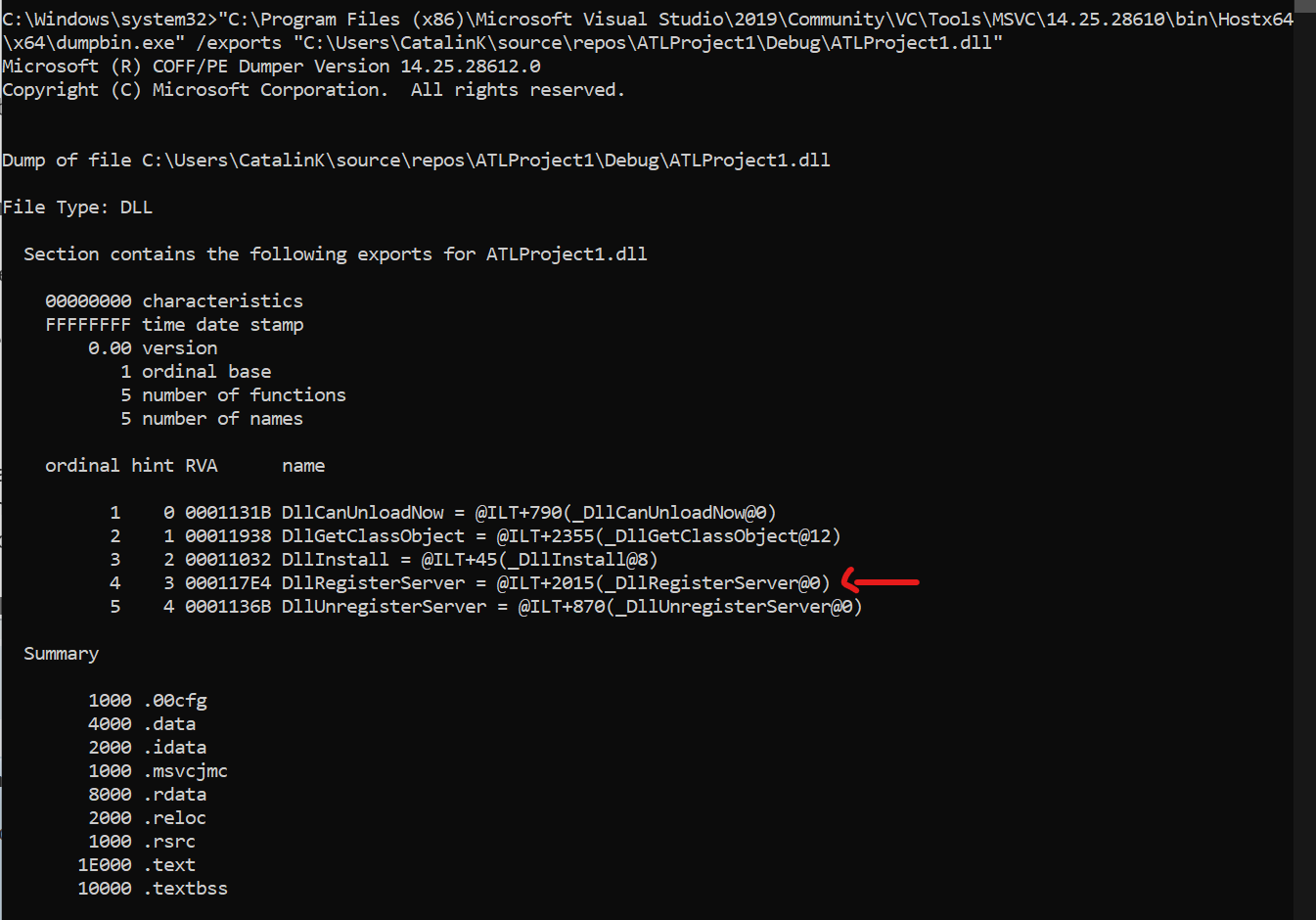
dumpbinExports.png
dumpbinExports.png (76.46 KiB) Viewed 11984 times


However, since you have mentioned the "Assembly Information" which, from what I know, is specific to .NET Framework, and also the "Register .NET assembly for COM interoperability" option, I am assuming that your DLL is a .NET DLL.

Please note that, in this case, the RegAsm.exe tool should be used, not the regsvr32.exe tool.

When using the "Register .NET Assembly for COM interoperability" option, we use the RegAsm.exe tool.

The RegAsm.exe tool comes by default with the .NET Framework and it can be found in the following location(s):
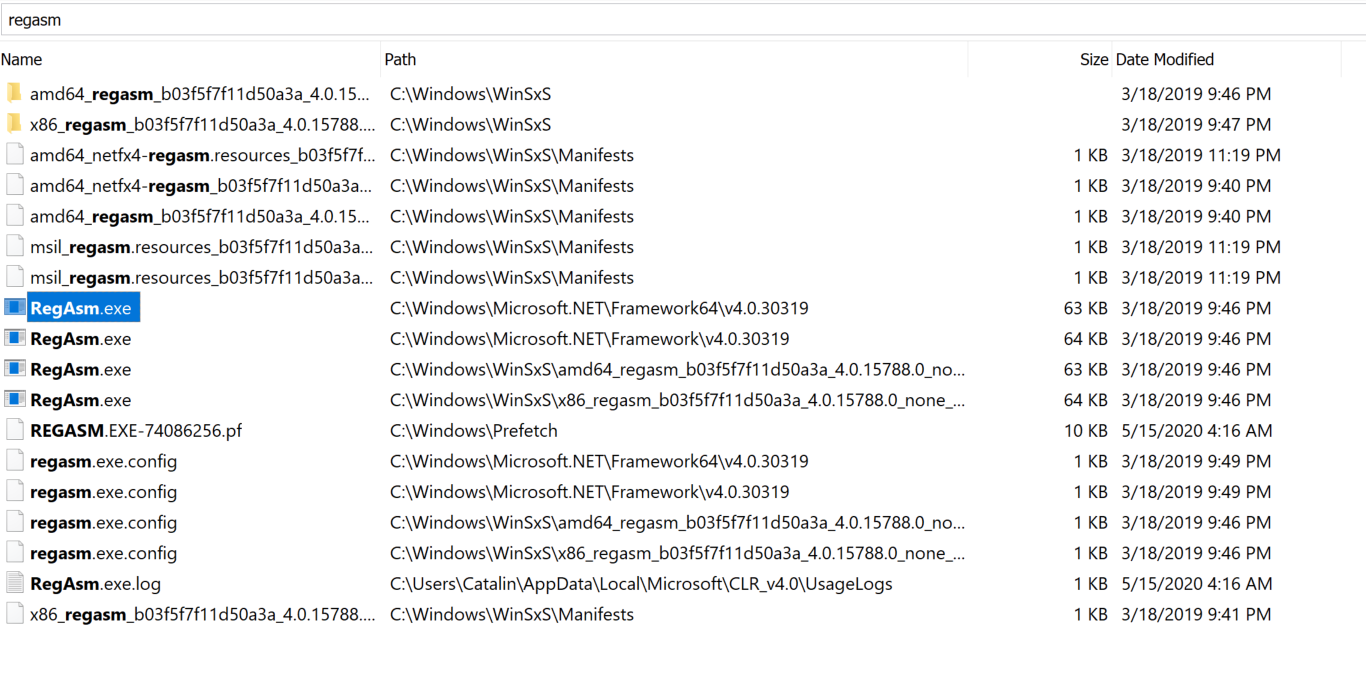
RegAsm.png
RegAsm.png (398 KiB) Viewed 11984 times

With this in mind, I am not quite sure that trying to register your DLL file using the regsvr32.exe tool is the correct approach.

Could you please try to register it using the RegAsm.exe tool instead and let me know the outcome?

Additionally, since you have said you are not quite familiar with the registries and where to check whether a COM was registered or not, here is a little trick - when a COM is registered, it registers in the registry in locations defined by the system (you can say these are predefined locations). You can check these locations by running a command line as it follows:

RegAsmCmd.png
RegAsmCmd.png (29.99 KiB) Viewed 11984 times

The above command generates the file myRegistry.reg, which contains all the necessary registry entries. This command does not update the registry.

After doing so, if you open the file using a text editor (e.g. Notepad++), you can see the registry entries that are about to be updated:
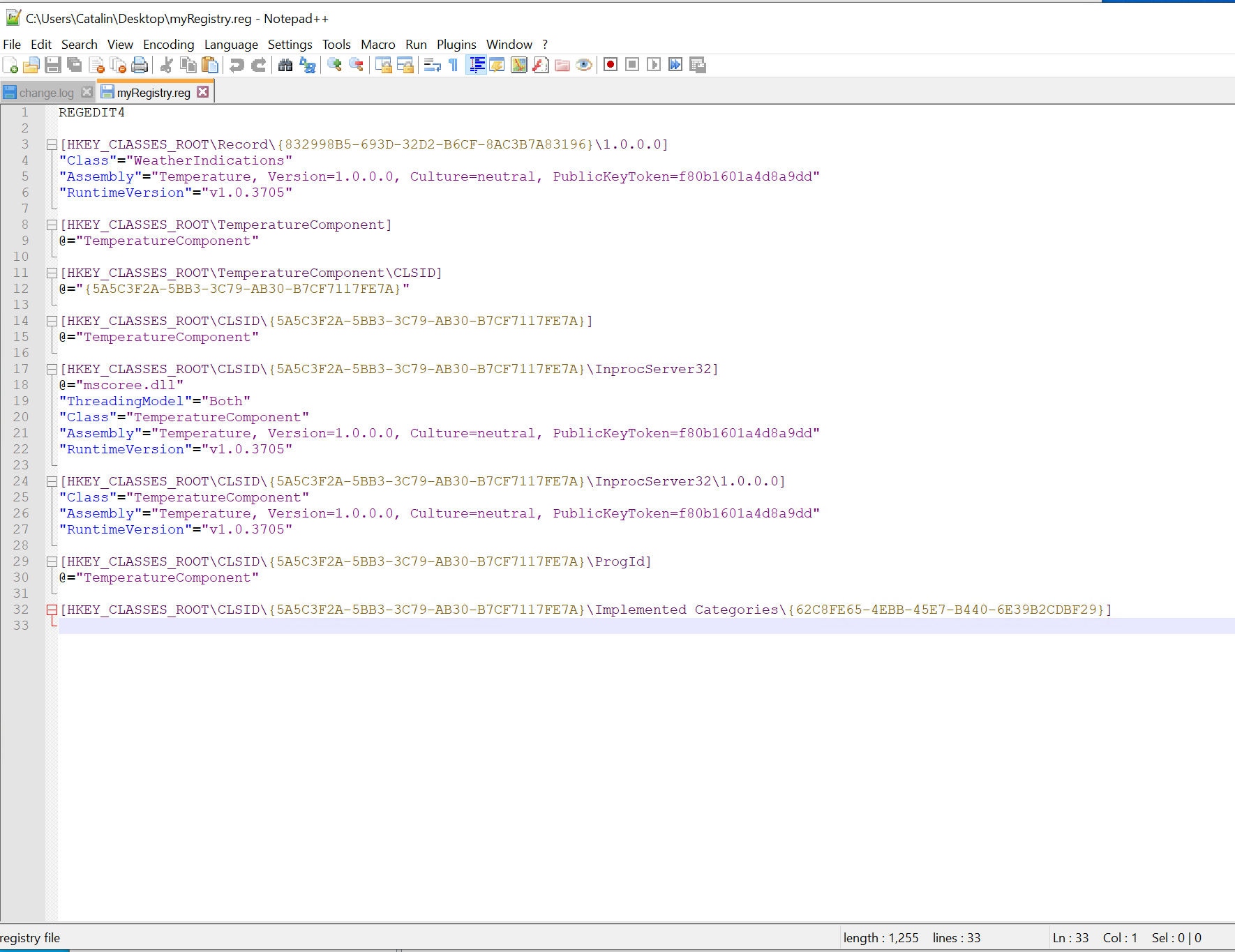
Registry.png
Registry.png (193.72 KiB) Viewed 11984 times

Hope this helps.

Best regards,
Catalin
Catalin Gheorghe - Advanced Installer Team
Follow us: Twitter - Facebook - YouTube
flycast
Posts: 24
Joined: Thu Jul 25, 2019 10:31 pm

Re: Having issues with registering a dll

I don;t know why. It strikes me that I should mention that using the Visual Studio template for an installer project works. I want the updater capability of the Advanced Installer though. I'll do what you outline here and report back.
flycast
Posts: 24
Joined: Thu Jul 25, 2019 10:31 pm

Re: Having issues with registering a dll

Using dumpbin.exe:
C:\Program Files (x86)\Microsoft Visual Studio\2019\Community\VC\Tools\MSVC\14.25.28610\bin\Hostx64\x64>dumpbin.exe "C:\Program Files\Sharpline Converting, Inc\SL24 Add In\Sharpline.SL24.ToolingAddIn.dll"
Microsoft (R) COFF/PE Dumper Version 14.25.28614.0
Copyright (C) Microsoft Corporation. All rights reserved.


Dump of file C:\Program Files\Sharpline Converting, Inc\SL24 Add In\Sharpline.SL24.ToolingAddIn.dll

File Type: DLL

Summary

2000 .rsrc
44000 .text
Using RegAsm.exe:
C:\Windows\Microsoft.NET\Framework64\v4.0.30319>RegAsm.exe "C:\Program Files\Sharpline Converting, Inc\SL24 Add In\Sharpline.SL24.ToolingAddIn.dll"
Microsoft .NET Framework Assembly Registration Utility version 4.8.3752.0
for Microsoft .NET Framework version 4.8.3752.0
Copyright (C) Microsoft Corporation. All rights reserved.

Types registered successfully
The DLL is registering properly when I use RegAsm.exe. I have verified that SolidWorks is now seeing the DLL when I installed and then hand registered. Now to make Advanced Installer use RegAsm.exe? I think we are close.
Catalin
Posts: 7853
Joined: Wed Jun 13, 2018 7:49 am

Re: Having issues with registering a dll

Hello,
I don;t know why. It strikes me that I should mention that using the Visual Studio template for an installer project works.
Here, do you mean that when creating the installer with Visual Studio, the registration works as expected?
The DLL is registering properly when I use RegAsm.exe. I have verified that SolidWorks is now seeing the DLL when I installed and then hand registered.
This is great news. I am glad everything worked as expected.
Now to make Advanced Installer use RegAsm.exe?
This is quite strange, because the "Register .NET Assembly for COM interoperability" option uses the RegAsm.exe tool.

RegAsm.png
RegAsm.png (28.68 KiB) Viewed 11965 times
One more thing that I am thinking about here. Could you please try to register your .DLL file with the 32-bit (the Framework folder instead of Framework64) version of RegAsm.exe and let me know if everything works as expected?

From what I could see in the "External Tools" window, it is the 32-bit version that is linked.

Not quite sure this will change anything, but I think it is worth a shot.

Best regards,
Catalin
Catalin Gheorghe - Advanced Installer Team
Follow us: Twitter - Facebook - YouTube
flycast
Posts: 24
Joined: Thu Jul 25, 2019 10:31 pm

Re: Having issues with registering a dll

I don;t know why. It strikes me that I should mention that using the Visual Studio template for an installer project works.
Here, do you mean that when creating the installer with Visual Studio, the registration works as expected?
Yes, it was really easy. The issue is I cannot do updates with the Visual Studio installer (or at least I don't know how).

I saw that registration uses RegAsm.exe. Puzzling.

I am out today, I will try the 32 bit registration tomorrow.
Catalin
Posts: 7853
Joined: Wed Jun 13, 2018 7:49 am

Re: Having issues with registering a dll

Hello,

Thank you for your followup on this.
I am out today, I will try the 32 bit registration tomorrow.
Sure thing. Please let me know the outcome once you do so.

Best regards,
Catalin
Catalin Gheorghe - Advanced Installer Team
Follow us: Twitter - Facebook - YouTube
flycast
Posts: 24
Joined: Thu Jul 25, 2019 10:31 pm

Re: Having issues with registering a dll

This is massively frustrating. Using the either 32 bit and 64 bit RegAsm.exe does not work.
I started with a clean slate. It still does not register.

If I create an installer using the Visual Studio setup template it installs just fine. All I need is from Advanced Installer is the updater.

I have the Professional version of Advanced Installer - this means I DID pay for it. I started this thread on May 13th, it's now May 22nd. Working through the forum is like being in quicksand. I get a response 24 - 48 hours later.

I can't get Advanced Installer to register my DLL. I paid for the software. I'd really like to get a quicker solution than this. Even if it is not quick I'd like to be able to find the issue. I feel I am no closer to a solution now then when I started.
Catalin
Posts: 7853
Joined: Wed Jun 13, 2018 7:49 am

Re: Having issues with registering a dll

Hello,

First of all, please accept my apologies for the delayed reply, I was offline for two days (sick days off).
I have the Professional version of Advanced Installer - this means I DID pay for it. I started this thread on May 13th, it's now May 22nd. Working through the forum is like being in quicksand. I get a response 24 - 48 hours later.
I apologize this is taking this long, but unfortunately not all problems can be solved right away. Some require more investigation and therefore more time.
Using the either 32 bit and 64 bit RegAsm.exe does not work.
I started with a clean slate. It still does not register.
I am a bit confused now. In an earlier thread you have mentioned that it worked as expected when you registered the .DLL manually using the RegAsm.exe tool:
The DLL is registering properly when I use RegAsm.exe. I have verified that SolidWorks is now seeing the DLL when I installed and then hand registered. Now to make Advanced Installer use RegAsm.exe? I think we are close.
I would like to further investigate this on my end. Could you please forward me the following resources, by e-mail at support at advancedinstaller dot com:

- a copy of the .AIP file

- a download link for the setup project

- a link from where I can download SolidWorks

- a test-case which I can use to verify that everything works as expected (basically, how can I check from within SolidWorks that the .DLL was registered or not).

I will start investigating this as soon as I will get the files. Hopefully we can figure things out.

Best regards,
Catalin
Catalin Gheorghe - Advanced Installer Team
Follow us: Twitter - Facebook - YouTube
flycast
Posts: 24
Joined: Thu Jul 25, 2019 10:31 pm

Re: Having issues with registering a dll

Using the either 32 bit and 64 bit RegAsm.exe does not work.
I started with a clean slate. It still does not register.
I am a bit confused now. In an earlier thread you have mentioned that it worked as expected when you registered the .DLL manually using the RegAsm.exe tool:
The DLL is registering properly when I use RegAsm.exe. I have verified that SolidWorks is now seeing the DLL when I installed and then hand registered. Now to make Advanced Installer use RegAsm.exe? I think we are close.
You understand correctly. When the installer runs the DLL does not register. When I register the DLL manually it registers just fine. That has been the issue all along.
- a link from where I can download SolidWorks
Unfortunately, Solidworks is complex and they tightly control licenses. It is a 14Gb download and will have some configuration to be done. I appreciate your offer but I think it would be too complicated to realistically accomplish.

Is there no other way to determine why the DLL won't register when the installer runs if I can register manually after the installer runs? It **seems* to me that the only issue to find is why the DLL is not registering when the installer runs. Perhaps it is not that simple. Can I do a desktop share with someone in support? That would be way easier then you setting up a install of SolidWorks on your end.
Catalin
Posts: 7853
Joined: Wed Jun 13, 2018 7:49 am

Re: Having issues with registering a dll

Hello,
You understand correctly. When the installer runs the DLL does not register. When I register the DLL manually it registers just fine. That has been the issue all along.
I understand now. I thought that you have said that the registration does not work manually either.

When registering the .DLL file manually, could you please let me know what is the command line you are using?
Unfortunately, Solidworks is complex and they tightly control licenses. It is a 14Gb download and will have some configuration to be done. I appreciate your offer but I think it would be too complicated to realistically accomplish.
I understand that this might get a little complicated to test. However, could you please forward me at least a copy the .DLL file and also a log of the installation process so I can further investigate this on my end?
Is there no other way to determine why the DLL won't register when the installer runs if I can register manually after the installer runs?
Since this works manually and does not work from within the setup, there are two things I am thinking about:

- the manual command line you are using is different from the one we are using at install time (this is why I have asked for the log file and for the used command line)

- somehow, we do not extract the correct data from the .DLL file / we do not import it correctly in the "Registry" page (this is why I have asked for the .DLL file, so I can compare what we import in "Registry" page vs what the RegAsm.exe tool is exporting when using the /regfile parameter)

Looking forward to hearing from you.

Best regards,
Catalin
Catalin Gheorghe - Advanced Installer Team
Follow us: Twitter - Facebook - YouTube

Return to “Building Installers”