Hi Dan,
this discussion moves into an unwanted direction. I am aware of How-To create patches, and that I need a later version for a diff against the original version. This is without questions so far.
You mentioned, that patches cannot be installed through a custom action. I assume, this is be the case because the installer which should be patched is already running and this is not allowed. OK, accepted.

My goal is, to update the setup to the latest patch level. It does not matter, if this happens before or after the main installation. I tried the AI Updater project to achieve that, but as you already mentioned, its not as flexible as I would like to use it. The problem is, if you don't have an internet connection, the update procedure will wait approx. 2 minutes and can't be interrupted - this is unfortunately not acceptable for us (improvement suggestion: add a cancel button on the "checking for updates" dialog).
So, after that, I wrote a small little tool, which checks for updates and downloads them. This tool works in two ways: If the tool finds a major update, it will download a complete zip file and exit, but if the tool finds only a patch, it will download the correct one (Server or Client, x86 or x64) and (should) continue the main installation together with the patch. This tool shall later start AI setup.exe to let it install prerequisites and run the main installation.
My problem is: I can't do so

When directly calling the msi installer, I can attach a patch to the msi (first time installation). This patch is immediately installed together with the original installer packet:
Code: Select all
msiexec.exe /i MyOriginalInstaller.msi /update ImportantPatch.msp
According to the documentation, the AI installer is taking command line parameters, and anything except some specific AI command line switches are forwarded to msiexec and used as option there. But if I try to run the AI bootstrapper with:
Code: Select all
AIsetup.exe /update ImportantPatch.msp
or
I only get:
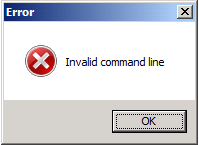
- SetupError.png (4.8 KiB) Viewed 17875 times
... Hm, sh**

I am a bit stumped now. How can I achieve the desired behavior? Why is the AI setup tool denying the /update option? Is there a special trick to get this option being used?
Thanks for helping!
Roland


FOLLOW US
Get the latest news in Application Packaging