We’re moving our forums to a new platform.

You can still browse and search existing topics, but you can no longer create new topics or post replies.

For questions, technical issues, or feature requests, please don’t hesitate to contact our support team at support@advancedinstaller.com.

Thank you for your understanding!

R.Mueller
Posts: 202
Joined: Thu Aug 02, 2012 3:31 pm

First time install of MSI together with (possible) patches

Hi,

with the next upcoming version of our product, we would like to distribute only the base image (let's say version 1.0.0) as complete installer and then later on only the patches (1.0.1, 1.0.2, ...). Typically we distribute our product electronically as zipped file, as an iso-image (for easy use in virtual machines) and also partly on USB-drives.

The idea is, to place patches together with the base image. Hence the original base image (1.0.0) shouldn't be touched afterwards, the question is, how to design it in a way, that it automatically installs any patches, if they exists on the source media (or a predefined location on the media)?

I know, that it is possible to install a msi package during initial installation together with patches using command line:

Code: Select all

msiexex /i MyProduct.ms PATCH="Patch1.msp,Patch2.msp"
Is it possible to set patches to be installed together with the current (initial) installation as a CustomAction or using the (AI) bootstrapper.exe? The problem might be, that for the beginning no patch exists, but later we want to add them to the media.

Regards,

Roland
Dan
Posts: 4530
Joined: Wed Apr 24, 2013 3:51 pm

Re: First time install of MSI together with (possible) patch

Hello Roland,

Please note that a patch cannot be installed through a custom action.
Is it possible to set patches to be installed together with the current (initial) installation as a CustomAction or using the (AI) bootstrapper.exe? The problem might be, that for the beginning no patch exists, but later we want to add them to the media.
You can try to do this and see if there is achieved the desired behavior. You can have an .EXE that search in a location detects available patches and then install them if there are or don't install them if no patch was found. You can have the related .EXE as a “Post-Install” prerequisite.

EDIT:
There might be an easier way to achieve your desired behavior:
You can have an .EXE package and the related package with its possible patches added as “Feature-based” prerequisites in order to have a bundled installation. You can install the prerequisite silent using the /qn parameter in the “Install Command Line” labels from the Setup Files tab.

Also, your .EXE project will not be registered(disable the “Register product with Windows Installer” option from the “Product Details” page).

Please let us know if that helped.

Best regards,
Dan
Dan Ghiorghita - Advanced Installer Team
Follow us: Twitter - Facebook - YouTube
R.Mueller
Posts: 202
Joined: Thu Aug 02, 2012 3:31 pm

Re: First time install of MSI together with (possible) patch

Hi Dan,

thanks for your answers, but they did not exactly cover my questions. Maybe I was a bit unclear with those.

I don't try to install a third-party program with some patches from within our main installer. I try to update our main installer or to install a patch together with the main installer in one step.

The scenario is like this:
  • We release Version 11 of the product with no patches (yet) and distribute it on a USB drive
  • Later we provide a patch for this setup, we don't want to touch the setup anymore and just want to copy additional patch files on the usb drive
  • The installer is installing the product together with all patches available at this point
Something like this.

I played also around with the updater project and the updater functionality in advanced installer. It is a bit poorly documented and hard to achieve something. I did not manage to get it working with version 12 of the product. The problem was to download and install the version 12 setup, while starting and using version 11. Furthermore it does only cover parts of my needs. e.g. I was unsuccessful downloading more than one file.

So, the very interesting questions for me are:
  • How do I install a patch during first-time-installation of the setup (or directly afterwards)?
  • How do I download and install a later major version of the setup, when the older version used for installing was already replaced by a newer one?
The second case would require to download a zip file with all setup parts (setup.exe, msi files, cab files, prerequisites) or all files individually.

I would be happy to find an easy solution for both cases. It might also be, that I try to complicate things here, in this case I would be happy to get some advices from you.

Regards,

Roland
Dan
Posts: 4530
Joined: Wed Apr 24, 2013 3:51 pm

Re: First time install of MSI together with (possible) patch

Hi Roland,
we don't want to touch the setup anymore
Please keep in mind that a patch contains the difference between two packages. Please take a look on the patch authoring article which may be useful.

So in order to create the patch you need to create the second MSI, thus touch the original MSI file.

So if you create a new MSI file is normal to place it on the USB/DVD and deploy it to the users.
How do I download and install a later major version of the setup, when the older version used for installing was already replaced by a newer one?
The second case would require to download a zip file with all setup parts (setup.exe, msi files, cab files, prerequisites) or all files individually.
Please note that this can be achieved with the “Updater” functionality, just make sure you have to download a single file(an .EXE with resources inside or an .MSI with resources inside).

I'm afraid that our updater tool doesn't have support to download multiple files. In order to use the “Updater” you can build your upgrade installation project as an .EXE with resources inside or an .MSI with resources inside and, then upload to your server.

If you have other questions, please let us know.

Best regards,
Dan
Dan Ghiorghita - Advanced Installer Team
Follow us: Twitter - Facebook - YouTube
R.Mueller
Posts: 202
Joined: Thu Aug 02, 2012 3:31 pm

Re: First time install of MSI together with (possible) patch

Hi Dan,

this discussion moves into an unwanted direction. I am aware of How-To create patches, and that I need a later version for a diff against the original version. This is without questions so far.

You mentioned, that patches cannot be installed through a custom action. I assume, this is be the case because the installer which should be patched is already running and this is not allowed. OK, accepted. :!:

My goal is, to update the setup to the latest patch level. It does not matter, if this happens before or after the main installation. I tried the AI Updater project to achieve that, but as you already mentioned, its not as flexible as I would like to use it. The problem is, if you don't have an internet connection, the update procedure will wait approx. 2 minutes and can't be interrupted - this is unfortunately not acceptable for us (improvement suggestion: add a cancel button on the "checking for updates" dialog).

So, after that, I wrote a small little tool, which checks for updates and downloads them. This tool works in two ways: If the tool finds a major update, it will download a complete zip file and exit, but if the tool finds only a patch, it will download the correct one (Server or Client, x86 or x64) and (should) continue the main installation together with the patch. This tool shall later start AI setup.exe to let it install prerequisites and run the main installation.

My problem is: I can't do so :?

When directly calling the msi installer, I can attach a patch to the msi (first time installation). This patch is immediately installed together with the original installer packet:

Code: Select all

msiexec.exe /i MyOriginalInstaller.msi /update ImportantPatch.msp
According to the documentation, the AI installer is taking command line parameters, and anything except some specific AI command line switches are forwarded to msiexec and used as option there. But if I try to run the AI bootstrapper with:

Code: Select all

AIsetup.exe /update ImportantPatch.msp
or

Code: Select all

AIsetup.exe /p ImportantPatch.msp
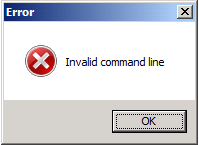
I only get:
SetupError.png
SetupError.png (4.8 KiB) Viewed 17864 times
... Hm, sh** :shock:


I am a bit stumped now. How can I achieve the desired behavior? Why is the AI setup tool denying the /update option? Is there a special trick to get this option being used?

Thanks for helping!

Roland
Bogdan
Posts: 2796
Joined: Tue Jul 07, 2009 7:34 am
Contact: Website

Re: First time install of MSI together with (possible) patch

Hi Roland,

You made a little mistake, the command line uses calls to msiexec.exe to install the patches, not the EXE generated by Advance Installer,
thus you need to have this in your code:

Code: Select all

msiexec.exe /p ....
or

Code: Select all

msiexec.exe /update ...
Regards,
Bogdan
Bogdan Mitrache - Advanced Installer Team
Follow us: Twitter - Facebook - YouTube
R.Mueller
Posts: 202
Joined: Thu Aug 02, 2012 3:31 pm

Re: First time install of MSI together with (possible) patch

Hi Bogdan,

this was no mistake, we would like to keep calling the original setup.exe because it should install the prerequisites as required for the customer's system.

I referring to http://www.advancedinstaller.com/user-g ... -file.html, there is clearly written:
The EXE bootstrapper supports all MSIEXEC command line options (basically all the command line parameters you can use for a MSI package). A command line received by the EXE bootstrapper will be passed to MSIEXEC when launching the main MSI.
But this leads me to the error message above.

How can I pass correctly the /p or /update option to setup.exe to be used with msiexec afterwards?

Regards,

Roland
R.Mueller
Posts: 202
Joined: Thu Aug 02, 2012 3:31 pm

Re: First time install of MSI together with (possible) patch

Hi Bogdan,

Are you still researching for answers?

Regards,

Roland
Bogdan
Posts: 2796
Joined: Tue Jul 07, 2009 7:34 am
Contact: Website

Re: First time install of MSI together with (possible) patch

Hi Roland,

I'm afraid you misunderstood our documentation regarding the command line supported by the EXE setup. I'll try to explain it better for you.

So, the role of our EXE bootstrapper is to add enhanced support over the MSI packages, support not offer directly by Windows Installer.
The way this is done is by having the MSI package built and injected into the final MSI package. So at install time the EXE extracts the MSI and CAB
files, then launches the installation by calling ShellExecute on "msiexec.exe" and passing the path of the extracted MSI in the command line.

When our documentation says it supports all Windows Installer command line switches it refers to the switches you would normally use if you were
to install the MSI, that is bundled into the EXE, from the command line.

Let me give you an example. To install the MSI from the EXE silently you would execute this command:

Code: Select all

setup.exe /qn
This would translated in the setup.exe launching the MSI from inside, the one it extracted, with this command:

Code: Select all

msiexec.exe /i <MSI path> /qn [plus additional parameters sent to it from our bootstrapper]
No EXE built by Advanced Installer supports a command line of this type:

Code: Select all

setup.exe /qn setup.msi
Or the one you are using for the patches. To install an MSI or MSP that is a separate package you need to call msiexec.exe directly.

Best regards,
Bogdan
Bogdan Mitrache - Advanced Installer Team
Follow us: Twitter - Facebook - YouTube
R.Mueller
Posts: 202
Joined: Thu Aug 02, 2012 3:31 pm

Re: First time install of MSI together with (possible) patch

Hi Bogdan,

I understand the point, that this is a bit outside the normal use case. But as explained before, the reason for that is, that we want/need to integrate our own "Check-For-Updates" and "Download" method.

If its not possible to add special command line parameters, like /update to the default bootstrapper, which options I will have to solve my problem?

We are not really keen, to write our own bootstrapper, because we want to keep the original prerequisite handling/checking/installing, starting of msiexec and update/upgrade handling. At the end, I just want to either add an patch for the current installation or to let the user know, that there is an newer version available, so he's not installing the latest or recommended version.

How do I achieve that?

Regards,

Roland
R.Mueller
Posts: 202
Joined: Thu Aug 02, 2012 3:31 pm

Re: First time install of MSI together with (possible) patch

... one additional thing: From software development point of view, I don't really understand, why its so complicated to also forward also /update or /p parameters also to the final msiexec call. It would make the default bootstrapper just more practical and useful. If external command line switches will conflict with internal switches, you could just ignore the internal parameters or combine them (in case of additional patches, because it is possible to add multiple patches in once).

I assume, that you will not like this idea.

But I have the trouble, that the Advanced Installer Update Check mechanism is not powerful enough to fit our needs, but on the other hand, I don't want to implement the bootstrapper completely by our own (because of prerequisite handling, time limitations, complexity for testing, ...)

So, please, which options do I have?

Regards,

Roland
Bogdan
Posts: 2796
Joined: Tue Jul 07, 2009 7:34 am
Contact: Website

Re: First time install of MSI together with (possible) patch

Hi Roland,

We do forward all commands but the bootstrapper is designed to pass the the command lines parameters to the MSI that was extract from it, i.e. you cannot
also specify in the command line the package to which the parameters to be applied. That package is already contained by the EXE, this is were the problem is.

Back to your solution. Since you have created a small tool to download and install all updates why don't you configure your tool to launch the downloaded packages one by one. i.e. first launch the main installation (if available, this is mandatory as the patch will apply over it) by calling directly our EXE installer, then, when our EXE installer exists, call "msiexec /update" and provide the MSP package to be installed. I fail to see why you cannot do this from the tool you already built. Is there a limitation which I am missing?

Best regards,
Bogdan
Bogdan Mitrache - Advanced Installer Team
Follow us: Twitter - Facebook - YouTube
R.Mueller
Posts: 202
Joined: Thu Aug 02, 2012 3:31 pm

Re: First time install of MSI together with (possible) patch

Hi Bogdan,

the first show-stopper is a possible reboot from setup (e.g. after MSI installation or after updating some blocked files). This would also quit our Prelauncher. The second issue is a custom action, which starts a configuration tool at the end of the installation (and the update must be installed before this happens).

And btw, we are not using the compress function of AI, all files (setup.exe, 2 msi files for x32 and x64, cab files, folder with prerequisites) are in the same folder. The bootstrapper is just caring about prerequisites and starting the right msi in the same folder.

This is the bootstrapper log file:

Code: Select all

====== Starting logging of "D:\...\Outcome\Client\Setup.exe" ====
<< OS Version:  MajorVersion: 6; MinorVersion: 1; BuildNumber: 7601; PlatformId: 2; CSDVersion: Service Pack 1; ServicePackMajor: 1; ServicePackMinor: 0; SuiteMask: 256; ProductType: 1; >> 

2013-09-12 @15:44:32-Full command line:"D:\...\Outcome\Client\Setup.exe"  /exelog logfile2.log /L*v logfile.log /p Client.msp
2013-09-12 @15:44:32-Command line to pass to MSI:/L*v logfile.log /p Client.msp
2013-09-12 @15:44:32-Extraction path set to:\\?\C:\Users\UserName\AppData\Local\Temp\{702A7C8A-C2D8-4451-9284-86675324CA39}\
2013-09-12 @15:44:32-Extraction path set to:\\?\C:\Users\UserName\AppData\Roaming\Therefore\Prerequisites\
2013-09-12 @15:44:32-Maintenance mode:false
2013-09-12 @15:44:32-Detected Windows Installer version:5.0.7601.17807
2013-09-12 @15:44:32-Language used for UI:0-English (United States)
2013-09-12 @15:44:32-Searching for:Visual C++ 2008 SP1 Redistributable x86
2013-09-12 @15:44:32-Search result:An acceptable version was found.
2013-09-12 @15:44:32-Searching for:Visual C++ 2008 SP1 Redistributable x64
2013-09-12 @15:44:32-Search result:An acceptable version was found.
2013-09-12 @15:44:32-Searching for:Visual C++ 2010 SP1 Redistributable x86
2013-09-12 @15:44:32-Search result:An acceptable version was found.
2013-09-12 @15:44:32-Searching for:Visual C++ 2010 SP1 Redistributable x64
2013-09-12 @15:44:32-Search result:An acceptable version was found.
2013-09-12 @15:44:32-Wrong OS or Os language for:MSXML 6.0 SP1 Redistributable x86
2013-09-12 @15:44:32-Wrong OS or Os language for:MSXML 6.0 SP1 Redistributable x64
2013-09-12 @15:44:32-Wrong OS or Os language for:Windows® Imaging Component x86
2013-09-12 @15:44:32-Wrong OS or Os language for:Windows® Imaging Component x64
2013-09-12 @15:44:32-Wrong OS or Os language for:Windows Installer 4.5 for Windows Server 2003 x86
2013-09-12 @15:44:32-Wrong OS or Os language for:Windows Installer 4.5 for Windows Server 2003 x64
2013-09-12 @15:44:32-Wrong OS or Os language for:Windows Installer 4.5 for Windows XP x86
2013-09-12 @15:44:32-Wrong OS or Os language for:Windows Installer 4.5 for Windows XP x64
2013-09-12 @15:44:32-Searching for:.NET Framework 4.0 Client Profile
2013-09-12 @15:44:32-Search result:An acceptable version was found.
2013-09-12 @15:44:32-No prerequisite must be installed.
2013-09-12 @15:44:33-Code returned to Windows by setup:-536870911
2013-09-12 @15:44:33-=====================End of Log=====================
The important parts seems to be:
Command line to pass to MSI:/L*v logfile.log /p Client.msp
This is exactly what I want. It seems, the command line parameters are correctly forwarded to msiexec, but were the "Invalid Command Line" error is coming from?

I assume, internally MSIEXEC will be called like this: "msiexec /i client.msi", whereby "client.msi" is the package name given to the bootstrapper (or extracted from it, when configured). Hence the log file option is forwarded properly, why it does not work the same way with the update option? The patch I want to add later is (at the creation time of setup) not part of the installation package. How is the updater mechanism handling possible updates of setup in this case?

Sorry for being a bit nasty here, but from my point of view, I am half way done to the final result I need to achieve.

Thanks for helping!

Roland
R.Mueller
Posts: 202
Joined: Thu Aug 02, 2012 3:31 pm

Re: First time install of MSI together with (possible) patch

Hi Dan, Bogdan!

I have now spit our update functionality into two parts, the first one is checking for new major versions as a custom action at the next click of the welcome dialog, the second part is running as Post-Install-Prequisite at the end of the installation (as recommended by Daniel in the second part of this post).

Now the question: How do I configure the post install prereq properly, that it gets executed each time?

AI is somehow checking, if the prereq was already installed and not executing it again.

Regards,

Roland
Bogdan
Posts: 2796
Joined: Tue Jul 07, 2009 7:34 am
Contact: Website

Re: First time install of MSI together with (possible) patch

Hi Roland,

In "Install Conditions" tab, available when you select the prerequisite, there is the option "Always install".

Best regards,
Bogdan
Bogdan Mitrache - Advanced Installer Team
Follow us: Twitter - Facebook - YouTube

Return to “Building Installers”