We’re moving our forums to a new platform.

You can still browse and search existing topics, but you can no longer create new topics or post replies.

For questions, technical issues, or feature requests, please don’t hesitate to contact our support team at support@advancedinstaller.com.

Thank you for your understanding!

martinpz97
Posts: 2
Joined: Fri Apr 18, 2014 5:37 am

How to make install dir read only.

Hey all, all night i search in forum how to make read only the install dir like this.
Image
To cant be changed.
When i try its again the same.
Image
How i can to change this really i need it ?
Sorry for bad english :(.
Dan
Posts: 4530
Joined: Wed Apr 24, 2013 3:51 pm

Re: How to make install dir read only.

Hello and welcome to Advanced Installer forums,

Please note that the Read Only Extended Attributes from the control's attributes require the use of Enhanced User Interface. Also note that the Enhanced User Interface option is handled through our bootstrapper and this require the package as an .EXE (you can have an .EXE with resources inside or an .EXE with resources next to it).

If you want to have your package as an .MSI you can set the False flag for the Enabled attribute of the PathEdit control from the FolderDlg dialog as it can be seen below. Also, you can do the same for the Browse control.
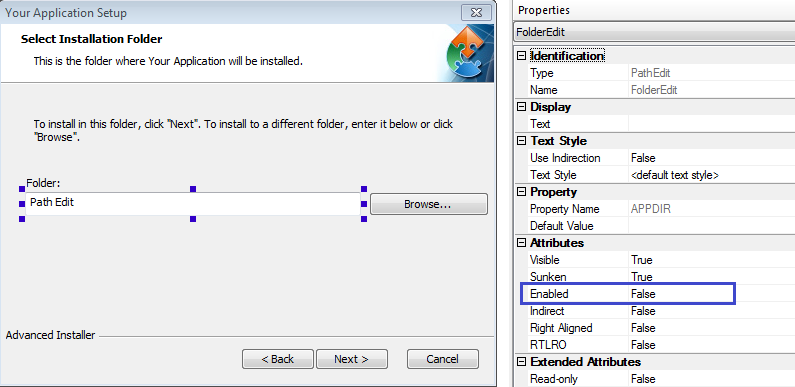
ReadOnlyInstallationFolder.png
ReadOnlyInstallationFolder.png (28.92 KiB) Viewed 2848 times
Please let us know if that helped.

Best regards,
Dan
Dan Ghiorghita - Advanced Installer Team
Follow us: Twitter - Facebook - YouTube
martinpz97
Posts: 2
Joined: Fri Apr 18, 2014 5:37 am

Re: How to make install dir read only.

Really tnanks i remove and button browse and now all is fine. Realy thanks u. Have a nice work. And again be heppy to help, Good day to all moderator\admin. team :), and all Advanced Installer Users.
:)
Dan
Posts: 4530
Joined: Wed Apr 24, 2013 3:51 pm

Re: How to make install dir read only.

You're welcome,

If you have other questions, please let us know.

Best regards,
Dan
Dan Ghiorghita - Advanced Installer Team
Follow us: Twitter - Facebook - YouTube

Return to “Building Installers”