We’re moving our forums to a new platform.

You can still browse and search existing topics, but you can no longer create new topics or post replies.

For questions, technical issues, or feature requests, please don’t hesitate to contact our support team at support@advancedinstaller.com.

Thank you for your understanding!

pimboden40
Posts: 22
Joined: Wed Jun 04, 2014 3:42 pm

New XML Elements On Install

Hello I have an XML that looks like this:
  • ..
    <syncPaths>
    </syncPaths>
    ..
I have done some CustomDialog that lets me add as many paths to an EditBox as I want. My EditBox (Multiline) now has a value of
  • ..
    C:\Path1
    C:\Path2
    C:\Path3
    C:\Path4
    C:\Path5
    ..
Now I was thinking of creating a custom action that for each path in the EditBox creates an Xml-Element under syncPaths.
So the XML should look like this:
  • <syncPaths>
    <syncPath value = 'C:\Path1' />
    <syncPath value = 'C:\Path2 />
    <syncPath value = 'C:\Path3' />
    <syncPath value = 'C:\Path4' />
    <syncPath value = 'C:\Path5' />
    ..
    ..
    </syncPaths>
Can someone help me to achieve that?
Thank you
Dan
Posts: 4530
Joined: Wed Apr 24, 2013 3:51 pm

Re: New XML Elements On Install

Hello,

In order to configure the related XML file you can use our XML support. Please take a look on the XML Files Page article with related information for hints and guidance.

Also, I've attached a .zip archive that contains a sample .AIP (project file) which implements a similar scenario.

Please let me know if that helped.

Best regards,
Dan
Attachments
XML_Sample.zip
(3.38 KiB) Downloaded 344 times
Dan Ghiorghita - Advanced Installer Team
Follow us: Twitter - Facebook - YouTube
pimboden40
Posts: 22
Joined: Wed Jun 04, 2014 3:42 pm

Re: New XML Elements On Install

Hello.
Thanks for the help.
However this isn't exactly what I need. In fact I use the described method for all the settings I have to store in the XML.
The difference in my problem is, that I don't know how many syncPath element's are going to be defined.
I have something like this
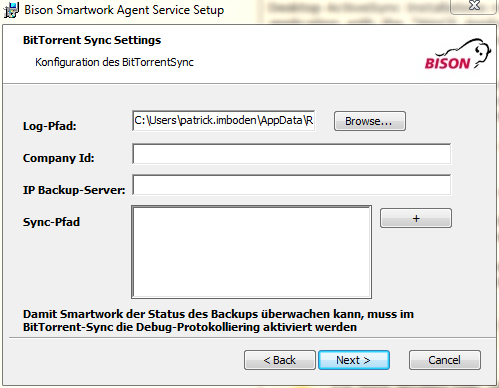
BitTorrentSync.PNG
BitTorrentSync.PNG (35.06 KiB) Viewed 4416 times
When I click on the "+"Button I show a modified Folder Page Dialog, that has an "add"-button.
This Button calls a Javascript Custom Action and concatenates the Property of the PathEdit (from the FolderPage Dialog) to the Property of the MultilineEdit
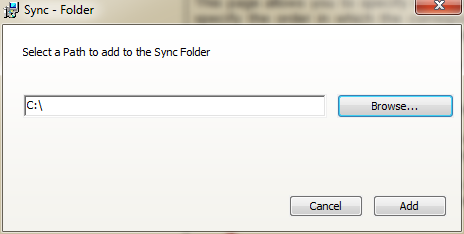
BitTorrentSync2.PNG
BitTorrentSync2.PNG (23.94 KiB) Viewed 4416 times
So at the end the MultilineEdit-Property has many paths separated by "\n" (newline) and looks like this:
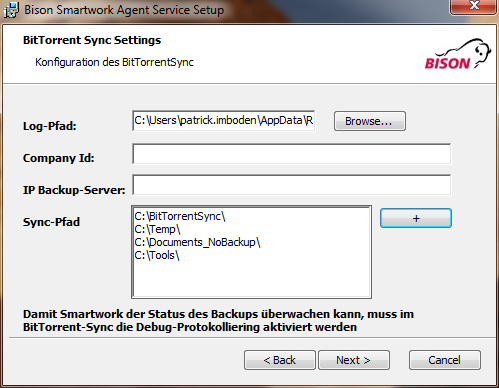
BitTorrentSync3.PNG
BitTorrentSync3.PNG (49.48 KiB) Viewed 4416 times
Now each of these Paths need to create a <syncPath> element inside the XML.

So the xml then should look like this:
<syncPaths>
<syncPath value = 'C:\BitTorrentSync' />
<syncPath value = 'C:\Temp />
<syncPath value = 'C:\Documents_NoBackup' />
<syncPath value = 'C:\Tools />
</syncPaths>

There can be n syncPath elements with n>1

Thanks again for the time you took for creating the sample.
Dan
Posts: 4530
Joined: Wed Apr 24, 2013 3:51 pm

Re: New XML Elements On Install

Hello,

In order to achieve that you can create a text file update from the Files and Folders page. A Text File Update can be used to either create a new file with the specified content or to modify those existing using "Append" and "Search & Replace" operations.

In order to add a new line in property, please take a look on the C# custom action, new line in property forum thread which debates this subject.

Should there be any difficulty you encounter implementing something, please do not hesitate to contact me and I will gladly assist.

Best regards,
Dan
Dan Ghiorghita - Advanced Installer Team
Follow us: Twitter - Facebook - YouTube
pimboden40
Posts: 22
Joined: Wed Jun 04, 2014 3:42 pm

Re: New XML Elements On Install

Thanks.
I solved it using a Placeholder in my XML-Config and then replacing that with a Custom Action.
Thanks for the Help
Dan
Posts: 4530
Joined: Wed Apr 24, 2013 3:51 pm

Re: New XML Elements On Install

You're welcome,

I'm glad you got this working. If you have other questions, please let us know.

Best regards,
Dan
Dan Ghiorghita - Advanced Installer Team
Follow us: Twitter - Facebook - YouTube

Return to “Building Installers”