We’re moving our forums to a new platform.

You can still browse and search existing topics, but you can no longer create new topics or post replies.

For questions, technical issues, or feature requests, please don’t hesitate to contact our support team at support@advancedinstaller.com.

Thank you for your understanding!

AndreG
Posts: 57
Joined: Tue Jun 10, 2014 11:41 am

Need some clarification with the structure of Setup Dialogs

I'm in the process of customising the installation dialogs for my setup wizard, but I'm somewhat confused by something here.. So before I go deleting things that I don't think should be there (probably because I don't understand them), I just want to get some clarification on this. So, using the following screenshot as reference..
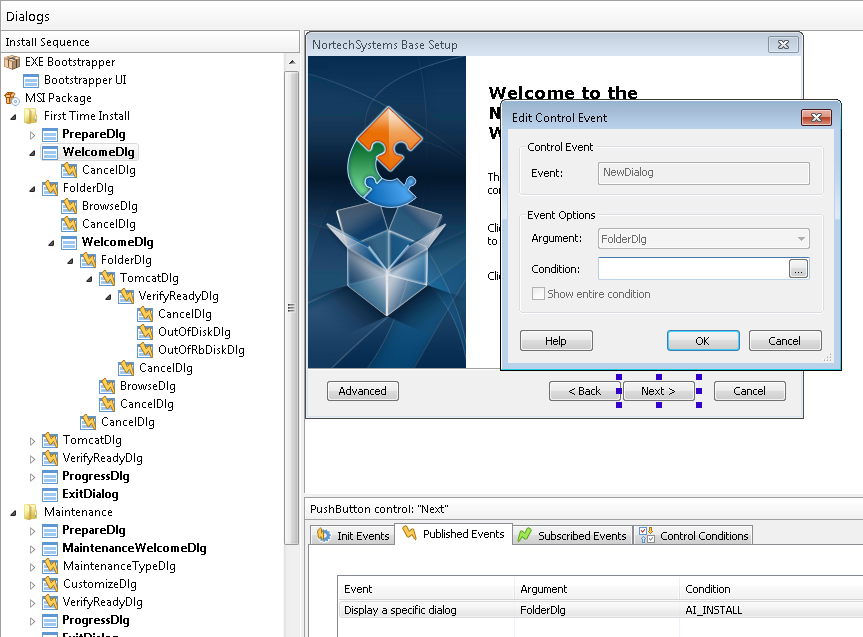
2015-11-18 11_11_05-Setup Wizard Dialog Editor.png
2015-11-18 11_11_05-Setup Wizard Dialog Editor.png (98.57 KiB) Viewed 3419 times
Firstly: The original flow here went through "WelcomeDlg" > "FolderDlg" > "VerifyReadyDlg", and I added a custom "TomcatDlg" using the same naming convention. But why did my custom dialog get added as a child of "FolderDlg" as well? I see the "VerifyReadyDlg" is also now a child of that, but I didn't specify this and I don't understand why it needs this.

Secondly: I've added a button called "Advanced", which I'd like to use to show the dialogs "FolderDlg" and "TomcatDlg", leaving the "Next" button on "WelcomeDlg" to go straight to "VerifyReadyDlg", but I'm not entirely sure how to go about doing this.. Especially since I can't change the argument (dialog target) for the "Next" button.

Effectively I want the following dialog flow routes from the "WelcomeDlg":

Standard Installation (Next button):
  • "VerifyReadyDlg"
  • "ProgressDlg"
Custom Installation (Advanced button):
  • "FolderDlg"
  • "TomcatDlg"
  • "VerifyReadyDlg"
  • "ProgressDlg"
I need to do this in such a way that the advanced installation route can be triggered from either "WelcomeDlg" or from "VerifyReadyDlg", where I've added a list with a summary of installation parameters that will be used.

Could someone please help me achieve this wizard structure?
Eusebiu
Posts: 4971
Joined: Wed Nov 14, 2012 2:04 pm

Re: Need some clarification with the structure of Setup Dialogs

Hi,
Firstly: The original flow here went through "WelcomeDlg" > "FolderDlg" > "VerifyReadyDlg", and I added a custom "TomcatDlg" using the same naming convention. But why did my custom dialog get added as a child of "FolderDlg" as well? I see the "VerifyReadyDlg" is also now a child of that, but I didn't specify this and I don't understand why it needs this.
This is an Advanced Installer issue that appears when a project is upgraded to a newer version. We are already aware of this issue and it will be fixed in a future version of Advanced Installer.
Secondly: I've added a button called "Advanced", which I'd like to use to show the dialogs "FolderDlg" and "TomcatDlg", leaving the "Next" button on "WelcomeDlg" to go straight to "VerifyReadyDlg", but I'm not entirely sure how to go about doing this.. Especially since I can't change the argument (dialog target) for the "Next" button.
To achieve this, you can add a "Push Button" control, then add a "Display a specific dialog" published event on that button with "FolderDlg" as an argument.

For the "Next" button, you can select it, then add a "Display a specific dialog" published event on that button with "VerifyReadyDlg" as an argument for it. Move that event up (first in the published event list), then save the project, close and reopen it. After this, you can delete the default event that could not be edited before.

Let us know if this helped, otherwise give us more details about your scenario.

Best regards,
Eusebiu
Eusebiu Aria - Advanced Installer Team
Follow us: Twitter - Facebook - YouTube
AndreG
Posts: 57
Joined: Tue Jun 10, 2014 11:41 am

Re: Need some clarification with the structure of Setup Dialogs

Hi Eusebiu,
Eusebiu wrote:This is an Advanced Installer issue that appears when a project is upgraded to a newer version. We are already aware of this issue and it will be fixed in a future version of Advanced Installer.
This may possibly be more than just that, the project I'm working with here was completely recreated after I ran into a host of other problems with the previous version.. To be fair, my previous project was created in 4.9.2 and last opened in 12.5, so maybe it was time for that anyway.

I'll play around with a dummy project when I finally find Free Time™ and let know if I find anything more on that.
Eusebiu wrote: For the "Next" button, you can select it, then add a "Display a specific dialog" published event on that button with "VerifyReadyDlg" as an argument for it. Move that event up (first in the published event list), then save the project, close and reopen it. After this, you can delete the default event that could not be edited before.
I think that might have been the part I was missing. After creating another "Display a specific dialog" or "Display a specific child dialog" events, I noticed I still couldn't delete the original, but I didn't try reopening the project at that point. I'll work on customising that soon then. :)

Thanks for the helpful info.
Eusebiu
Posts: 4971
Joined: Wed Nov 14, 2012 2:04 pm

Re: Need some clarification with the structure of Setup Dialogs

You're welcome. Glad to help.
This may possibly be more than just that, the project I'm working with here was completely recreated after I ran into a host of other problems with the previous version.. To be fair, my previous project was created in 4.9.2 and last opened in 12.5, so maybe it was time for that anyway.
So far, we only found that the problem appear when a project is upgraded to a newer version and that it only appears in AI versions newer than 11.5. Just let us know if you find anything else.

Best regards,
Eusebiu
Eusebiu Aria - Advanced Installer Team
Follow us: Twitter - Facebook - YouTube

Return to “Building Installers”