I'm in the process of customising the installation dialogs for my setup wizard, but I'm somewhat confused by something here.. So before I go deleting things that I don't think should be there (probably because I don't understand them), I just want to get some clarification on this. So, using the following screenshot as reference..
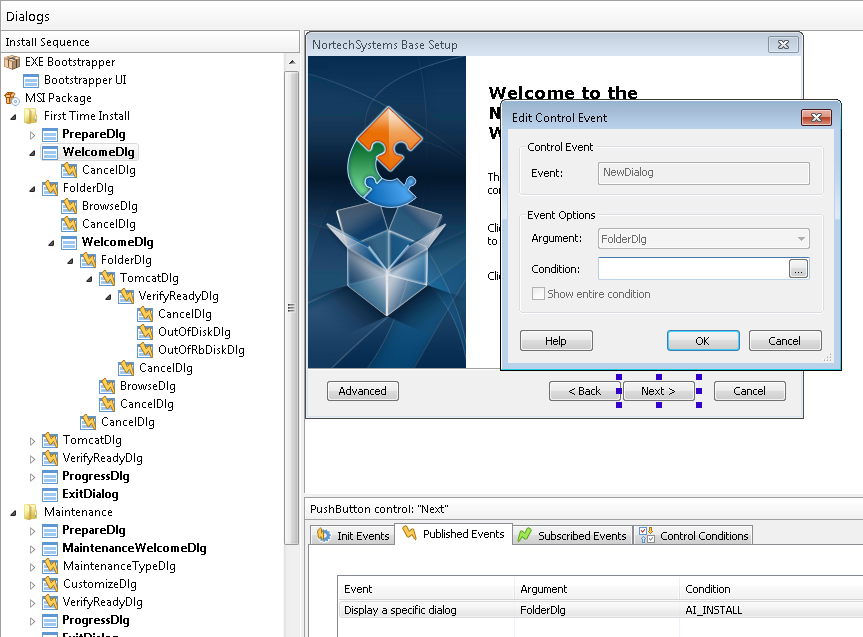
- 2015-11-18 11_11_05-Setup Wizard Dialog Editor.png (98.57 KiB) Viewed 3416 times
Firstly: The original flow here went through "WelcomeDlg" > "FolderDlg" > "VerifyReadyDlg", and I added a custom "TomcatDlg" using the same naming convention. But why did my custom dialog get added as a child of "FolderDlg" as well? I see the "VerifyReadyDlg" is also now a child of that, but I didn't specify this and I don't understand why it needs this.
Secondly: I've added a button called "Advanced", which I'd like to use to show the dialogs "FolderDlg" and "TomcatDlg", leaving the "Next" button on "WelcomeDlg" to go straight to "VerifyReadyDlg", but I'm not entirely sure how to go about doing this.. Especially since I can't change the argument (dialog target) for the "Next" button.
Effectively I want the following dialog flow routes from the "WelcomeDlg":
Standard Installation (Next button):
- "VerifyReadyDlg"
- "ProgressDlg"
Custom Installation (Advanced button):
- "FolderDlg"
- "TomcatDlg"
- "VerifyReadyDlg"
- "ProgressDlg"
I need to do this in such a way that the advanced installation route can be triggered from either "WelcomeDlg" or from "VerifyReadyDlg", where I've added a list with a summary of installation parameters that will be used.
Could someone please help me achieve this wizard structure?


FOLLOW US
Get the latest news in Application Packaging