What’s New in Advanced Installer 23.4
Welcome to Advanced Installer 23.4, which introduces a set of new features and improvements designed to strengthen security, automation, UI consistency, and overall stability.
This release includes:
- 2 new features focused on security validation
- 15 enhancements targeting automation, UI, and packaging improvements
- 13 resolved issues to maintain a stable and reliable installation experience
Security Validation Framework 

Advanced Installer now notifies you at build time if your project is missing any newly added security features or improvements.
These notifications appear in two key locations:
- The build log
- The Message Center
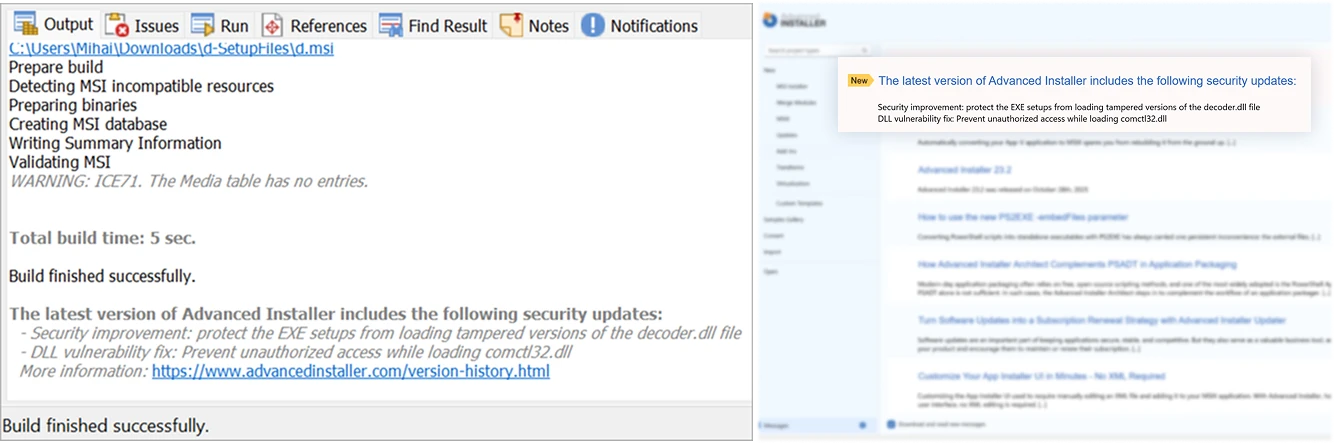
This proactive approach helps you maintain secure, compliant setups without manual checks.
Available in the following editions: Professional, Enterprise, Architect
Synchronize Temporary Files
A long-requested feature, this synchronization support applies to temporary files from your packages starting with v23.4. Simply select the source folder containing the files you want to add as temporary, and Advanced Installer will refresh its contents every time you build your package. This way, we ensure nothing gets out of sync.
Available in the following editions: Professional, Enterprise, Architect
Synchronize the “Expected Value” for registry search with the “Version” of an EXE file in the Updates Configuration Project
Just like you have the option to synchronize your product version to an EXE, from the Product Details view, you can now synchronize the version searched by the Updater when you build your updates configuration project.
This will help you speed up your update deployment process and avoid manual errors that can break the auto-update flow.

Available in the following editions: Professional, Enterprise, Architect
Among these new features and improvements, Advanced Installer 23.5 includes various automation enhancements, UI & UX usability improvements, as well as the latest platform and compatibility updates ready to be included in your package.
Access the full list of improvements and bug fixes here: https://www.advancedinstaller.com/release-23.4.html
 Perpetual License Policy Update
Starting January 2026, Advanced Installer will no longer offer perpetual licenses to new customers.
This change aligns with the continuous evolution of the Advanced Installer product, which delivers consistent value through monthly product updates and exceptional technical support – services we’ve proudly maintained for over two decades.
What does this mean for existing perpetual license holders?
If you are an existing perpetual license holder, you can continue to:
- Use your license according to your previous contract terms
- Extend or renew your maintenance plan
- Upgrade your license
- Purchase additional seats under your existing license (via email request only)
We remain fully committed to supporting our long-term perpetual license users.
Why this change?
This transition will be better reflected through our subscription-based model, which offers more flexibility, scalability, and ongoing access to the latest features for our users, and a stable and predictable revenue stream necessary for the long-term viability of our business.
What Features Do You Need Implemented Next?
Tell us what matters to you.
Download Advanced Installer 23.4
You can access this version in two ways:
- Use the built-in auto-updater within Advanced Installer.
- Download directly from our website: Download Advanced Installer 23.4
 Advanced Installer Customer Referral Program
For over 20 years, users like you have been recommending Advanced Installer—and we truly appreciate it.
Now we’ve made it official. The Referral Program makes it easy to share Advanced Installer and get rewarded.
You can now refer Advanced Installer to your peers and save up to 30% on your next renewal.
Get your referral code from My Account or Learn more.