What’s New in Advanced Installer 23.5
Version 23.5 brings a new layer of security and reliability to your installers, protecting custom actions from tampering while ensuring more predictable behavior during setup.
Alongside this safeguard, the release adds QEMU virtual machine detection, improves how UAC prompts are handled in silent installations, and introduces UI refinements to make the application easier to navigate and use.
This release includes:
- 1 new feature focused on installer security and integration
- 9 enhancements targeting UI/UX improvements, updated predefined prerequisites, and built-in custom actions
- 11 bug fixes to keep the installation process smooth
Security Improvement for PowerShell script

PowerShell scripts extracted to the temporary folder are now checked for tampering before execution, and won’t run if their contents have been altered (even when marked as signed).
To benefit from this new security measure, you just need to rebuild your installer with v23.5 or newer. Advanced Installer will automatically apply this security check to any PowerShell custom action included in the project.
Learn more about it and how to enable it in your installer in the following video:
Improved default option for PowerShell scripts
Starting with v23.5 of Advanced Installer, we set the platform to “Auto” for all new projects that include a PowerShell custom action. This change improves the success rate of your custom actions and reduces the chance of unnecessary troubleshooting.Existing projects that already contain these custom actions will not be modified. If you deploy your installer on both 32-bit and 64-bit platforms, we recommend you manually change the platform to “Auto.”

Enhanced Virtual Machine detection algorithm
Our VM detection mechanism can now recognize QEMU–based virtualizers, enhancing the protection measures designed to prevent unauthorized installations in virtual machines.
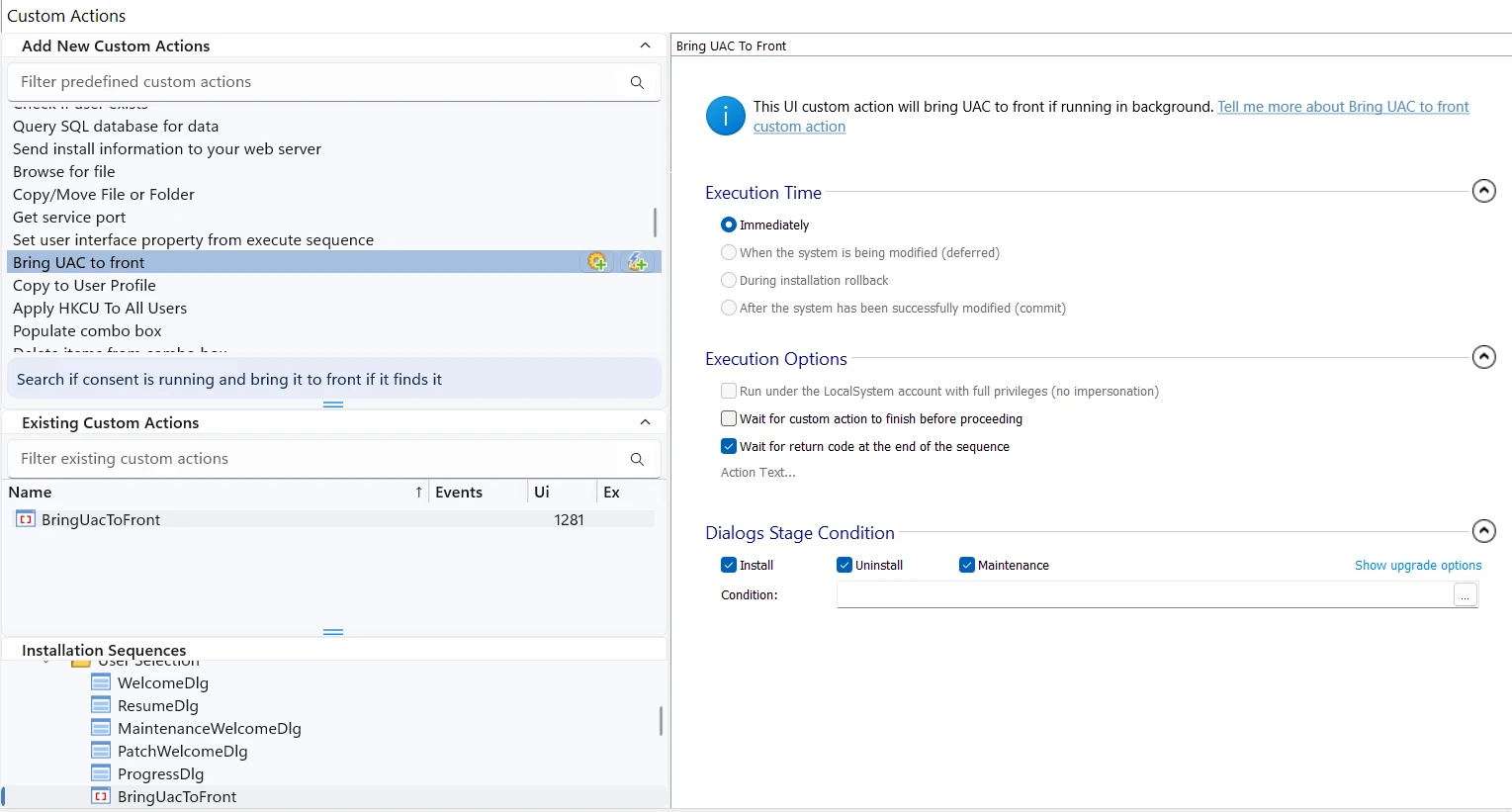
New predefined custom action "Bring UAC to front"
In some per-machine MSI installation scenarios, the Windows Installer service triggers the UAC prompt as a minimized window in the taskbar. This can lead to failed installation for some of your users.With this new predefined custom action, you can force the system bring the User Account Control dialog to the foreground, allowing your users to easily grant the necessary permissions for the installation to complete successfully.
What Features Do You Need Next?
Tell us what matters to you.
Download Advanced Installer 23.5
You can access this version in two ways:
- Use the built-in auto-updater within Advanced Installer.
- Download directly from our website: Download Advanced Installer 23.5
 Advanced Installer Customer Referral Program
For over 20 years, users like you have been recommending Advanced Installer—and we truly appreciate it.
Now we’ve made it official. The Referral Program makes it easy to share Advanced Installer and get rewarded.
You can now refer Advanced Installer to your peers and save up to 30% on your next renewal.
Get your referral code from My Account or Learn more.