What’s New in Advanced Installer 23.7
Version 23.7 is now available and introduces new customization capabilities for licensing workflows, expanded automation support, and multiple improvements across packaging and deployment scenarios.
Here’s what this release includes:
- 1 new feature focused on UI editing capabilities
- 12 enhancements dedicated to security, updated predefined prerequisites, and built-in custom actions
- 9 bug fixes to strengthen the packaging tool's power
Dialog editor for Trial licensing

Managing trial experiences is no longer limited to our predefined dialogs.
With the new UI editor for the built-in Licensing dialog, you can now fully customize how trial-related prompts look and behave, directly from Advanced Installer’s UI.
This gives you:
- Full control over trial dialogs (layout, text, flow)
- Better alignment with your product branding
- More flexibility in how you communicate trial limitations or expiration
This is especially useful if you’re building commercial applications where the trial experience directly impacts conversion.
MSIX Editor – detect missing resources in packages built with other tools
The MSIX Editor can now extract missing package resources from the files and registry of your package that are incorrectly mapped in the package manifest or as a PSF fixup.
This helps users with MSIX packages created with other tools, such as the Microsoft MSIX Packaging Tool, fix those packages without repackaging.The MSIX Editor is now available in the Enterprise edition.
Non-interactive authentication for the Advanced Installer
Automation just got easier.
You can now authenticate to the Advanced Installer Account using CLI. This removes the need for manual login steps in automated workflows.
What this enables:
- Integrate the authentication step into your CI/CD pipelines and deployment scripts
- Fully automated release processes
- Use Updater Cloud to fully automate the release pipelines
 JUST LAUNCHED: UPDATER CLOUD – Skip the hosting setup.
Updater Cloud is a new add-on built by the Advanced Installer team to help you: build, manage and host your updates configuration file directly from our GUI.
You can try it through the 90-Day Free Trial using your same Advanced Installer account (1000 update requests, unlimited hosted files).
Find out more here.
Coming Soon: MSI & EXE hosting.
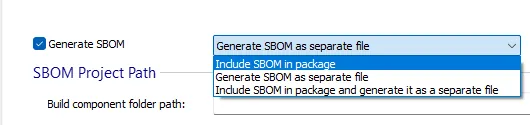
More flexibility for generating the SBOM File
You now have the option to:
- Include the SBOM directly inside the MSI setup package (for internal vulnerability tracking processes & audits)
- Generate it as a separate file alongside the installer (for easier scanning & sharing)
- Select both options
This flexibility helps you adapt to different compliance and distribution requirements.
Extending our PowerShell automation interface: SetProperty
The PowerShell COM interface of Advanced Installer has been extended to include the predefined custom action, “SetProperty”. You can add this type of custom action in your project from your automation scripts just as you did with other types of custom actions.
Security: Updated Zlib to the latest version 1.3.2
Zlib has been updated to version 1.3.2.
This ensures your packages benefit from the latest fixes and improvements in one of the core compression libraries used during packaging.
What Features Do You Need Next?
Tell us what matters to you.
Please request the feature directly through the forum.
Download Advanced Installer 23.7
You can access this version in two ways:
- Use the built-in auto-updater within Advanced Installer.
- Download directly from our website: Download Advanced Installer 23.7
 Advanced Installer Customer Referral Program
For over 20 years, users like you have been recommending Advanced Installer—and we truly appreciate it.
Now we’ve made it official. The Referral Program makes it easy to share Advanced Installer and get rewarded.
You can now refer Advanced Installer to your peers and save up to 30% on your next renewal.
Get your referral code from My Account or Learn more.