Is an Application the same with a Package? MSIX Example
If you’ve repackaged more than a handful of legacy installers into MSIX, you’ve probably noticed that in order to build an MSIX, you need to have at least one application defined before the package can go through. Even Advanced Installer has a hard stop when it comes to this because it will not let you remove all the applications inside the Application Details Page.
If you came up through MSI, where the installer is more or less the thing you are installing, that demand might look strange at first glance.
In most cases, people will consider that they built a package, but isn’t that also an application?
And the answer is no, it is not.
A package is something you sign, version, distribute, install, update, and remove. It is basically a unit that lands on the machine intact or doesn’t land at all, with no in-between.
An application is something else entirely. An application is a construct Windows tracks at runtime. It is tied to its own identifier that governs what shows up in the Start Menu, what gets grouped together on the taskbar, which processes send you a toast notification, etc.
Microsoft's MSIX team has written about this, which is worth reading if you want to see the theory laid out.
Let’s also look at the topic from a packaging perspective.
One Package, More Applications Than the Name Suggests

A package job stops at the file’s boundary.
It is signed and hashed as a whole, so a package that fails validation doesn’t usually install. Windows either accepts or rejects the whole unit, with no option for partial removal.
We can go even further on a technical level and discuss features, components with rule-based installation, and so on, but the fact remains that if the installation fails, it doesn’t matter how the package is defined. However, none of that reveals much about what is inside the package, and in some cases, it might be more than the package name implies.
On our blog, we walked through this a while ago by using iTunes as an example.
iTunes is made up of a single signed package, AppleInc.iTunes, but it contains three separate Application entries:
- iTunes app, which is launchable
- AppleInc.Defaults
- AppleInc.MDCrashReported
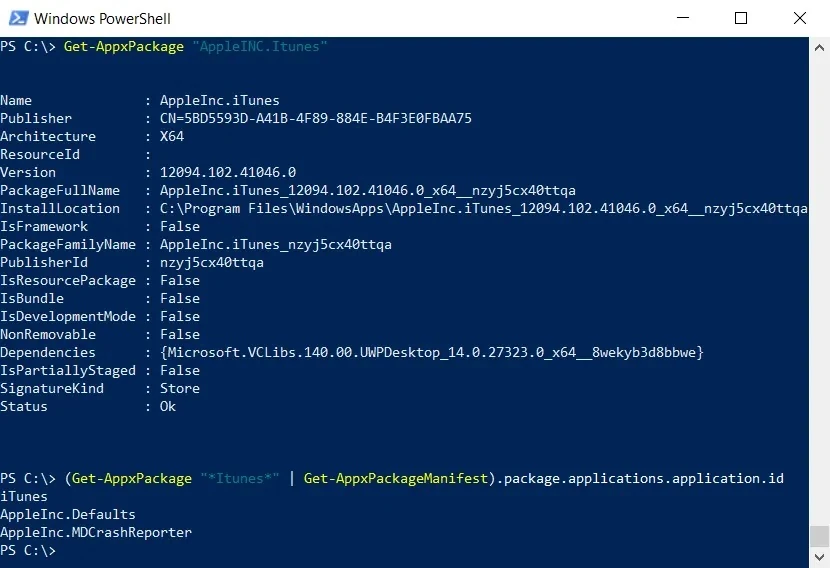
The last two are not launchable and never show up anywhere.
However, this is the same package with three applications, each of which started, tracked, and was torn down independently of the other two.
Windows even makes you type these two ideas differently because a Package Name can run 3 to 50 characters and accepts letters, numbers, periods, and dashes, whereas an Application ID is capped at 64 characters and only allows alphanumeric characters and periods.
It is a minor detail, but it’s the kind that trips you up once and makes you stop assuming the two fields behave the same way.
The Application ID feeds into something much larger, and this is the seed of the AUMID, which Windows builds by attaching it to the package’s family name with an exclamation mark.
iTunes’ main app resolves to something like:
AppleInc.iTunes_nzyj5cx40ttqa!iTunes
That string is not the package name.
It is what a shortcut actually points at, what a toast notification gets stamped with, and what kiosk profile a device is locked to. You can rename the package, and none of that breaks because nothing was initially keyed to the package to begin with.
This is why a package with zero declared applications is a contradiction within the MSIX model, because this would mean you would have a deployment unit with nothing inside for Windows to track as a runtime, and nothing for AUMID to point to.
So the tooling insists you explicitly define what a user will think of as “the app."
The list of resources being tracked has also grown well past the “windows and processes” point.
Execution aliases, file type associations, COM registrations, and AppPaths are declared against a specific application within the manifest, not the package as a whole, and all of this is exactly the type of thing that drifts out of alignments when a package gets captured using traditional tooling instead of declared cleanly from scratch.
It’s a big reason why the Analysis feature in the Advanced Installer MSIX Editor exists: it specifically looks for cases where one of those resources ended up attached to the wrong application or it’s left dangling from a capture that no longer matches what’s inside it.
A modification package is what you get if you want an MSIX package without an application.
There is, however, a catch: an MSIX modification package is only applicable to a target existing application. You can install it without it, but nothing will happen.
MSIX modification packages are roughly the equivalent of an MSI transform file. They are not allowed to declare their own application. It can add files and registry entries, but inventing a new application is off the table.
Conclusion
The main takeaway is simple: an MSIX package cannot exist without at least one declared application because the package is only the delivery unit, whereas the application is what Windows actually tracks at runtime, and it has to have a Start Menu presence, AUMID, notifications, aliases, COM, FTA, and so on.
A single package may contain multiple applications, each with their own identity and runtime behavior.
Resources in MSIX are bound to applications, not to the package itself, which is why captured packages often don’t assign them correctly and why tools validate these mappings.
If you truly need a package with no application, the only valid form is a modification package, but it can only extend an existing app and cannot declare one of its own.
Let us know if you found this helpful and if you have any additional questions!
Written by

Alex Marin
Application Packaging and SCCM Deployments specialist, solutions finder, Technical Writer at Advanced Installer.