Fixing MSIX Packages at Scale: Why Advanced Installer’s New Analysis Engine Changes Everything
MSIX Packaging Tool from Microsoft is a great tool for capturing applications and creating MSIX packages. However, creating a package with it results in an MSIX package, but that alone does not guarantee that the package is complete.
MSIX Packaging Tool captures files and registry entries well, but it does not interpret everything it captures.
For example, it doesn’t map an AppPath registry to an ExecutionAlias, which should be in the AppxManifest. Now keep in mind that MSIX packages don’t care about what’s present in the registry when it comes to OS integration; everything necessary must be in the manifest file.
That gap is exactly what the new Analysis feature in Advanced Installer is designed to close.
Let’s have a look at how it works.
How the Analysis Feature Works

Starting with Advanced Installer 23.7, the MSIX Editor includes a dedicated Analysis panel accessible directly from the ribbon.

When you open an MSIX package for editing, you can trigger a full analysis of its contents with a single click. Advanced Installer will inspect the package registry, files, and manifest, and if that’s the case, it will surface anything that is missing or misconfigured from the original packaging process.

The results appear in a structured list on the right side of the editor, and each finding is grouped by type, such as App Execution Aliases, ProgIDs, File Type Associations, Environment Variables, and more.
Each finding includes a plain-language description of what is wrong and, where possible, a Fix Now button that applies the correction immediately. If everything looks good and you want to take care of it all at once, there is a Fix All button at the top of the panel.
Looking at the above example, we see that a 7-Zip package built with Microsoft’s MSIX Packaging Tool does surface some issues after we analyze it with Advanced Installer.
First, the package is missing an ExecutionAlias in the manifest for 7zFM.exe, which means that the registry contains an AppPath entry pointing to it, but that information was never translated into the proper MSIX construct, namely the AppxManifest.
Second, a set of File Type Associations is again not declared. These are present in the registry but were never enrolled in the manifest, which means the OS will have no clue about them.
Third, the environment variables are defined in the package registry, but again, are not declared correctly in the MSIX package, so they will be ignored at runtime.
None of these are packaging errors in the traditional sense; however, some key functionality will be missing from the final package. Microsoft's MSIX Packaging Tool didn’t do anything wrong per se; it simply didn’t go the extra mile of interpreting what it captured and left this for the software packaging professionals to figure out. Advanced Installer does.

Looking at something more interesting, we have a Brave browser MSIX package. However, if we check the Files and Folders page, we can see that this MSIX places a desktop shortcut.
Looking at it, though, it appears to point to a per-user location, which obviously will not work in our case.
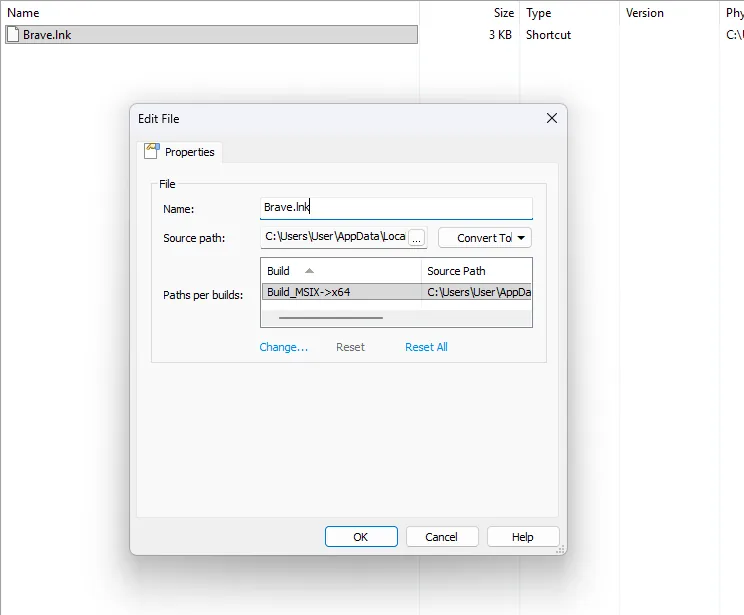
Here, this will actually be a two-step process. If we click the Analysis button, Advanced Installer will first notice that an ExecutionAlias is missing from the manifest.
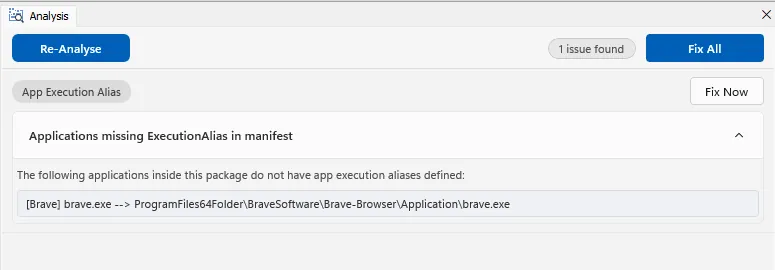
After we click the Fix Now button, another issue appears regarding shortcuts.

If we click Fix Now again and go back to the Files and Folders page, we can see that the desktop shortcut now has an icon and points to the correct file destination.

By the way, every time you fix something by clicking the Fix Now button, it is automatically reflected in the UI as well. Furthermore, the analysis runs automatically when you load a package in the MSIX Editor, so you don’t have to remember to trigger it manually. You can also re-run it on demand from the ribbon at any point.
 Want to try it yourself?
Download the latest version of Advanced Installer or start a free 30-day trial and analyze your existing MSIX packages in just a few clicks.
Watch the Analysis Feature in Action
 Upcoming MSIX Detection Capabilities
The Analysis feature is only getting started.
Future improvements will expand its detection capabilities with:
- MSIX package firewall rules detector
- MSIX package info detector
- MSIX package protocol detector
- MSIX package COM detector
These additions will make it even easier to identify and fix missing MSIX declarations.
Want to see how the Analysis feature evolves?
Check out the MSIX version history list for the latest improvements.
Conclusion
Most MSIX packages in the wild weren't built with a full understanding of what the manifest needs to declare. They were built with MPT, which does the job it's designed for and no more.
The Analysis feature in Advanced Installer's MSIX Editor gives you a clear picture of what those packages are actually missing. It lets you fix them without having to manually read the registry, cross-reference the manifest specification, and figure out the correct XML yourself.
Open the package, run the analysis, apply the fixes. That's it.
Written by

Alex Marin
Application Packaging and SCCM Deployments specialist, solutions finder, Technical Writer at Advanced Installer.