New Native PowerShell Support for Intune Win32 Apps
For years, Microsoft Intune administrators have used PowerShell scripts to automate application installations, configuration, and remediation tasks.
Microsoft recently introduced a capability that brings native PowerShell script support as an installer type for Win32 applications, improving the deployment experience and reducing operational overhead.
In this article, we’ll explore how the traditional PowerShell script installers work with Win32 apps, what the new native support changes are, and why this feature is important in modern endpoint management.
Command Line: The Traditional Approach

Before native PowerShell installer support, administrators typically deployed PowerShell-based installers by embedding scripts in the .intunewin package and calling them from the Install command field.
A common installation command looked like this:
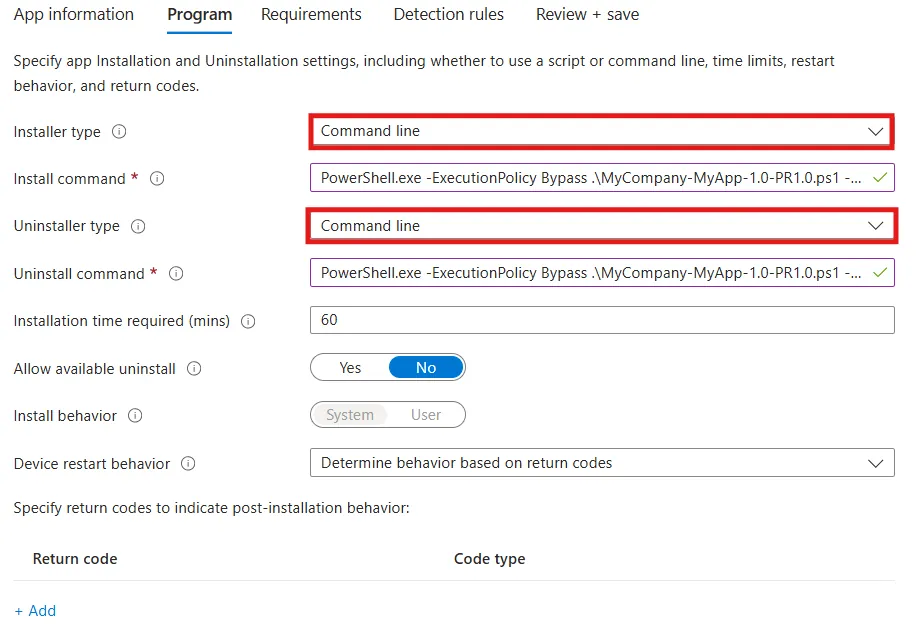
With this approach:
- The PowerShell script is included in the encrypted .intunewin package.
- The install command simply executes the script during installation.
- Any script modification requires rebuilding and re-uploading of the entire application package.
Although this approach is reliable, it may result in administrative overhead.
Limitations
- Package rebuilds for small changes
Even a minor script fix required repackaging the application and re-uploading it to Intune.
- Limited visibility and editing
Scripts embedded in .intunewin files were not easily editable in the Intune portal.
- Operational inefficiency
Every change required re-upload of the entire application package.
For organizations managing hundreds of applications, this process may increase deployment complexity.
Introducing Native PowerShell Script Installers
Microsoft introduced a new installer option for Win32 apps: PowerShell script.
Instead of defining a command line, administrators can now upload a PowerShell script directly as the installer when creating a Win32 application in Intune.
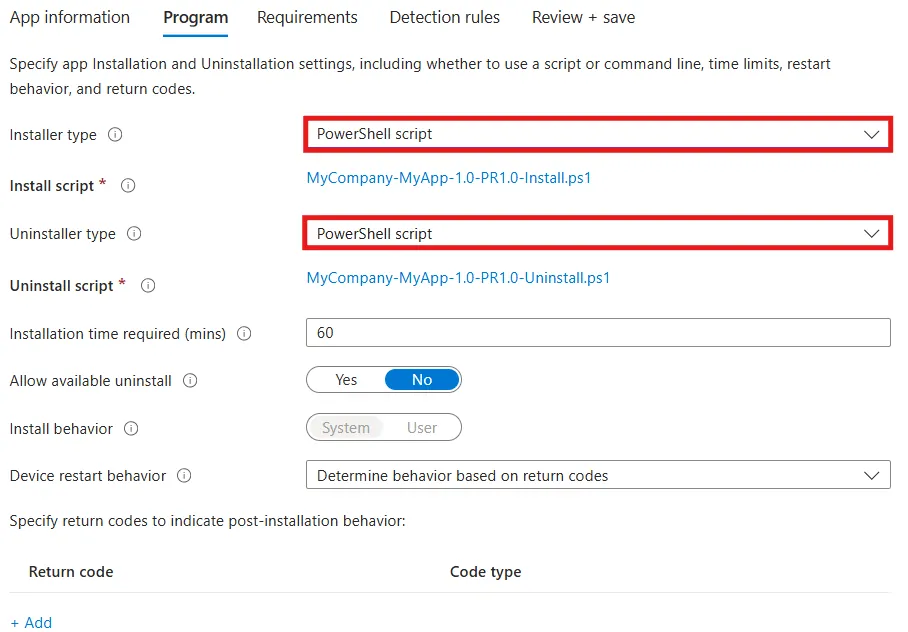
For package content, you still need to upload the .intunewin file in the same way you did before.
This fundamentally changes how installation logic is handled.
How the New PowerShell Script Installer Type Works
With native support:
- The PowerShell script becomes the installer itself
- The script is stored as configuration metadata instead of package content
- During installation, the Intune Management Extension (IME) retrieves and executes the script.
The script effectively replaces the traditional install command.
Script requirements
- Scripts are limited to 50 KB in size
- Scripts run in the same context as the app installer (system or user context)
- The return codes from the script determine the installation success or failure status
- Scripts should run silently, without user interaction
Final Takeaways
Microsoft recently introduced a feature that adds native PowerShell script support as an installer type for Win32 applications, improving the deployment experience and lowering operational overhead.
- Before native PowerShell installer support, administrators typically deployed PowerShell-based installers by embedding scripts in the .intunewin package and calling them from the Install command field.
- Limitations: package rebuilds for small changes, limited visibility and editing and operational inefficiency
- Microsoft added a new installer option for Win32 apps called PowerShell script. Instead of defining a command line, administrators can now upload a PowerShell script directly as the installer when creating a Win32 application in Intune.
- How the new PowerShell Script Installer works: The PowerShell script becomes the installer itself, and it's stored as configuration metadata instead of package content. During installation, the Intune Management Extension (IME) retrieves and executes the script
- Script requirements: 50 KB or less, run in the same context as the app installer (system or user context), use return codes to determine installation success or failure, and run silently without user interaction.
Conclusion
Native PowerShell support for Intune Win32 apps is a significant improvement in application deployment workflows.
By separating installer logic from packaged content, Microsoft has reduced operational overhead and allowed for more flexible automation scenarios.
While this capability makes it very easy to update installation or uninstall scripts directly in the portal, administrators should exercise caution.
Changing scripts on the fly, especially for applications that are already deployed in production, can result in unexpected behavior or inconsistencies across devices. Updates, like any other production change, should be tested and controlled using a proper change management process.
Written by

Horatiu Vladasel
Horatiu is a Software Packager/Sequencer with over 10 years experience, who has worked as a Software Packager at IBM and is currently offering software packaging services to companies such as BT or Nationwide.