What is Windows Desktop Runtime and what is its role?
Understanding the Windows Desktop Runtime and how it fits in the larger .NET ecosystem has become increasingly difficult, but it is also important for developers who build desktop Windows Applications.
With so many runtimes, SDKs, and frameworks available, it’s easy to become confused, especially when terms like .NET Desktop Runtime, .NET Runtime, .NET Framework and .NET SDK are used side by side.
So in this article, we’ll try to clarify what each component is, how they differ, and when you need them.
Key Concepts and Keywords Related To Windows Desktop Runtime

Let us first start to understand what Windows Desktop Runtime is.
This is a runtime package that allows Windows Desktop Applications created with Windows Forms (WinForms) or Windows Presentation Foundation (WPF) to run on Windows Machines. It includes everything you need to execute an application with a graphical user interface by using .NET.
The Windows Desktop Runtime includes the base .NET Runtime and Windows-specific desktop libraries for WinForms and WPF, and also supports components for rendering, UI and event handling.
If you install a desktop app built with .NET, you will typically need to install the Windows Desktop Runtime on your system so that the application can communicate with the system by using the runtime’s libraries.
Continuing our journey, we should look at the .NET Desktop Runtime, which is essentially the same concept.
This is the runtime required to run desktop applications built with .NET. Microsoft uses the terms Windows Desktop Runtime and .NET Desktop Runtime interchangeably in documentation.
The .NET Desktop Runtime includes the Microsoft .NET Desktop Runtime, .NET Runtime (the console runtime), and desktop-specific frameworks. This runtime is required for all non-self-contained WPF or WinForms applications.
Since I mentioned that .NET Desktop Runtime includes Microsoft .NET Desktop Runtime, let us look into what this is.
When you see the term “Microsoft .NET Desktop Runtime”, you should know that this refers to the official runtime package distributed by Microsoft, and it is specifically designed for WPF applications, WinForms applications, and hybrid desktop applications that use both console and UI components. This is available for download on the .NET website and is versioned alongside the main .NET releases, such as .NET 6, .NET 7, and so on.
Now that we covered the differences between the runtimes and how they work, let’s see some small comparisons to make things a bit easier to understand.
If we compare the .NET Runtime vs. the .NET Framework, which is one of the most common sources of confusion, we can make this small comparison:
What it is | Use Case |
|---|---|
.NET Runtime is the modern, cross-platform runtime for .NET, which was formerly known as .NET Core | This is for console apps, ASP.NET Core apps, desktop applications |
.NET Framework is an older, Windows-only runtime that has existed since the early 2000s | This is for legacy Windows applications, enterprise applications, and older WinForms applications |
The key differences between these two are that the .NET Runtime is cross-platform, modular, and actively developed, while the .NET Framework is Windows-only and in maintenance mode.
If you want to build .NET desktop applications, then these should be targeted towards .NET Core rather than .NET Framework.
Another frequently asked question is what the difference is between the .NET SDK and .NET Runtime, which is simple to answer.
The .NET Runtime runs .NET applications and is required on end-user machines. The .NET SDK builds, compiles, and publishes .NET applications, and it is typically required on developer machines.
So, if you only want to run an application, then install the runtime. If you want to develop an application, install the SDK (which also includes the runtime).
By the way, with Advanced Installer you can easily add .NET prerequisites (including .NET Core and .NET Framework) to your app packages, as shown below:
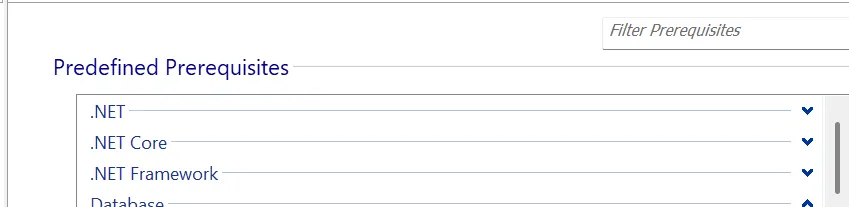
Here is an example on how to add .NET Framework prerequisites:
Conclusion
The Windows Desktop Runtime (or .NET Desktop Runtime) is essential for running modern Windows desktop applications built with .NET. It includes the base .NET Runtime plus the UI frameworks needed for WPF and WinForms apps.
Understanding how it differs from the .NET Runtime, .NET Framework, and .NET SDK helps developers choose the right prerequisites for both development and deployment.
In a nutshell, desktop apps require the Desktop Runtime, while console apps can run on the base .NET Runtime alone.
Final Takeaways
- The Windows Desktop Runtime package allows Windows Desktop Applications which use Windows Forms and Windows Presentation Foundation to operate on Windows operating systems.
- Most .NET-based desktop applications require users to install Windows Desktop Runtime because this runtime package enables the software to interact with Windows through its system libraries.
- The .NET Desktop Runtime serves as the essential runtime environment for executing desktop applications that developers create using .NET technology.
- The Microsoft.NET Desktop Runtime serves as the official runtime package that Microsoft provides for WPF applications, WinForms applications, and hybrid desktop applications that combine console and UI elements.
- .NET Runtime provides cross-platform support through its modular framework, which developers continue to enhance, while .NET Framework remains exclusive to Windows systems and enters its final development stage.
- The .NET Runtime enables .NET applications to operate on user devices while it functions as an essential component for end-user systems.
- The .NET SDK allows developers to build .NET applications, while they need the SDK for all development activities, which include application creation and distribution.
Written by

Alex Marin
Application Packaging and SCCM Deployments specialist, solutions finder, Technical Writer at Advanced Installer.