How to Avoid Software Update Security Vulnerabilities with Advanced Installer
Updates are an important part of any application. They allow you to deliver fixes, improvements, and security patches.
However, the update mechanism itself can pose a security risk. This occurs when an attacker substitutes a malicious executable for your legitimate update. As a result, your updater may install malware rather than the intended software.
This scenario is easy to avoid if the update process is properly configured.
In this article, we will discuss the risks associated with application updates and teach you how you can avoid them with Advanced Installer.
Why Does the Updated Mechanism Bring Security Risks?

Most update systems follow the same flow:
- The application checks the server for updates by downloading a configuration file
- If an update is available, it downloads the new setup package from a URL specified in the configuration file
This design appears to be safe, but if the updater fails to verify the identity of the download files, things can go wrong.
An attacker can modify the configuration file, causing the updater to download a different executable that contains malicious code.
There have been many discussions about the similar update mechanism used by Notepad++, which was recently hijacked.
This design is common across many tools, but there is one important practice you must follow: always validate what you install.
Don’t trust the server hosting the updates, or make sure that the communication channel between the server and the end-user is not compromised.
How Advanced Installer Protects Your Updates
When you enable the signature validation, Advanced Installer Updater is protected by built-in security and is not susceptible to update vulnerabilities.
It includes a validation option for your update packages, called “Install only digital update packages signed with the same certificate as the Updater." Therefore, only packages signed with your trusted code signing certificate can be installed. More information can be found in this article.
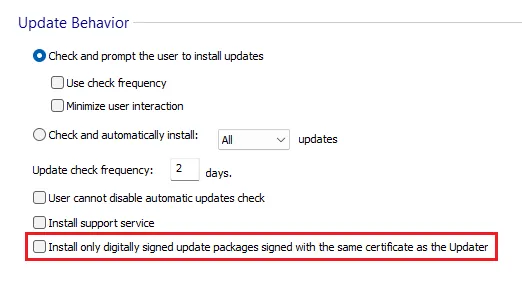
The Updater will only accept digitally signed packages with the same certificate.
This eliminates the common update-related attacks and requires little to no action from developers.
All you have to do is just enable the option and sign your build. This should be the default behavior rather than an optional step.In the coming months, Advanced Installer will add new options to improve the security of your updates channel.
You will be able to digitally sign the updates configuration file that you store on your servers, not just the setup package.
You will also be able to hide certain configurations by injecting them directly in the updater rather than storing them in a separate config file, as well as disable the option to overwrite the updater configurations you shipped via command line execution.
 Check out the auto-updater’s functionalities: Auto-Updater: Get Your Application's Lifecycle Ready for Market Continuity.
Keep Advanced Installer Up-To-Date
As a best practice, always use the latest version of Advanced Installer. The updater and its related components have received improvements and security updates in new releases.
If you use an outdated version, you might miss important features.
Keeping your tooling updated ensures that you benefit from the most recent security enhancements with no additional effort on your part.
Final Takeaways
As important as they are to an application, they can pose a security risk. This occurs when an attacker substitutes a malicious executable for your legitimate update. This can be avoided if the update process is properly configured.
- Most updates have the same flow: the app checks the server for updates by downloading a configuration file. If an update is available, it downloads the new setup package from a URL specified by the configuration file.
- An attacker can modify the configuration file, causing the updater to download a different executable that contains malicious code.
- Always validate what you install: don't trust the server hosting the updates, and make sure that the communication channel between the server and end-user is not compromised.
- Advanced Installer is protected by built-in security and therefore is not susceptible to update vulnerabilities. It includes a validation option for your update packages, called “Install only digital update packages signed with the same certificate as the Updater."
- The Updater will only accept digitally signed packages with the same certificate.
- As a best practice, always use the latest version of Advanced Installer. The updater and its related components have received improvements and security updates in new releases.
Conclusions
Automatic updates should not pose new risks. With Advanced Installer, the solution is simple: use the built-in support to sign your update packages.
By staying up-to-date with Advanced Installer releases, you ensure that only your software is installed as an update.
Try out our Advanced Updater and keep the end-users updated with your application through our 30-day fully featured free trial.
Written by

Renato Ivanescu
Renato is a technical writer for Advanced Installer and an assistant professor at the University of Craiova. He is currently a PhD. student, and computers and information technology are his areas of interest. He loves innovation and takes on big challenges.