What is and how do you create and open a CFG (config) file?
Although rarely considered, a cfg file is an essential component that keeps software running as expected by users.
Whether it appears as a simple text document or a more structured cfg file, it stores preferences, system paths, feature toggles, or any other settings that may be needed. It all starts with a blank file, and it is up to the developers to decide how it will look.
Many people look up what a config file is and what "cfg" means, and the answer is quite broad.
A configuration file is simply a container for settings, and its structure is entirely determined by the application that reads it and the developers who created it. Because of this flexibility, cfg files look very different from one program to the next, even though their purpose is somewhat similar.
Understanding CFG Files

The cfg file type is not limited to a single standard. Some applications use plain text with key-value pairs, while others adopt an XML or JSON format. You can even create your own format that only your application understands.
The term "cfg" (configuration) is intentionally generic, allowing developers the freedom to design the files however they see fit.
Because there is no universally accepted format, a cfg file can be as minimal or as complex as the developer wants.
For example, if we look at the cfg files that PacKit uses, you will notice that we chose an XML type format:
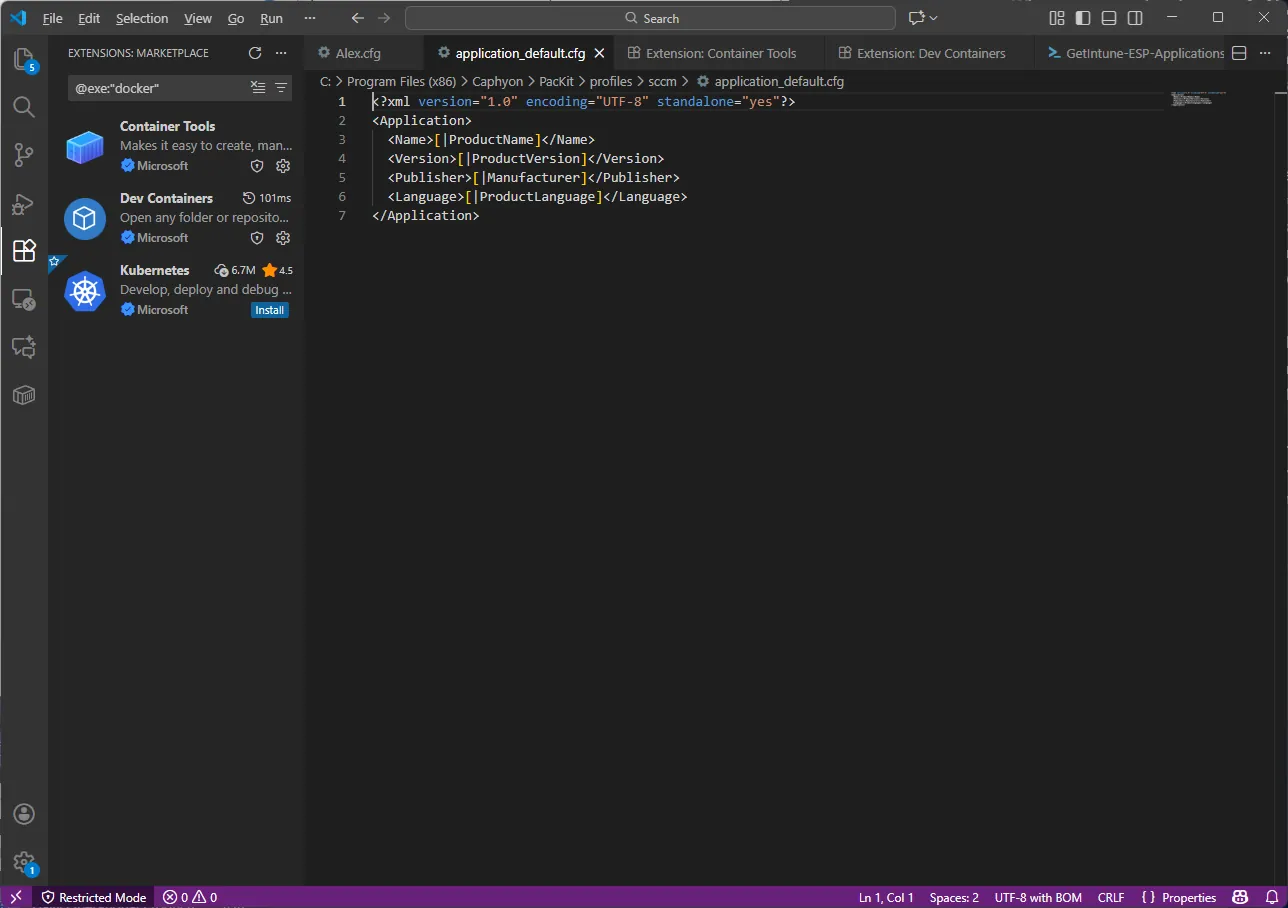
Another example comes from the IcoFXPortable, whose main configuration file is done with an INI structure:

However, you also have cfg files that are not standard configuration files but rather binary ones. Here is an example of a cfg file from GTA Vice City:
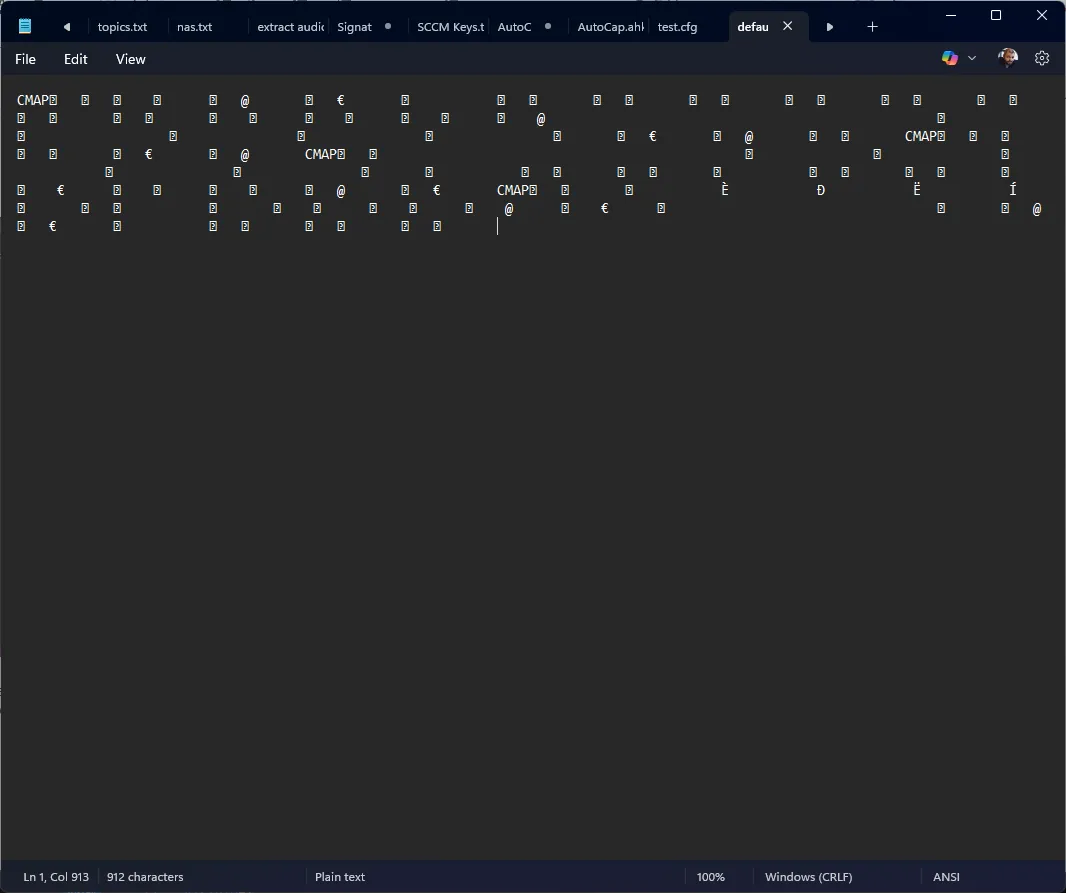
Notepad tries to display everything as text, but if the file contains binary data, the editor cannot interpret it and instead displays random characters, weird symbols, unregulated spaces, or sequences such as CMAP, @, and so on.
In this case, the repeated occurrences of the CMAP sequence indicate that the file contains one of several possible internal structures. It could represent the application’s character map, a data mapping structure that the software relies on, or something else.
This is not a universal standard, but it is a common pattern in the binary files produced by the graphic applications, editors, games, or tools that store complex internal layouts.
Even though this file has a cfg extension, it’s not a configuration file in the traditional sense. Some applications save their configuration in a binary format rather than plain text. They do this to speed up loading, prevent users from editing the file manually, and store complex structures like colors, icons, and UI layouts.
Apple also used the concept of configuration files, but in the Apple ecosystem these are plist files with an XML-based schema.
However, simple tools such as Notepad, Notepad++, Visual Studio Code, and Sublime Text can display them without errors and allow for fast changes to the file if required.
Advanced Installer and CFG Files
Advanced Installer naturally integrates with configuration files. During installation, an application may require a cfg file to be pre-populated with system-specific values such as installation paths, server addresses, license keys, hostnames, and so on.
Advanced Installer can automatically insert these values, eliminating the need for users to manually edit the file after the installation.
If you navigate to the Files and Folders page and search for your CFG file, you can either right-click on it and select “New Text File Update” or, if the file is not in your project but you know where it might be, you can click on “New Text File Update” in the upper ribbon.
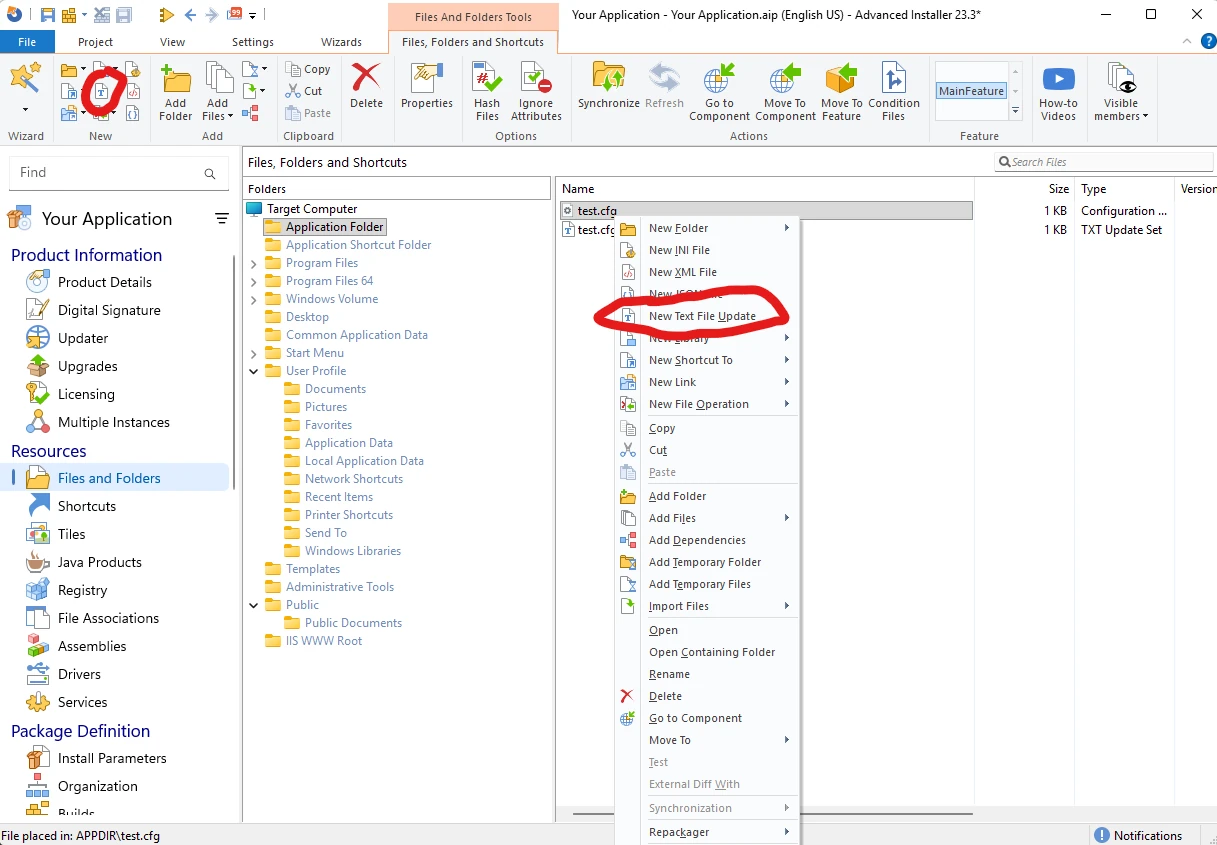
A new window will open, and the first step is to specify which file to include. If this is a file that exists within the project, we simply mention the file name. In my case, it is test.cfg.
The following operations are available on the left side of the window:
- Create or append
- Search and replace
“Create or append” allows you to create the file immediately if it isn’t already there and populate it with the desired text.
“Search and replace” allows you to find an exact match in the file and replace it with the desired value.
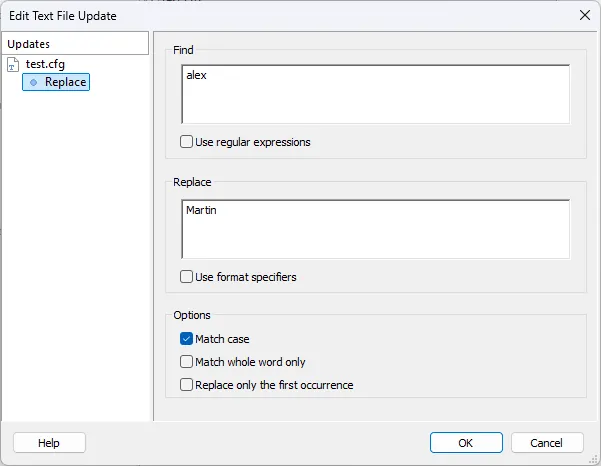
This is where it gets interesting.
In the “Replace” field, you can add file locations, folder locations, or properties in place of normal text.
You can create a property inside the Properties page and modify it using a Custom Action, or you can modify it during the installation phase using the command line, or you can create a custom dialog that retains this information and passes it to the property during the installation phase.
Final Takeaways
A cfg file is an important component that contains preferences, system paths, feature toggles, and any other settings that may be required.
- There is no universally accepted format, so a cfg file can be as minimal or as complex as the developer wants. Also, cfg files can take many different forms, including plain text, XML, JSON, and custom syntax.
- Notepad attempts to display everything as text, but if the file contains binary data, it cannot interpret it and instead displays random characters, strange symbols, unregulated spaces, or sequences.
- Apple also used the concept of configuration files, but in the Apple ecosystem these are plist files with an XML-based schema.
Advanced Installer and CFG Files:
- Go to the “Files and Folders” page and search for your CFG file. You can right-click on it and select “New Text File Update”. If the file is not in your project but you know where it might be, you can click on “New Text File Update” in the upper ribbon. A new window will open, and the first step is to specify which file to include.
- “Create or append” allows you to create the file immediately if it isn’t already there and populate it with the desired text. “Search and replace” allows you to find an exact match in the file and replace it with the desired value.
- In the “Replace” field, you can add file locations, folder locations, or properties in place of normal text.
Conclusion
A cfg file is a simple yet effective mechanism for controlling software behavior.
Because there is no strict standard, a .cfg file can take many different forms, including plain text, XML, JSON, or custom syntaxes.
Understanding what a config file is or what a .cfg file is helps users and developers appreciate how flexible and essential these files are. In most cases, they can be opened easily, edited as needed, and tailored to the requirements of any application.
When paired with tools such as Advanced Installer, cfg files become even more useful, allowing installers to generate and customize configuration data automatically. This combination ensures that applications are deployed with the proper settings from the start, without requiring users to dig into configuration details themselves.
Written by

Alex Marin
Application Packaging and SCCM Deployments specialist, solutions finder, Technical Writer at Advanced Installer.