What’s New in Advanced Installer 24.2
Advanced Installer 24.2 is now available, bringing improvements to installer UI rendering, PowerShell automation, Visual Studio solution imports, MSIX compatibility, and security.
This release includes:
- 1 new feature: ClearType text support in WinUI views and installer themes.
- 18 enhancements: Including expanded PowerShell automation, Visual Studio .slnx support, and updated MSIX schema.
- 28 bug fixes: Including security fixes for TLS certificate validation and custom EXE signature verification.
Let's explore the main changes in Advanced Installer 24.2.
ClearType Text Support in WinUI Views and Installer Themes
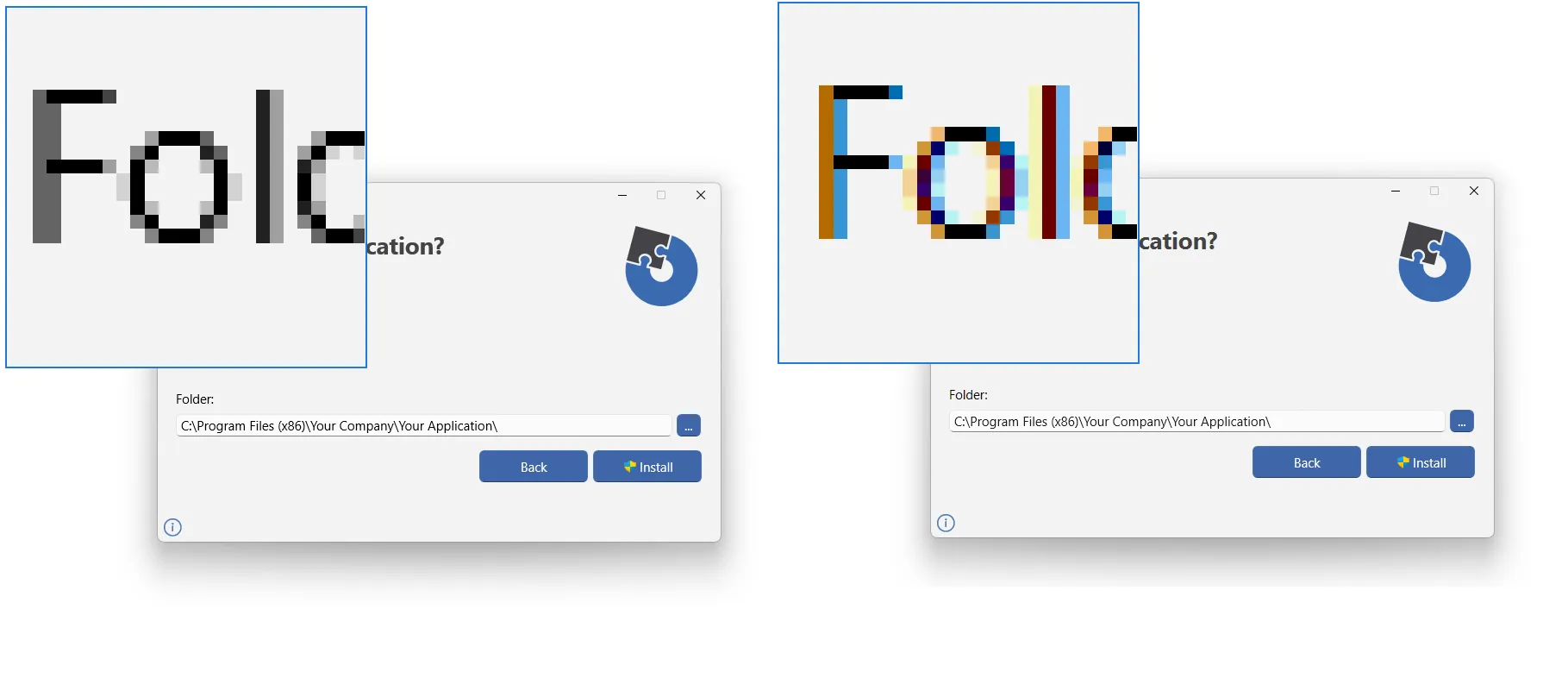
Starting with version 24.2, Advanced Installer supports ClearType text rendering in WinUI views and installer themes.
ClearType uses font-rendering techniques to improve text clarity on supported displays, particularly at smaller font sizes.
This improvement makes text easier to read in WinUI-based views within Advanced Installer and installer dialogs that use WinUI themes, such as AppInstaller.
More PowerShell Automation Options
We're continuing to expand the Advanced Installer PowerShell automation interface, giving you more flexibility when integrating packaging tasks into your CI/CD pipelines.
Version 24.2 introduces two additional automation capabilities:
- PowerShell automation for Exit Dialog actions: You can now configure Exit Dialog actions automatically instead of setting them manually.
- PowerShell automation for adding a Temporary Folder: You can now define Temporary Folders programmatically as part of your project configuration.
- PowerShell automation for Azure Key Vault Login Type
- Added descriptions for all PowerShell automation properties and methods
 What's New in Advanced Installer Architect 2026
Explore the latest functionalities in MSIX packaging, application compatibility, and deployment.
Check what’s new in Architect 2026.
 What's New in Advanced Installer Enterprise 2026
Discover new capabilities for stronger MSIX editing, safer updates, and more flexible installer UI customization.
Check what’s new in Enterprise 2026.
Support for Importing Visual Studio .slnx Files
Advanced Installer 24.2 now supports importing Visual Studio .slnx files.
Developers using the newer Visual Studio solution format can import their solutions directly into Advanced Installer without first converting them to the older .sln format.
For teams using Visual Studio to build their applications, this import lets you create your first package with Advanced Installer quickly and easily.
Improved the Extended Identity OID Field Synchronization
Advanced Installer 24.2 improves the Synchronize functionality in the Auto Updater configuration.
When using Microsoft Artifact Signing, the Synchronize option now ignores the generic Artifact Signing OID instead of populating it in the Extended Identity OID field.
This prevents the generic OID from being incorrectly included in the Auto Updater's digital signature settings.
Security Fixes
Advanced Installer 24.2 includes three security-related fixes:
- Enforced strict TLS certificate validation across shared HTTP client connections
- Hardened digital signature verification for custom EXE detection in the Updater
- Restricted VMLauncher.exe temp folder sharing to strictly required files during "Run in VM" execution
Introducing Open Package Manifest (OPM) Deployment Information Belongs with the Application Applications are easy to move between teams and environments. Their deployment information usually is not. Teams often recreate or store installation commands, detection rules, requirements, and other deployment settings across multiple tools. Built by the teams behind Advanced Installer and PacKit, OPM is an open format that keeps your application's deployment information together with the application source. By making deployment information portable, OPM simplifies application handoffs, versioning, automation, and deployment across different tools and environments. Watch the webinar launch to learn more about OPM. Introducing The Open Package Manifest for Intune & SCCM Deployment |
|---|
Download Advanced Installer 24.2
You can access this version in two ways:
- Use the built-in auto-updater within Advanced Installer.
- Download directly from our website: Download Advanced Installer 24.