Advanced Installer
  • features by EDITION:
    icon ArchitectArchitect
    Manage any packaging project with our Repackager, MSI(X) editing, and MECM/Intune integration for a complete application lifecycle.

    Explore Architect Features ›

    icon EnterpriseEnterprise
    Automate team workflows with CI/CD integrations & auto-updates for your end-users, while leveraging our team management portal for smooth collaboration.

    Explore Enterprise Features ›

    icon ProfessionalProfessional
    Create secure MSI, EXE, and MSIX installers with PowerShell Automation, Visual Studio Integration, and Trusted Signing for robust packaging.

    Explore Professional Features ›

    icon FreeFreeware
    Build basic installers quickly with essential tools for small packaging projects.

    Explore Freeware Features ›

    FEATURES by role:
    for devs
    For Developers
    for professional
    For IT Pros
    for msp
    For Managed Service Providers
    orBrowse all features ›
    Get a FREE Personalized Demo!
  • Application Packaging
    Architect EditionBundled with PacKit PlusNEWApplication PackagingRepackagingPatchingDeploymentFor MSPs, large enterprises, and IT ProsEnterprise EditionApplication PackagingMSIX EditorEXE to MSIFor ISVsProfessional EditionApplication PackagingTrusted SigningPowerShellDeploymentFor individual developers
    Patching & Deployment
    PacKit PlusPatchDeploySCCM to Intune
    Installer Reporting
    Installer AnalyticsTrack installs, activators, errors
    Add-ons
    Updater CloudNEWBuild, host, and publish updates
    See now Advanced InstallerVideo Walkthrough
    Get Demo1-on-1 with an Engineer
    Start Free Trial»30 DaysAll featuresNo card
    Free Tools
    For developers
    Advanced Installer FreeClang Power Tools
    For IT Professionals
    Advanced Express MSIXPacKit Free
  • Help
  • Forum
  • Blog
  • Pricing
  • Download
Start Free Trial
BlogThe MSIx Experts Crib
All Categories
Advanced Installer Releases
MSIX
MSIX
PSF
Scripting & Deployment
Appdata
Application resources
Automation
Custom action
MSP
MST
Powershell
Update
Windows
Testing
Intune
SCCM
Automation & Continuous Integration
Azure
Continuous integration
Devops
IIS
Jenkins
Python
Teamcity
Visual studio
Web
Database
Updater
Conversion & Editing
Application virtualization
AppV
AppX
Desktop bridge
Import
Installer compression
Installer conditions
Java
Localization
Bootstrapper
Migration
MSI
Services
User interface
Wise
Wix
XML
Digital signature
Tips
Repackaging
Enterprise packaging
Packaging series
Repackager
Virtual machine
Free tools
Hover
Tools
Product & News
Event
False positive
Licensing
Malware
News
Virus
Webinar
Documentation
Analytics
Analytics
Security
Security
RSS
icon subscribe mail

Thank you for
subscribing!

Newsletter

Newsletter

Msix transition banner

The MSIX Shift. And why you should start preparing for it.

With App-V packages closing to end-of-life (2026), the reality of a transition to MSIX is much closer and many are starting to research the ins and outs of what it entails. Although we now know that MSIX is not an update to MSI, but a completely new technology, there are still some correlations that we'd like to address.

See author's page
Alex Marin

July 31st, 2020 · 30min read

#MSIX #MSI #APPDATA
Device guard signing integration

Advanced Installer Enables Enterprise Security directly from the installer package

Starting with version 17.3, Advanced Installer natively supports Device Guard Signing. This feature is of most use for the vendors to prepare their software product installers to be used in enterprise environments.

#SECURITY #MSIX #NEWS
Ai v17
Ai v17

Advanced Installer 17.3 Released

The latest version of Advanced Installer brings more than 25 features and improvements across all editions. Modernize and increase the security of your release process with our Device Guard Signing integration.

July 29th, 2020

How to upgrade msix package

How does MSIX package upgrades change industry best practices?

When building a new version of an installation package, you should pay attention not only to adding improvements but also ensuring a seamless upgrade to the old version.

See author's page
Alex Marin

July 24th, 2020 · 4min read

#MSIX #MSI #TIPS
Msix fonts
Msix fonts

Installing Fonts in MSIX Package

If you have ever wondered how fonts are installed in an MSIX package or if you want to master all MSIX concepts, you landed on the perfect page. In the following article, we’ll see how to add and register fonts so your package will be more impactful.

See author's page
Alex Marin

July 17th, 2020 · 3min read

#MSIX #MSI #TIPS
Per machine deployment

Technical Guide: Per-machine deployment of MSIX in SCCM

On a recent post, we explored how MSIX deployments are done via SCCM, covering the scenario when a per-user installation is needed.

See author's page
Alex Marin

July 17th, 2020 · 12min read

#MSIX #POWERSHELL #SCCM
How to disable registry and file redirections

How To Disable Registry and File Redirections for MSIX

Recently, in one of our previous articles, we covered how MSIX redirects user data to specific locations.

See author's page
Alex Marin

July 9th, 2020 · 4min read

#MSIX #TIPS
Managed service account

Managed Service Accounts (MSA): Installing a service

Recently, one of our users has asked us if it is possible to install, through Advanced Installer, a service under a Managed Service Account (MSA).

See author's page
Catalin Gheorghe

July 2nd, 2020 · 6min read

#TIPS #SERVICES
Ai v17
Ai v17

Advanced Installer 17.2 Released

Version 17.2 of Advanced Installer brings you more than 20 features and enhancements ready to be discovered.

June 30th, 2020

Psf introduction banner

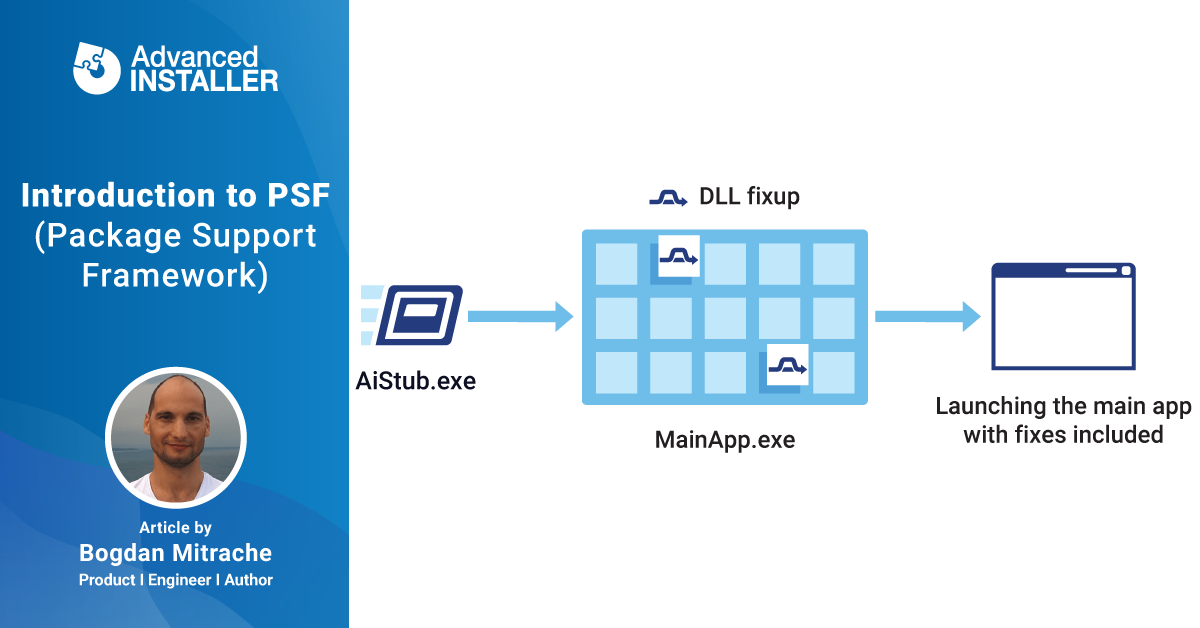
Introduction to Package Support Framework

To help with the MSIX transition, Microsoft has released the Package Support Framework (PSF) - an open-source framework that enables you to apply runtime fixups for issues that might appear when migrating legacy applications that you don’t have the source code for.

See author's page
Bogdan Mitrache

June 26th, 2020 · 6min read

#MSIX #WINDOWS-10 #MIGRATION
Disable msix uninstallation

How to Disable MSIX Uninstallation

Although not necessarily common practice, there are some instances where you would want to prevent users from uninstalling specific MSIX packages such as monitoring software that is required to gather data from all employees.

See author's page
Alex Marin

June 18th, 2020 · 3min read

#MSIX #TIPS
Banner msix modification package

MSIX Modification Packages: Deploying custom application configurations.

MSIX Modification Package is a type of MSIX package format introduced by Microsoft with the goal of decoupling customizations from the main application. Launched with the release of their MSIX packaging format, the MSIX Modification Package is an MSIX package meant to store the customizations of the application.

See author's page
Horatiu Vladasel

June 11th, 2020 · 7min read

#MSIX #TIPS
Ai v17
Ai v17

Advanced Installer 17.1 Released

We have good news! Advanced Installer 17.1 comes with Digital Signature support for PowerShell scripts - you can now digitally sign PowerShell scripts to enhance your enterprise security policies.

May 27th, 2020

Software packaging automation

How much can you automate your software packaging process? An IT Pro perspective.

Automation. A word heavily used around industries, especially the software one. A word that arouses great interest for every manager, service, or business owner.

See author's page
Alex Marin

May 22nd, 2020 · 10min read

#MSIX #MSI
Msix ready
Msix ready

Which applications are ready to convert to MSIX? Are you curious?

Every new MSIX package we build allows us to learn more and improve the tools we build. The whole Advanced Installer team got involved.

#MSIX #NEWS
Resume installation after reboot

How to continue with an installation after reboot?

Although it’s a rare scenario - you might run into the situation where you need to continue the installation of a certain application after reboot. We are talking about a silent installation that doesn't require admin rights or any input from the user.

See author's page
Alex Marin

May 8th, 2020 · 7min read

#WINDOWS-10 #CUSTOM-ACTION #TIPS
Components and features

How to create components in Advanced Installer. And why you should not bother with it.

As a standard, Advanced Installer automatically creates the components when generating the product package. The automatic process respects a strict set of Windows Installer rules, together with a series of best practices we have gathered from our customers during the years.

See author's page
Alex Marin

April 30th, 2020 · 4min read

#MSI #TIPS
Ai v17
Ai v17

Advanced Installer 17.0 Released

Since 2018, when Advanced Installer was named The Microsoft Launch Partner for MSIX technology, we've worked on setting its foundation and continuously bringing you powerful tools - all with the goal of making your job easier.

April 27th, 2020

Temp folder access
Temp folder access

How does MSIX handle the temp folder? And why is it important to know it!

We learned in How does Files Redirection work with MSIX that user data files, either from the project or created by executables, are automatically redirected to: %localappdata%\packages\PublisherName.AppName_hash\LocalCache.

See author's page
Alex Marin

April 23rd, 2020 · 3min read

#MSIX #APPDATA #TIPS
Don't do it series
Don't do it series

Always use the app package version and not app version to your package versioning

Every software packaging department has its own rules when it comes to MSI - whether we talk about naming convention (package naming, product naming) or package description and comments.

See author's page
Alex Marin

April 15th, 2020 · 6min read

#MSI #MSIX
  • 1
  • 23
  • 24
  • 25
  • 26
  • 27
  • 40
  • 1
  • 22
  • 23
  • 24
  • 25
  • 26
  • 27
  • 28
  • 40
  • 1
  • 20
  • 21
  • 22
  • 23
  • 24
  • 25
  • 26
  • 27
  • 28
  • 29
  • 30
  • 40

Popular Articles

We use cookies to enhance your experience and analyse site traffic. Read our Cookie Policy.
New add-on Build & publish updates from your installer project. Host them securely in Updater Cloud. Learn more ›

CAPHYON PRODUCTS

  • Advanced Installer
  • PacKit
  • Advanced Web Ranking
  • Clang Power Tools
  • Wattspeed
  • Bytes Route

ADD-ON SERVICES

  • Updater Cloud
  • Installer Analytics

COMPANY

  • About Us
  • Contact
  • Partners
  • Press Information

PRODUCT

  • Download Latest Version
  • Release Notes
  • Manage Your Account
  • Documentation
  • Architect + PacKit Plus Bundle
  • Refer a Friend
  • Product Feedback
  • Feature Request

SERVICES

  • Personalized Training
  • Consulting
  • Premium Support

GET STARTED

  • Free Trial
  • Pricing
  • Get a Demo
  • Features
  • Customers
  • Case Studies
  • Testimonials
  • Product Flyer

ADD-ON SERVICES

  • Updater Cloud
  • Installer Analytics

MIGRATION SUPPORT

  • Migrate from InstallShield
  • Migrate from WIX
  • Migrate from Inno Setup
  • Migrate from MSIX Packaging Tool
  • Migrate from Pace Suite

FREE TOOLS

  • Advanced Installer Express MSIX
  • Advanced Installer Free
  • TweakAppV
  • Visual Studio Extension
  • PacKit Free (Patch & Deploy)

RESOURCES

  • Advanced Installer Upgrade Guide
  • FREE Packaging eBooks
  • Webinars
  • MSIX Introduction
  • MSIX New Features
  • Blog
  • Forum

TRAINING & CERTIFICATION

  • MSI Packaging Essentials
  • Advanced MSI Packaging
  • MSIX Packaging Fundamentals
  • All Certifications
Link to Capterra ReviewsAdvanced Installer, a Microsoft Partner

FOLLOW US

Get the latest news in Application Packaging

© Caphyon 2002 - 2026 Ltd. Trademarks belong to their respective owners. All rights reserved.
EULA  |  Privacy  |  Security  |  Site Map