- Introduction
- Registration
- Using Advanced Installer
- GUI
- Working with Projects
- Installer Project
- Patch Project
- Merge Module Project
- Updates Configuration Project
- Windows Store App Project
- Modification Package Project
- Optional Package Project
- Windows Mobile CAB Projects
- Visual Studio Extension Project
- Software Installer Wizards - Advanced Installer
- Visual Studio integration
- Alternative to AdminStudio/Wise
- Replace Wise
- Migrating from Visual Studio Installer
- Keyboard Shortcuts
- Shell Integration
- Command Line
- Advanced Installer PowerShell Automation Interfaces
- Features and Functionality
- Tutorials
- Samples
- How-tos
- FAQs
- Windows Installer
- Deployment Technologies
- IT Pro
- MSIX
- Video Tutorials
- Advanced Installer Blog
- Table of Contents
- Introduction
- Registration
- Using Advanced Installer
- GUI
- Working with Projects
- Installer Project
- Patch Project
- Merge Module Project
- Updates Configuration Project
- Windows Store App Project
- Modification Package Project
- Optional Package Project
- Windows Mobile CAB Projects
- Visual Studio Extension Project
- Software Installer Wizards - Advanced Installer
- Visual Studio integration
- Alternative to AdminStudio/Wise
- Replace Wise
- Migrating from Visual Studio Installer
- Keyboard Shortcuts
- Shell Integration
- Command Line
- Advanced Installer PowerShell Automation Interfaces
- Features and Functionality
- Tutorials
- Samples
- How-tos
- FAQs
- Windows Installer
- Deployment Technologies
- IT Pro
- MSIX
- Video Tutorials
- Advanced Installer Blog
- Table of Contents
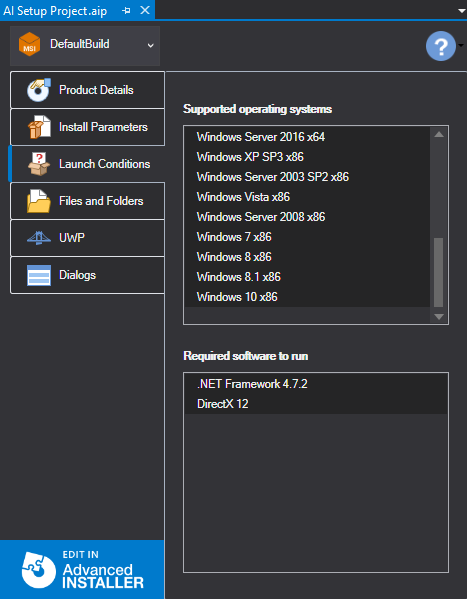
OS and Software Launch Conditions

Displays the list of the supported operating systems and the software applications that are required in order to install and run the application. Information is displayed in separate tabs for each build.