


How do I integrate Advanced Analytics SDK in my C++
application?

Requirements
- Installer Analytics Account with a valid application
- Visual C++ Runtime
To integrate Advanced Analytics in a C++ application you can follow this article which explains AdvancedAnalyticsCppSample.cpp from the C++ sample on GitHub.
 We encourage you to use this sample as a starting point so you can
understand how the SDK works, then to expand the logic and use your own
methods according to your application's architecture.
We encourage you to use this sample as a starting point so you can
understand how the SDK works, then to expand the logic and use your own
methods according to your application's architecture.
The exported functions that leverage the SDK functionality are:
- AA_Start(appID, appVersion) - Initializes the service using the appID and appVersion parameters.
- AA_Stop() - After this function is called, any further calls to the SDK will not work.
- AA_Enable(true|false) - Enables/disables data sending to the server.
- AA_IsEnabled() - Returns true/false depending on whether data sending is enabled/disabled.
Step 1 - Include the header into the project.
#include "../../sdk/AdvancedAnalyticsSDK.h"
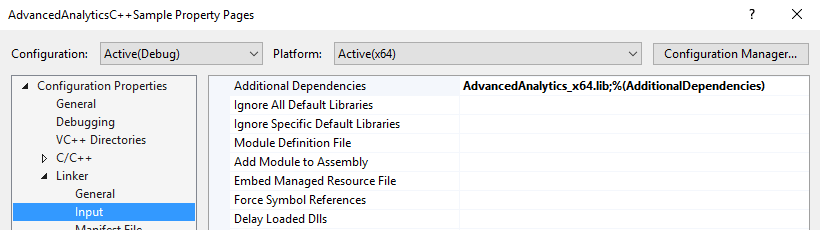
Step 2 - Add AdvancedAnalytics_x64 library
as a dependency or load it dynamically using LoadLibrary
function.
The file can be found in the sample under this location: ..\..\sdk\x64.
Step 3 - Get the app id from your Advanced Installer project or from your
Installer Analytics account.
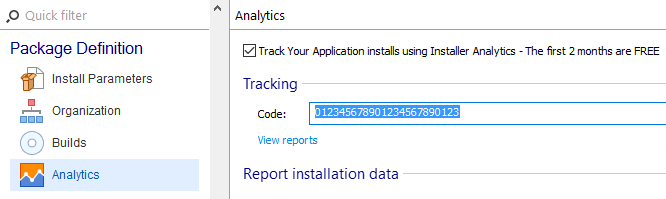
Step 4 - Set a couple variables to the app id and version.
They will be passed as parameters to initialize the service.
wstring appId      = L"012345678901234567890123";
wstring appVersion = L"1.0.0";
Step 5 - Initialize the service by calling
AA_Start.
AA_Start(appId.c_str(), appVersion.c_str());
Step 6 - Get the user's consent to enable tracking of your
app.
The following snippet uses a simple message box, but you can feel free to implement how the interaction, if any, should be carried out.
if (::MessageBox(NULL, L"Do you want to enable tracking?", L"Sample", MB_YESNO) == IDYES)
    AA_Enable(true);
else
AA_Enable(false);In the sample, a registry entry is used to store the user's choice and verify it every time the app starts. Instead of registry entries you can use a file, DB or whatever suits your app.
Data sending will be disabled by default until you call AA_Enable with true. Once you do, the SDK sets its own registry value to persist the setting.
 You won't be able to see any data in the reports until you call
AA_Enable with true.
You won't be able to see any data in the reports until you call
AA_Enable with true.
Step 7 - Run the application.
YourProgram::Run();
Step 8 - When the app needs to close, stop the tracking service by
calling AA_Stop.
AA_Stop();