


SBOM Tab

 The following article uses options that are available starting with the Enterprise edition and project type.
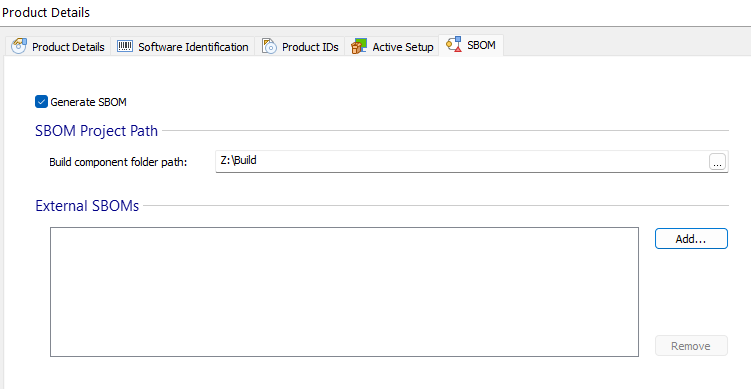
This tab allows you to configure SBOM generator settings.
 SBOM reports are genarated with the latest version of Microsoft SBOM tool available, using
the SPDX 3.0 format (starting with Microsoft SBOM tool v4.0.2). You can also use any external
SBOM sources (.spdx or .json), depending on your organisation's standards.
SBOM reports are genarated with the latest version of Microsoft SBOM tool available, using
the SPDX 3.0 format (starting with Microsoft SBOM tool v4.0.2). You can also use any external
SBOM sources (.spdx or .json), depending on your organisation's standards.
An SBOM is an inventory of the software components, including critical information about the libraries, tools, and processes used to develop, build, and deploy a certain application for example the version of each component, the licensing information or even potential vulnerabilities that a software might have. For more information about this topic, see What Are SBOMs and How to Integrate Them into Your Software Packages article.
Generate SBOM
Using this feature a Software Bill of Materials (SBOM) report will be generated. Select from the list to :
- Include SBOM in the package
- Generate SBOM as separate file
- Include SBOM in the package and generate it as separate file
You can share that report at your discretion, in an access-controlled manner (if needed) using a set of predictable and discoverable ways, including:
- Along with the source code
- On the Manufacturer's website
- Human-readable files provided to the purchaser
SBOM Project Path
Build component folder path
Define the folder that contains the source code and components for building the binary. The tool will look in this location for the various components and packages that are used in the build process.
External SBOMs
A collection of external SBOMs to be included as external references in the generated SBOM.
Use Add... or Remove... buttons to add or remove elements from the list.
SBOM Options
Namespace URI base
Specify the base path of the SBOM namespace URI.
Parse package metadata
Check this option to parse license and supplier info from the package's metadata file.
Fetch license information
This option will fetch the license information of packages detected in the SBOM from the ClearlyDefinedApi.