


Stock Keeping Units Page

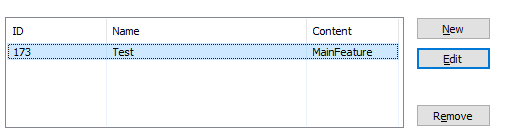
Stock keeping units are used to identify a software product. For example you can have a project organized in several features. Each feature can belong to a different edition (e.g. Professional, Enterprise, etc.), which in turn would represent a different build. Using this page you can add, edit or remove each edition's stock keeping unit.
 Adding a stock keeping unit will automatically enable serial
validation.
Adding a stock keeping unit will automatically enable serial
validation.
Creating a new SKU
Use the “New” button, list context menu item or press the Insert key in order to create a new stock keeping unit.
Editing an SKU
Use the “Edit” button, list context menu item or press the F2 key. The Stock Keeping Unit Edit Dialog will be shown allowing you to edit the selected stock keeping unit.
Removing an SKU
Use the “Delete” button, list context menu item or press the Delete key in order to remove a selected stock keeping unit.
Stock Keeping Unit Edit Dialog
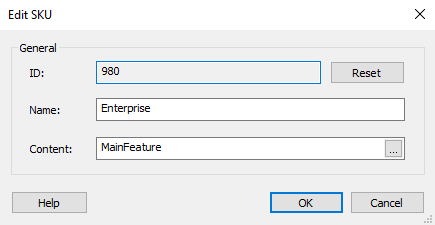
In this dialog, you can reset each SKU's ID, change its name or its content.
ID
The ID is used as a seed for serials.
Name
Specify the stock keeping unit name.
Content
A list of semicolon (;) separated features to be enabled.