


Custom Launch Conditions Tab

In this tab you can define custom launch conditions by using installer properties or environment variables. The properties can be predefined or set by searches and custom actions.

Creating a new launch condition
Use the button, the “New” list context menu item or press the Insert key while the list control is focused. The Edit Launch Condition Dialog will pop up allowing you to specify a launch condition.
Modifying a launch condition
Use the button, the “Edit” list context menu item or press the Space key while an element from the list control is selected. The Edit Launch Condition Dialog will pop up allowing you to edit a launch condition.
Evaluate
Use the button to evaluate the status for each launch condition.

Removing a launch condition
Use the button, the “Remove” list context menu item or press the Delete key while an element from the list control is selected.
 The installation will run only if the custom launch conditions are True.
Otherwise, the launch condition description will be showed to the user.
The installation will run only if the custom launch conditions are True.
Otherwise, the launch condition description will be showed to the user.
Edit Launch Condition Dialog
This dialog allows you to specify a custom launch condition based on an installer property or environment variable.
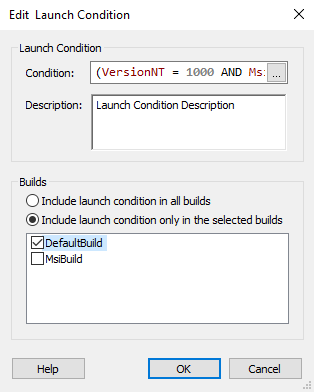
Condition
Edit this field using Smart Condition Edit Control. If the condition is True, the installation will run, if not then a message with the launch condition description is showed and the installation is aborted.
Description
Specify a description for the launch condition. This field is of Formatted Type and can be edited with Smart Edit Control. You can localize this string.
Builds
In this section, you can specify the project builds that should contain this launch condition.
The "Builds" options won't appear listed unless the
project contains multiple builds defined in the Builds Page.