


- Introduction
- Registration
- Using Advanced Installer
- GUI
- Working with Projects
- Installer Project
- Patch Project
- Merge Module Project
- Updates Configuration Project
- Windows Store App Project
- Modification Package Project
- Optional Package Project
- Windows Mobile CAB Projects
- Visual Studio Extension Project
- Software Installer Wizards - Advanced Installer
- Visual Studio integration
- Alternative to AdminStudio/Wise
- Replace Wise
- Migrating from Visual Studio Installer
- Keyboard Shortcuts
- Shell Integration
- Command Line
- Advanced Installer PowerShell Automation Interfaces
- Features and Functionality
- Tutorials
- Samples
- How-tos
- FAQs
- Windows Installer
- Deployment Technologies
- IT Pro
- MSIX
- Video Tutorials
- Advanced Installer Blog
- Table of Contents
- Introduction
- Registration
- Using Advanced Installer
- GUI
- Working with Projects
- Installer Project
- Patch Project
- Merge Module Project
- Updates Configuration Project
- Windows Store App Project
- Modification Package Project
- Optional Package Project
- Windows Mobile CAB Projects
- Visual Studio Extension Project
- Software Installer Wizards - Advanced Installer
- Visual Studio integration
- Alternative to AdminStudio/Wise
- Replace Wise
- Migrating from Visual Studio Installer
- Keyboard Shortcuts
- Shell Integration
- Command Line
- Advanced Installer PowerShell Automation Interfaces
- Features and Functionality
- Tutorials
- Samples
- How-tos
- FAQs
- Windows Installer
- Deployment Technologies
- IT Pro
- MSIX
- Video Tutorials
- Advanced Installer Blog
- Table of Contents
Search Results Dialog

Select in the searches list the desired search property and its value will be displayed in the bottom edit field.
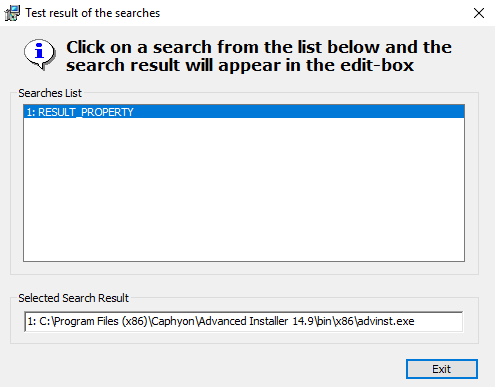
 The string after the "1: " characters (the searches number) represents
the actual value stored in the searches property.
The string after the "1: " characters (the searches number) represents
the actual value stored in the searches property.