


Users and Groups Page

On this page you can set up the creation of new users and groups.
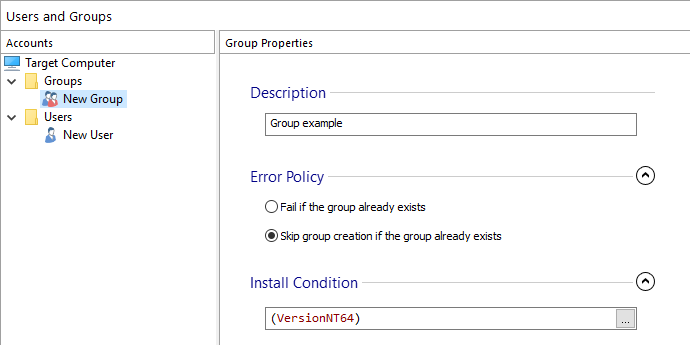
Create a new group
 Setup the creation of a new group by using the
toolbar button, selecting the “New Group” context menu option or by
pressing the Insert key while the “Users and Groups”
pane is focused.
Setup the creation of a new group by using the
toolbar button, selecting the “New Group” context menu option or by
pressing the Insert key while the “Users and Groups”
pane is focused.
Create a new user
 Setup the creation of a new user account by using the toolbar button, selecting the “New User” context menu
option or by pressing the + key while the “Users and
Groups” pane is focused.
Setup the creation of a new user account by using the toolbar button, selecting the “New User” context menu
option or by pressing the + key while the “Users and
Groups” pane is focused.
Rename a user or group
Rename a user or group by using the “Rename” context menu option or by pressing the F2 key while an element is selected.
Browse users or groups
 Add a new browse operation by using the toolbar
button or by selecting the “New Browse” context menu option while the
“Users and Groups” pane is focused.
Add a new browse operation by using the toolbar
button or by selecting the “New Browse” context menu option while the
“Users and Groups” pane is focused.
Removing a user account or group
 Remove a user account from the list by using the
toolbar button, selecting the “Remove” context
menu option or by pressing the Del key while the desired element is
selected.
Remove a user account from the list by using the
toolbar button, selecting the “Remove” context
menu option or by pressing the Del key while the desired element is
selected.
Notes
If the user or group already exist on target computer the installation will fail. User account names are limited to 20 characters and group names are limited to 256 characters. In addition, account names cannot be terminated by a period and they cannot include commas or any of the following printable characters: ", /, \, [, ], :, |, <, >, +, =, ;, ?, *.
 Both user and groups names can use Windows Installer Formatted Type. If you provide a
formatted reference, the names will be resolved accordingly at install time. On the other
hand, if the names you provide don't have a formatted syntax, they will be validated
according to the above notes.
Both user and groups names can use Windows Installer Formatted Type. If you provide a
formatted reference, the names will be resolved accordingly at install time. On the other
hand, if the names you provide don't have a formatted syntax, they will be validated
according to the above notes.
Topics
- User Account Properties
Setting user accounts properties in Advanced Installer. - Group Properties
Setting group properties in Advanced Installer. - User Browse Properties
Setting user browse properties in Advanced Installer.