


Edit Component Policies Dialog

In this dialog, you can change the Component Policy for files and registry entries.
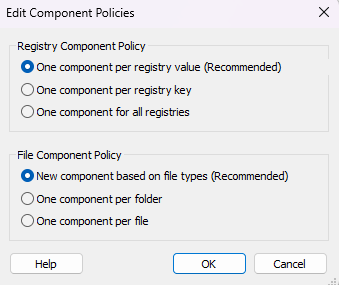
Registry Component Policy
In this section you can configure the Component policy for the Registry.
One component per registry value (Recommended)
Check this option to create a component for each registry value that is created.
One component per registry key
If this option is checked, for registry keys with multiple registry values only a component will be created.
One component for all Registries
This option will ensure that a single component will be created for all registries so if there are multiple keys and values, all of them will be in the same component. This option is useful for minimizing the installation time in scenarios with a large number of registers .
File Component Policy
This section allows you to set the Component policy for the Files
New component based on file types (Recommended)
if this option is checked, a new component may be created or an already existing one will be used based on the type of the files.
One component per folder
This option will ensure that only one component will be created for all the files contained by a folder, disregarding their type.
One component per file
This option will create a new component for each file, disregarding its type.