


Edit SCCM Program Dialog

In this dialog you can edit the SCCM program settings like general information, requirements, run options and dependencies.
General Information Tab

Description
This section contains general information about the selected program profile.
Name
This field displays the name of the profile. This field must be unique within the package and is mandatory.
 It supports PseudoFormatted Type and can
be edited using Smart Edit Control.
It supports PseudoFormatted Type and can
be edited using Smart Edit Control.
Comment
This field is optional and can be used to add comments for this program profile.
It supports PseudoFormatted Type and can
be edited using Smart Edit Control.
Application
In this section, you can select the application that will be associated with this program profile.
Command Line
This field contains the application and the parameters that will be executed. The command is relative to the package source folder. This field is mandatory.
In order to select an application use the button. The following file extensions are supported: EXE, MSI, MSP.
This field supports PseudoFormatted Type
and can be edited using Smart Edit Control.
Start In
In this field, you can declare the working folder of the program. This entry is mandatory. It can point to an absolute path on the client computer or a path relative to the package source folder. If no specific path is declared the folder where the package is deployed will be used as the working directory.
Run Mode
This combo box lets you declare how the program will run. The following options are available:
- Normal
- The application will run in normal mode.
- Minimized
- The application will run minimized in the taskbar.
- Maximized
- The application will be run maximized if this option is being supported by the program.
- Hidden
- The application will be executed in the background without any visible way of interaction.
After Run
This combo box allows you to declare the post-execution behavior if the program is completed successfully. The following options are available:
- No action
- If this option is selected no post-execution action is set.
- SMS Restart
- Once the program has ended successfully the System Management Server will be restarted.
- Program Restart
- Once the program has ended successfully it will be restarted.
- SMS Logoff
- Once the program has ended successfully the "Log Off" operation will be executed on the System Management Server.
If a predefined configuration profile is being edited these settings
cannot be changed.
Requirements Tab

In this section, you can specify the amount of time and space required by the program to run on the client machine.
Estimated disk space
In this field, you can specify the amount of disk space the program requires to run on the client computer.
By default, this value is empty meaning the estimated space is unknown and can be set as a whole number greater than or equal to zero to specify a fixed disk space requirement. Use the combo box from the right to select the desired units from the list: KB, MB, GB.
Estimated runtime
This field allows you to specify the estimated time (in minutes) that the program is expected to run on the client computer.
By default, this value is empty meaning the estimated time is unknown and can be set as a whole number greater than zero to specify an estimated time.
Additional Requirements
In this field, you can write optional text that can include any other information or requirements for client computers.
Supported Platforms
In this section you can choose the platform and operating system on which the program will run.
This program can run on any platform
If this option is enabled the program will run both on 32 and 64-bits platforms and on all Microsoft Windows versions.
This program can run only on the following platforms:
If this option is enabled the program will run only on the platform and operating systems selected from the list.
The list is structured in 32 and 64-bits platforms, starting with the oldest operating system supported:
| Platform | Operating System | Description |
|---|---|---|
| 32-bits | All X86 Windows 2000 | The package supports any Windows 2000 version on 32-bits platforms. |
| 32-bits | X86 Windows 2000 Service Pack 4 | The package will run on Windows 2000 with Service Pack 4 on 32-bits platforms only. |
| 32-bits | All X86 Windows XP | The package supports any Windows XP version on 32-bits platforms. |
| 32-bits | X86 Windows XP Professional Service Pack 2 | The package will run on Windows XP Professional with Service Pack 2 on 32-bits platforms only. |
| 32-bits | X86 Windows XP Professional Service Pack 3 | The package will run on Windows XP Professional with Service Pack 3 on 32-bits platforms only. |
| 32-bits | All X86 Windows Server 2003 (Non-R2) | The package supports any Windows Server 2003 prior to R2 version on 32-bits platforms. |
| 32-bits | X86 Windows Server 2003 SP1 | The package will run on Windows Server 2003 with Service Pack 1 on 32-bits platforms only. |
| 32-bits | All X86 Windows Server 2003 R2 | The package supports any Windows Server 2003 R2 release on 32-bits platforms. |
| 32-bits | X86 Windows Server 2003 R2 original release (SP1) | The package will run on Windows Server 2003 R2 with Service Pack 1 release on 32-bits platforms only. |
| 32-bits | X86 Windows Server 2003 SP2 | The package will run on Windows Server 2003 with Service Pack 2 on 32-bits platforms only. |
| 32-bits | All X86 Windows Vista | The package supports any Windows Vista on 32-bits platforms. |
| 32-bits | All X86 Windows Server 2008 | The package supports any Windows Server 2008 on 32-bits platforms. |
| 32-bits | X86 Windows Vista original release | The package will run on Windows Vista original release version on 32-bits platforms only. |
| 32-bits | X86 Windows Vista SP1 | The package will run on Windows Vista with Service Pack 1 on 32-bits platforms only. |
| 32-bits | X86 Windows Server 2008 | The package will run on Windows Server 2008 on 32-bits platforms only. |
| 32-bits | X86 Windows Server 2008 SP2 | The package will run on Windows Server 2008 with Service Pack 2on 32-bits platforms only. |
| 32-bits | X86 Windows Vista SP2 | The package will run on Windows Vista with Service Pack 2 on 32-bits platforms only. |
| 32-bits | All X86 Windows 7 | The package supports any Windows 7 on 32-bits platforms. |
| 32-bits | X86 Windows 7 | The package will run on Windows 7 on 32-bits platforms only. |
| 64-bits Itanium | All IA64 Windows Server 2003 (Non-R2) | The package supports any Windows Server 2003 prior to R2 release on 64-bits Itanium platforms. |
| 64-bits Itanium | IA64 Windows Server 2003 SP1 | The package will run on Windows Server 2003 with Service Pack 1 on 64-bits Itanium platforms only. |
| 64-bits Itanium | IA64 Windows Server 2003 SP2 | The package will run on Windows Server 2003 with Service Pack 2 on 64-bits Itanium platforms only. |
| 64-bits Itanium | All IA64 Windows Server 2008 | The package supports any Windows Server 2008 on 64-bits Itanium platforms. |
| 64-bits Itanium | IA64 Windows Server 2008 | The package will run on Windows Server 2008 on 64-bits Itanium platforms only. |
| 64-bits Itanium | IA64 Windows Server 2008 SP2 | The package will run on Windows Server 2008 with Service Pack 2 on 64-bits Itanium platforms only. |
| 64-bits | All x64 Windows Server 2003 (Non-R2) | The package supports any Windows Server 2003 prior to R2 release on 64-bits platforms. |
| 64-bits | x64 Windows Server 2003 SP1 | The package will run on Windows Server 2003 with Service Pack 1 on 64-bits platforms only. |
| 64-bits | x64 Windows XP Professional SP1 | The package will run on Windows XP Professional with Service Pack 1 on 64-bits platforms only. |
| 64-bits | All x64 Windows Server 2003 R2 | The package supports any Windows Server 2003 R2 release on 64-bits platforms. |
| 64-bits | x64 Windows Server 2003 R2 original release (SP1) | The package will run on Windows Server 2003 R2 original release edition with Service Pack 1 on 64-bits platforms only. |
| 64-bits | All x64 Windows Professional | The package supports any Windows Professional version on 64-bits platforms. |
| 64-bits | x64 Windows Server 2003 SP2 | The package will run on Windows Server 2003 with Service Pack 2 on 64-bits platforms only. |
| 64-bits | x64 Windows Professional SP2 | The package will run on Windows Professional with Service Pack 2 on 64-bits platforms only. |
| 64-bits | x64 Windows Professional SP3 | The package will run on Windows Professional with Service Pack 3 on 64-bits platforms only. |
| 64-bits | All X64 Windows Vista | The package supports any Windows Vista on 64-bits platforms. |
| 64-bits | All X64 Windows Server 2008 | The package supports any Windows Server 2008 on 64-bits platforms. |
| 64-bits | X64 Windows Vista original release | The package will run on Windows Vista original release version on 64-bits platforms only. |
| 64-bits | X64 Windows Vista SP1 | The package will run on Windows Vista with Service Pack 1 on 64-bits platforms only. |
| 64-bits | X64 Windows Server 2008 | The package will run on Windows Server 2008 on 64-bits platforms only. |
| 64-bits | X64 Windows Server 2008 SP2 | The package will run on Windows Server 2008 with Service Pack 2on 64-bits platforms only. |
| 64-bits | X64 Windows Vista SP2 | The package will run on Windows Vista with Service Pack 2 on 64-bits platforms only. |
| 64-bits | All X64 Windows Server 2008 R2 | The package supports any Windows Server 2008 R2 release on 64-bits platforms. |
| 64-bits | All X64 Windows 7 | The package supports any Windows 7 on 64-bits platforms. |
| 64-bits | X64 Windows 7 | The package will run on Windows 7 on 64-bits platforms only. |
| 64-bits | X64 Windows Server 2008 R2 | The package will run on Windows Server 2008 R2 release on 64-bits platforms only. |
Run Tab
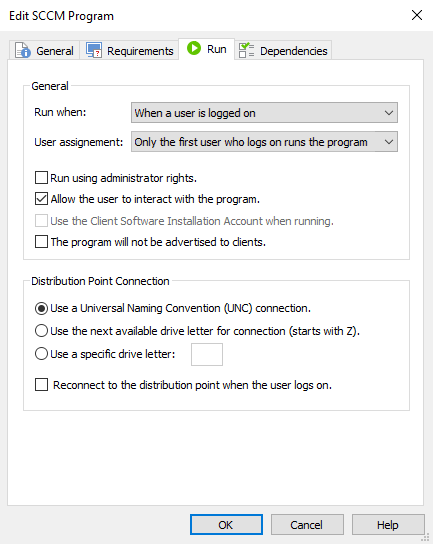
General
Run when
This option specifies the user status required by the program to run on the client machine. The following options are available:
- When a user is logged on
- When no user is logged on
- Any user status
By default, the "When a user is logged on" option is selected.
User assignment
This option specifies how the program is assigned to users. The following options are available:
- Only the first user who logs on runs the program
- Every user who logs on runs the program
Run using administrator rights
This option specifies if the program requires administrative privileges to run on the client machine.
Allow the user to interact with the program
This option specifies whether the program requires interaction with the user to complete running. This option will be automatically disabled if the "When a user is logged on" option is not selected under "Run when" field.
Use the Client Software Installation Account when running
This option specifies whether the program uses the Client Software Installation Account when running on the client computer. This option is automatically disabled if the "When a user is logged on" option is selected under "Run when" field.
The program will not be advertised to clients
If this option is enabled, the program will not be advertised to client machines.
Distribution Point Connection
In this section, you can specify the connection settings needed by the program.
The following options are available:
- Use a Universal Naming Convention (UNC) connection
- If this option is enabled, the program will access a network location using a UNC format. Example: \\Server\Location.
- Use the next available drive letter for connection (starts with Z)
- This option specifies whether the program requires a drive letter connection to the package files on the distribution point. A network drive mapping will be automatically created.
- Use a specific drive letter
- This option lets you specify, in the right side edit box, the drive letter under which the network mapping will be created.
Reconnect to the distribution point when the user logs on
This option enables you to specify whether the computer reconnects to the distribution point when the user logs on.
Dependencies Tab

Programs
This list will display all the programs created in the current package. From this list, you can select one or more programs that will run before the current one.