


Firewall Exceptions Tab

In this tab you can add or import applications or ports that you want to authorize / register in Windows Firewall. If your application requires inbound network connections and Windows Firewall is turned on, your connections will be blocked by the firewall (in the best case scenario the user will be prompted to allow a connection) unless you register a proper firewall exception rule. You can choose to authorize a certain TCP or UDP port or authorize a whole process (your application).
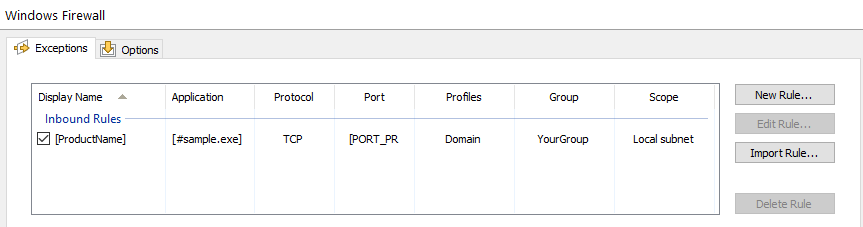
Adding a new firewall rule
Use the button or context menu. The Edit Firewall Exception Dialog will enable you to configure the firewall rule.
Editing an existing firewall rule
Use the button or context menu. The Edit Firewall Exception Dialog will enable you to configure the firewall rule.
Importing a firewall rule
Use the button or context menu. The Firewall Import Exception Dialog will enable you to add an existing exception from the development machine.
 If you uncheck a firewall exception rule from the list, the rule
will be registered with Windows Firewall but will remain
inactive.
If you uncheck a firewall exception rule from the list, the rule
will be registered with Windows Firewall but will remain
inactive.
 The firewall rules installation will be skipped if the Windows
Firewall service is turned off.
The firewall rules installation will be skipped if the Windows
Firewall service is turned off.
Topics
- Edit Firewall Exception Dialog
Configure a firewall application or port exception. - Firewall Import Exception Dialog
Select what rule to import from the development machine.