


Internet Information Services Browse

Advanced Installer can automatically browse the IIS Server to discover all its Application Pools, Web Sites, Virtual Directories and Web Applications.
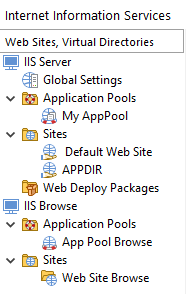
Creating a new IIS Browse Application Pool operation
 To create a new IIS Application Pool Browse operation use
the toolbar button or the “New
IIS Browse > Application Pools” context menu
item.
To create a new IIS Application Pool Browse operation use
the toolbar button or the “New
IIS Browse > Application Pools” context menu
item.
Creating a new IIS Browse Web Site operation
 To create a new IIS Web Site Browse operation use the
toolbar button or the “New
IIS Browse > Web Sites” context menu item.
To create a new IIS Web Site Browse operation use the
toolbar button or the “New
IIS Browse > Web Sites” context menu item.
Renaming an IIS Browse operation
Use the “Rename” context menu item or press the F2 key while a browse operation is selected.
Removing an IIS Browse operation
 Use the
toolbar button, the “Delete” context menu item or press the
Delete key while a browse operation is
selected.
Use the
toolbar button, the “Delete” context menu item or press the
Delete key while a browse operation is
selected.
IIS Application Pool Browse
Let the installing user view and select available Application Pools on IIS Server. Advanced Installer can automatically browse the IIS Server to discover all its Application Pools.

UI Output
Advanced Installer can return the discovered available Application Pools either in dialog controls or in an installer property.
Display the result into a ListBox or CheckList control
Specify the installer property associated with a ListBox or CheckList control which will be populated with the available Application Pools.
Display the result into a ComboBox control
Specify the installer property associated with a ComboBox control which will be populated with the available Application Pools.
Put the result into a property
A flat, comma separated list of the available Application Pools will be dumped into the specified installer property.
Output text format
Configure what Application Pool information the user will view in the dialog control or how Application Pools will be enumerated in the flat property. Each item can include one (the pool name) or some of the following information in the output list:
- Pool name
- .NET Version
- Pipeline Mode
- Running State
Data Output
Assign installer properties to each Application Pool attribute you need to use elsewhere in the installation process. When a user selects an Application Pool, each of its attributes will be stored in their assigned properties.
Adding a new data output
Use the button on the right or the list control context menu.
Removing a data output
Use the button on the right, the context menu or the Delete key while an element from the list control is focused.
Execution
IIS App Pool Browse can be triggered by scheduling the associated action in the Wizard Dialogs Stage or by directly invoking the action with a published/init event on a dialog.
Run in UI sequence
Enabling this option will trigger the IIS App Pool Browse operation when an associated custom action will be executed in the installation sequence. To configure the custom action in the Custom Actions Page, press the Scheduled Action link button.
Attached to an event
Enabling this option will trigger the IIS App Pool Browse operation when an event is published by a control on a dialog. To configure the event in the Dialog Editor Page, select the dialog and the control and press Control Event link button.
Execution privileges
 Although the operation of listing the available App Pools on
the IIS Server does not alter its configuration, for security reasons,
the system does not allow accessing any IIS configuration properties
without administrator privileges. Due to this security policy, the
installing user must be a member of the Administrators group and, on
Windows Vista or above, an UAC Elevation will be necessary in order to
proceed.
Although the operation of listing the available App Pools on
the IIS Server does not alter its configuration, for security reasons,
the system does not allow accessing any IIS configuration properties
without administrator privileges. Due to this security policy, the
installing user must be a member of the Administrators group and, on
Windows Vista or above, an UAC Elevation will be necessary in order to
proceed.
Advanced Installer will automatically trigger the necessary UAC Elevation Prompt for the installing user, enabling temporary elevated privileges to execute the IIS browsing operation. This means there is no need to elevate the MSI execution beforehand (manually or by means of the EXE bootstrapper).
 If you have a button control which triggers the
IIS Browse operation, you should set its Elevation Shield control
property to True. This will make the OS (Vista, and above) show an
elevation shield icon on the button when the installation runs, in
order to warn the installing user that an elevation request is about
to happen when the button is pressed.
If you have a button control which triggers the
IIS Browse operation, you should set its Elevation Shield control
property to True. This will make the OS (Vista, and above) show an
elevation shield icon on the button when the installation runs, in
order to warn the installing user that an elevation request is about
to happen when the button is pressed.
IIS Web Site Browse
Let the installing user view and select available Web Sites and Virtual Directories on IIS Server. Advanced Installer can automatically browse the IIS Server to discover all its Web Sites and Virtual Directories.
Browse type
There are three browse types available:
- Web Sites - Shows only the Web Sites on the IIS Server.
- Virtual Directories - Shows only the Virtual Directories on the IIS Server.
- Web Sites and Virtual Directories - Shows both Web Sites and Virtual Directories on the IIS Server.
From Web Site
Specify on what Web Site to browse for Virtual Directories.
 This field is of Formatted Type and can be
edited using Smart Edit Control. It can be set
only for Virtual Directories browse type.
This field is of Formatted Type and can be
edited using Smart Edit Control. It can be set
only for Virtual Directories browse type.
Filter
Show only Web Sites and Virtual Directories that are web applications.
UI Output
Advanced Installer can return the discovered available Web Sites or Virtual Directories either in dialog controls or in an installer property.
Display the result into a ListBox or CheckList control
Specify the installer property associated with a ListBox or CheckList control which will be populated with the available Web Sites or Virtual Directories.
Display the result into a ComboBox control
Specify the installer property associated with a ComboBox control which will be populated with the available Web Sites or Virtual Directories.
Put the result into a property
A flat, comma separated list of the available Web Sites or Virtual Directories will be dumped into the specified installer property.
Output text format
Configure what item information the user will view in the dialog control or how items will be enumerated in the flat property. Each item can include one (the Web Site name\Virtual Directory name) or some of the following information in the output list:
- Web Site name\Virtual Directory name
- Bindings
- Physical Path
- Site URL
- Runnning State
Data Output
Assign installer properties to each item attribute you need to use elsewhere in the installation process. When a user selects a Web Site or Virtual Directory, each of its attributes will be stored in their assigned properties.
Adding a new data output
Use the button on the right or the list control context menu.
Removing a data output
Use the button on the right, the context menu or the Delete key while an element from the list control is focused.
Execution
IIS Web Site Browse can be triggered by scheduling the associated action in the Wizard Dialogs Stage or by directly invoking the action with a published/init event on a dialog.
Run in UI sequence
Enabling this option will trigger the IIS Web Site Browse operation when an associated custom action will be executed in the installation sequence. To configure the custom action in the Custom Actions Page, press the Scheduled Action link button.
Attached to an event
Enabling this option will trigger the IIS Web Site Browse operation when an event is published by a control on a dialog. To configure the event in the Dialog Editor Page, select the dialog and the control and press Control Event link button.
Execution privileges
Although the operation of listing the available Web Sites and
Virtual Directories on the IIS Server does not alter its configuration,
for security reasons, the system does not allow accessing any IIS
configuration properties without administrator privileges. Due to this
security policy, the installing user must be a member of the
Administrators group and, on Windows Vista or above, an UAC Elevation
will be necessary in order to proceed.
Advanced Installer will automatically trigger the necessary UAC Elevation Prompt for the installing user, enabling temporary elevated privileges to execute the IIS browsing operation. This means there is no need to elevate the MSI execution beforehand (manually or by means of the EXE bootstrapper).
If you have a button control which triggers the
IIS Browse operation, you should set its Elevation Shield control
property to True. This will make the OS (Vista, and above) show an
elevation shield icon on the button when the installation runs, in order
to warn the installing user that an elevation request is about to happen
when the button is pressed.