


Edit Function Argument Dialog

This dialog allows you to edit a function argument.
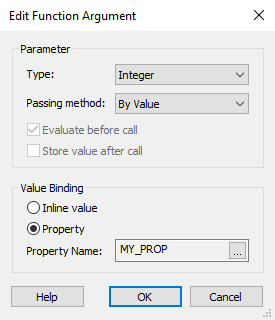
Parameter
Type
The argument's data type.
Passing Method
Specifies if the argument is passed by value or by reference.
Evaluate before call
This option allows you to pass the property value to a DLL function as an input parameter and and then you evaluate that parameter in that function. In case this option is disabled, the property will not be passed to the function.
Store value after call
This applies only when the parameter is passed by reference. The parameters' value after the function's call is stored in the property from where it was taken. If its value was no taken from a property then its final value is ignored.
Value Binding
Specifies where the argument's value is deposited or taken from.
Inline Value
Set the inline argument value. The argument's value is a formatted string.
Property
The argument's value is taken from a property before the function's call and stored in the same property after the call.