


Default Strings Tab

Default strings can be used in subsequent projects, and their localization identifiers are associated with Advanced Installer's default controls and elements.
 There are two ways of translating default strings to a new
dictionary and including it into your project. One involves selecting the
untranslated language from the Languages Tab and then
defining each string in Advanced Installer's predefined dictionary editor
described in this article. The other involves manually editing the
dictionary file and is described in Translating and using a new language tutorial.
There are two ways of translating default strings to a new
dictionary and including it into your project. One involves selecting the
untranslated language from the Languages Tab and then
defining each string in Advanced Installer's predefined dictionary editor
described in this article. The other involves manually editing the
dictionary file and is described in Translating and using a new language tutorial.
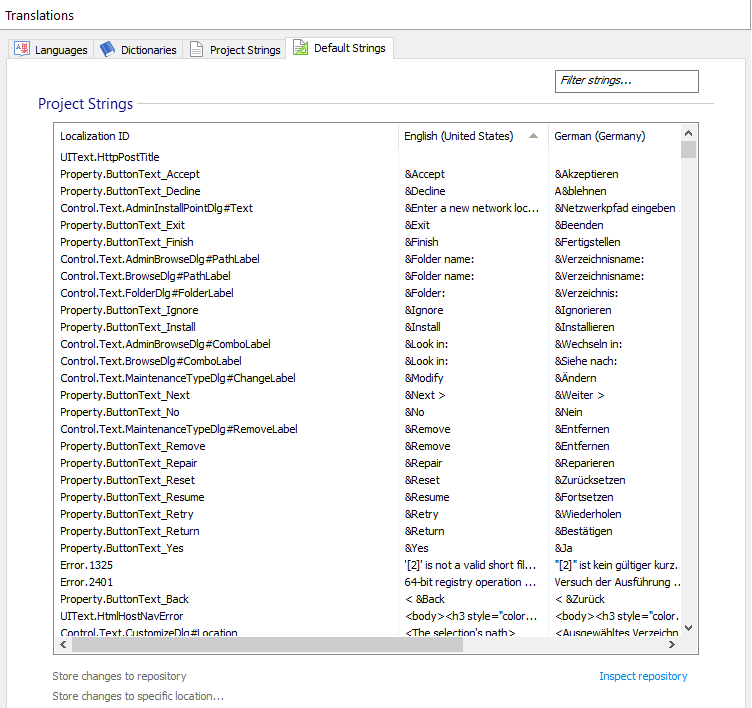
Project Strings
In this section, you can provide translations for untranslated default strings or change translated default strings. To edit a cell double-click it.
 Changes made to the texts are marked with a green outline, which
disappears after saving.
Changes made to the texts are marked with a green outline, which
disappears after saving.
Store changes to repository
Save changes to your repository. Each language will be stored in separate dictionaries.
Store changes to a specific location
Save changes as a dictionary file to a specific location on your computer. All languages will be stored in a single dictionary.
Inspect repository
Manage dictionaries with the Repository Manager.
We will gladly offer you a free license if you help us with
missing translations. To contact us regarding this, just use the
Send to Advanced Installer team item from the Repository Manager > Dictionaries tab context
menu.