


Driver Settings

 Starting with Windows 10 Version 1703 the driver installations are handled by our
internal custom action that calls DiInstallDriverW at install and
DiUninstallDriverW on uninstall and rollback.For previous OS versions,
Microsoft DIFx is used.
Starting with Windows 10 Version 1703 the driver installations are handled by our
internal custom action that calls DiInstallDriverW at install and
DiUninstallDriverW on uninstall and rollback.For previous OS versions,
Microsoft DIFx is used.
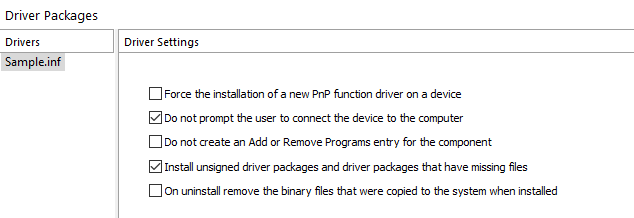
Force the installation of a new PnP function driver on a device
This option forces the driver's installation even if a newer driver version is already present on the target machine.
Do not prompt the user to connect the device to the computer
 This option is only available for prior to Windows 10 Version 1703. Starting with this
version the flag will be ignored.
This option is only available for prior to Windows 10 Version 1703. Starting with this
version the flag will be ignored.
If the device that the driver controls cannot be detected Windows will ask the user to connect it. This option prevents this behavior.
Do not create an Add or Remove Programs entry for the component
This option is only available for prior to Windows 10 Version 1703. Starting with this
version the flag will be ignored.
This option prevents the creation of a separate entry in the Add or Remove Programs list for the driver. The user can remove the driver only by uninstalling the whole product.
Install unsigned driver packages and driver packages that have missing files
This option is only available for prior to Windows 10 Version 1703. Starting with this
version the flag will be ignored.
This option will force the driver's installation even is the driver is unsigned or some of the files mentioned in the INF file are not found in the project. Advanced Installer will automatically check this option if it detects missing files.
On uninstall remove the binary files that where copied to the system when
installed
This option is only available for prior to Windows 10 Version 1703. Starting with this
version the flag will be ignored.
By default, the driver's binary files are not removed from the system when the product is uninstalled. This option prevents this.
 Use this option with caution, to avoid removing files that may still be used by other
programs.
Use this option with caution, to avoid removing files that may still be used by other
programs.