


Conditional Levels Dialog

This dialog contains a list of condition/level pairs. Each level will be set if the corresponding condition evaluates to True.
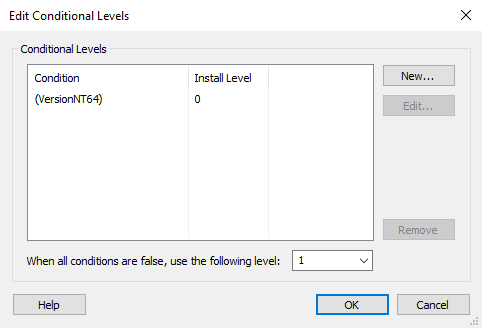
Use the button to create a new condition/level pair, the button to edit an existing pair or the button to delete it.
 If more than one level will have their condition evaluated to True
then the feature will use the highest one. If all level conditions are
false, the feature will use its default level.
If more than one level will have their condition evaluated to True
then the feature will use the highest one. If all level conditions are
false, the feature will use its default level.
 The feature is installed only if its resulting level is less than
or equal to the current global installation level (INSTALLLEVEL property).
The global installation level can be changed during installation by using
the SetInstallLevel control event.
The feature is installed only if its resulting level is less than
or equal to the current global installation level (INSTALLLEVEL property).
The global installation level can be changed during installation by using
the SetInstallLevel control event.
Edit Conditional Level Dialog
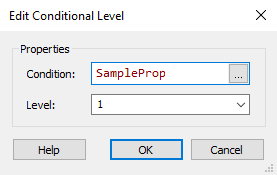
Condition
The condition for setting this level. Edit this field using Smart Condition Edit Control.
Level
The install level which will be set for this feature if the condition evaluates to true. This value is an Integer, and well-known values are:
- 0: disabled
- 1: typical
- 4: complete