


PowerShell Scripts

Powershell Scripts can be executed before and after the packaged applications runs:
 The Powershell scripts configured via the Package Support Framework integration will
always run inside the container context of the MSIX package.
The Powershell scripts configured via the Package Support Framework integration will
always run inside the container context of the MSIX package.
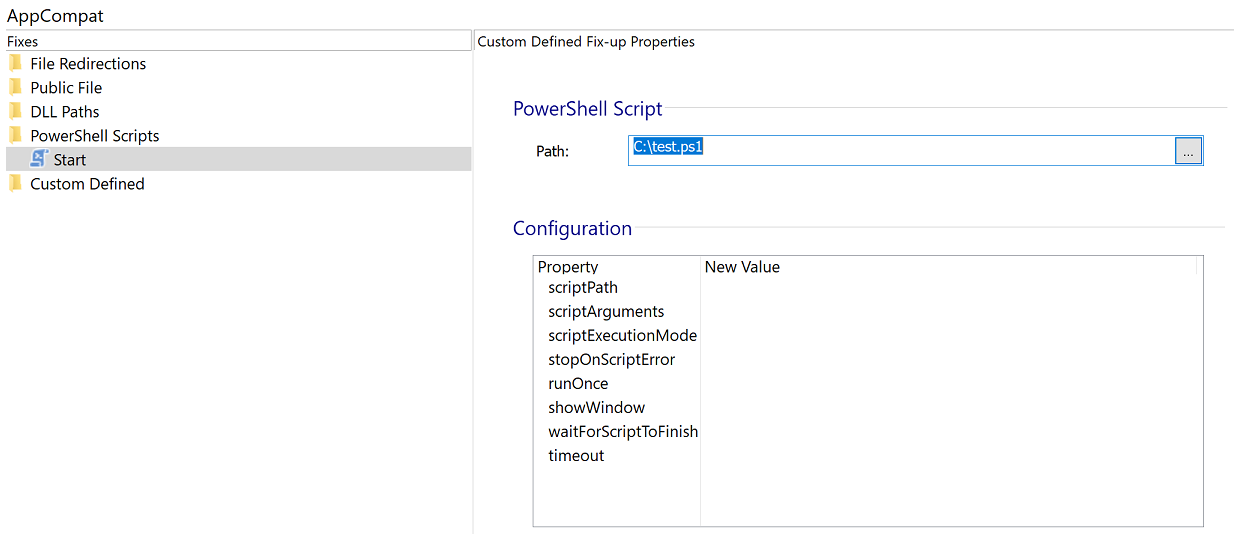
PowerShell Script
Path
Pick the scripts you want to execute before and after your application runs.
 In order to allow the scripts to run, you need to set the execution policy
to unrestricted or RemoteSigned for both 32 bit and 64 bit PowerShell executables.
In order to allow the scripts to run, you need to set the execution policy
to unrestricted or RemoteSigned for both 32 bit and 64 bit PowerShell executables.
Configuration
In this section, you can change the settings of the Script configuration items, as they are defined by the Package Support Framework (PSF).
scriptPath
The path of the script including its name and extension. The path starts from the root folder of the application.
scriptArgumets
This field should contain the argument list (Space delimited that will be appended to the PowerShell.exe call.
scriptExecutionMode
This field should contain a string value that will be added to the powershell launch of any startScript or endScript. The use of scriptExecutionMode may only be necessary in environments when Group Policy setting of default PowerShell ExecutionPolicy is expressed.
stopOnScriptError
This value should be set to "True" in order to close the application if the script fails.
runOnce
This value should be set to "True" if the script should run once per user, per version.
showWindow
This value should be set to "True" in order to show the PowerShell window.
waitForScriptToFinish
This value should be set to "True" if the application should wait for the script to finish before starting.
timeout
Specify how long the script will be allowed to execute.
waitForScriptToFinish, and stopOnScriptError
configuration items are ignored for End application configuration.