


ISAPI Filters

This view allows you to add, edit or remove ISAPI Filters on the target IIS server.

Adding a new ISAPI filter
Use the button, the “New...” context menu item or press the Insert key while the list control is focused. The ISAPI Filter Properties Dialog will be shown allowing you to add a new ISAPI filter.
Editing an ISAPI filter
Use the button, the “Edit...” context menu item or press the Space key while an element from the list control is selected. The ISAPI Filter Properties Dialog will be shown allowing you to edit an existing ISAPI filter.
Removing an ISAPI filter
Use the button, the “Remove” context menu item or press the Delete key while an element from the list control is selected.
ISAPI Filter Properties Dialog
This dialog allows you to configure ISAPI filters.
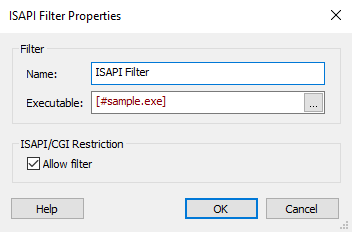
Filter
Name
Specify a name for the ISAPI filter.
Executable
Click the browse button on the right to navigate to the installation folder that contains the filter source file.
 This field is of Formatted Type and can be
edited with the Smart Edit Control.
This field is of Formatted Type and can be
edited with the Smart Edit Control.
ISAPI/CGI Restriction
Allow filter
Allows dynamic content to execute on the target IIS server.
On IIS 6 the feature is called Web Service
Extensions.