


HTTP Response Headers

This dialog allows you to properly configure common and custom HTTP Response Headers for your application on the target IIS Server.

Common Headers
HTTP keep-alive
- <not specified>
- inherit HTTP keep-alive header setting. - Disable
- disable HTTP keep-alive header. - Enable
- enable HTTP keep-alive header.
Expire Web-Content
- <not specified>
- inherit content expiration header setting. - Disable
- disable content expiration. - Immediately
- set content expiration to immediately. - After
- set content expiration after a predefined time interval (in seconds, minutes, hours or days). - On (in Coordinated Universal Time (UTC))
- set content expiration on a specific date and time (in UTC).
Custom Headers
Adding a new HTTP Response Header
Use the button, the “New...” context menu item or press the Insert key while the list control is focused.
Editing an HTTP Response Header
Use the button, the “Edit...” context menu item or press the Space key while an element from the list control is selected.
Removing an HTTP Response Header
Use the button, the “Remove” context menu item or press the Delete key while an element from the list control is selected.
HTTP Response Header Configuration Dialog
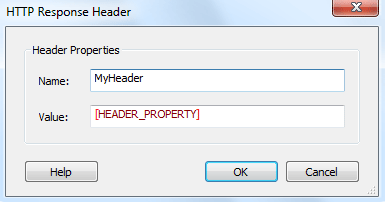
Name
Specify the name of your custom HTTP header.
Value
Specify the value of your custom HTTP header.
 These fields are of Formatted Type and can
be edited using Smart Edit Control.
These fields are of Formatted Type and can
be edited using Smart Edit Control.