


FastCGI Settings

This view allows advanced configuration for FastCGI application pool definitions. Adding or removing mappings with FastCGIModule for web applications will automatically create the FastCGI application pool definition.
 Only one pool will be added for all application mappings sharing the
same Script Processor. To see all web sites using the pool,
refer to the Websites column.
Only one pool will be added for all application mappings sharing the
same Script Processor. To see all web sites using the pool,
refer to the Websites column.
Editing an element
Use the button, the “Edit...” context menu item or press the Space key while an element from the list control is selected. The FastCGI Properties dialog will be shown allowing you to configure an existing application pool definition along with its environment variables.
Application Properties Tab
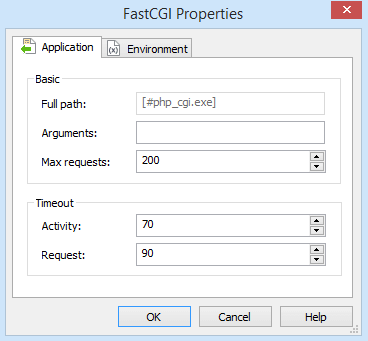
This tab can be used to configure application pool definitions.
FastCGI
Full path
The full path of the FastCGI process.
Arguments
Specify the command-line arguments for the FastCGI process.
Max requests
The maximum number of requests that a FastCGI worker process can process before it is recycled.
Timeout
Activity
Specify the maximum time (in seconds) that a FastCGI process can take to process.
Request
The maximum amount of time (in seconds) a FastCGI request can take.
Environment Variables Tab
This tab can be used to configure FastCGI environment variables.

Adding a new environment variable
Use the button, the “New...” context menu item or press the Insert key while the list control is focused.
Editing an environment variable
Use the button, the “Edit...” context menu item, double click or press the Space key while an element from the list control is selected.
Removing an environment variable
Use the button, the “Remove” context menu item or press the Delete key while an element from the list control is selected.