


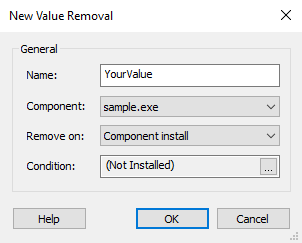
Registry Value Removal Dialog

In this dialog, you can customize a registry value removal
operation. Such operations will be presented with  icon.
icon.
 By default Windows Installer will remove only the resources that were
installed by the MSI package. This removal operation is intended to be
used for external resources created by custom behavior.
By default Windows Installer will remove only the resources that were
installed by the MSI package. This removal operation is intended to be
used for external resources created by custom behavior.
Name
The registry value's name to be removed. The content of this field can be localized.
Component
The component whose install will trigger the value removal operation.
Remove On
The time when the removal will be executed. There are three available moments:
- Component install
- Component uninstall
- Both
Condition
Specify a removal condition.
You can specify a whole registry key to be removed upon install from the Registry Key Dialog.
 The removal operation is extremely useful when the installed
resources are modified post install and would not be removed
otherwise.
The removal operation is extremely useful when the installed
resources are modified post install and would not be removed
otherwise.