


SharePoint Solution Options Tab

This page contains all the options that can be set for the selected SharePoint Solution.
Solution Information
Solution Name
This field contains the name under which the SharePoint solution will be deployed. By default, it is set to [ProductName] WSP. The value of the [ProductName] property can be set from the Product Details Tab.
Solution Folder
This field contains the path where the SharePoint solution's files are stored. Use the button to open the Folder Picker Dialog and select another destination.
Deployment Options
Allow Global Assembly (GAC) deployment
This option enables you to deploy the assemblies found in your SharePoint solution via GAC.
Allow Code Access Security (CAS) policies
This option determines if your solution Code Access Security (CAS) policies are used during deployment.
Overwrite files created by other solutions
This option makes the installer overwrite any files installed by other solutions.
Skip solution if it cannot be deployed
By default, the installation is stopped if a solution cannot be deployed. When enabling this option, any deployment error is ignored and the installation process continues.
Deployment Target
Select target websites during install
If this option is selected the user will be prompted with a list containing all the available websites from which he can select one or more. This option inserts the BrowseIISWebsiteDlg dialog in the dialogs chain.
Deploy globally
If this option is selected the SharePoint solution will be installed on all the available websites that support SharePoint solutions deployment.
Deploy to all nonadministrative virtual servers in a farm
If this option is selected the SharePoint solution will be deployed to all the available virtual servers that are of nonadministrative type.
Deploy only to the current server
The SharePoint solution will be deployed on the current SharePoint server of the machine running the installation package.
Deployment Time
Deploy immediately
The SharePoint solution will be deployed at the installer's runtime depending on the option selected as "Deployment target". If the Deploy only to the current server option is selected the solution will be deployed only to the selected server, otherwise the deployment operation will be executed on all selected or available websites.
Deploy at a specific time
The SharePoint solution will be deployed at the specified date and time to all the available servers that support SharePoint deployment. This field is of Formatted Type and can be edited using Smart Edit Control.
You can assign a property or write directly in the edit box the time and date.
If you want to set the deployment time using a property, an easy and quick way to do it is:
- Click anywhere in the field.
- From the context menu select the "Property..." option.
- In the Property Picker Dialog press the button.
- In the Edit Property Dialog write the name of a public property for the Name field.
- In the Value field write the time and date.
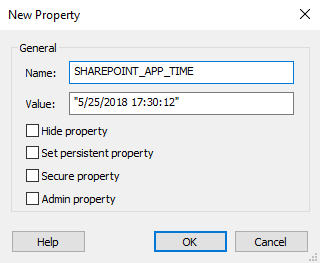
 The supported "date:time" format is culture-specific to the
administrative language. Ex: "5/25/2018
17:30:12".
The supported "date:time" format is culture-specific to the
administrative language. Ex: "5/25/2018
17:30:12".