


Application Settings Tab

This page allows you to specify settings for the application that is launched by the scheduled task.
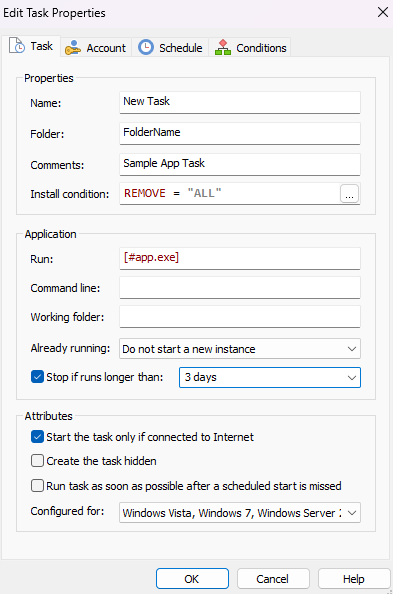
Properties
Name
Specify the task name. You can localize this string.
 If a task with this name already exists on the target computer the Task Name will be
prefixed with the underscore character (_).
If a task with this name already exists on the target computer the Task Name will be
prefixed with the underscore character (_).
Folder
Specify the folder in the Windows Task Scheduler Library in which the task will be created.
Comments
Additional comments for the task. This string is localizable.
Install Condition
This condition is evaluated when the package is installed and based on the result the task will be created or not.
Update if found
Check this option to update the scheduled task if it is already installed instead of recreating it. This will ensure that runtime metadata such as Last Run Time, task GUID, and other historical/debugging information is preserved.
Application
Run
Specify the application that should be run by the scheduled task.
Command Line
Command line options for the launched application.
Working Folder
Specify the working directory for the scheduled application. Leave it empty for the current (default) directory.
The following fields are a Formatted or PseudoFormatted type and can be edited with Smart Edit Control:
- Folder
- Comments
- Run
- Command Line
- Working Folder
Already running
Specify the behavior if the executable is already running:
- Run a new instance in parallel
- Queue a new instance
- Do not start a new instance
- Stop the existing instance
Stop if runs longer than...
In this field you can specify a time interval for a continous run of the task.
Restart on failure every...
In this field you can specify a time interval in minutes after which there will be an attempt to automatically restart the task in case of failure. You can also specify a maximum number of these attempts.
Remove the task if not scheduled to run again after...
Specify the time interval passed after task execution that will trigger the task removal.
Attributes
Additional settings for the scheduled task:
- Create the task hidden.
- Run task as soon as possible after a scheduled start is missed.
- Allow task to be run on demand/
- Force the task to stop if doesn't end on request