


COM Properties Tab

This view allows you to specify the settings of the COM that will register.
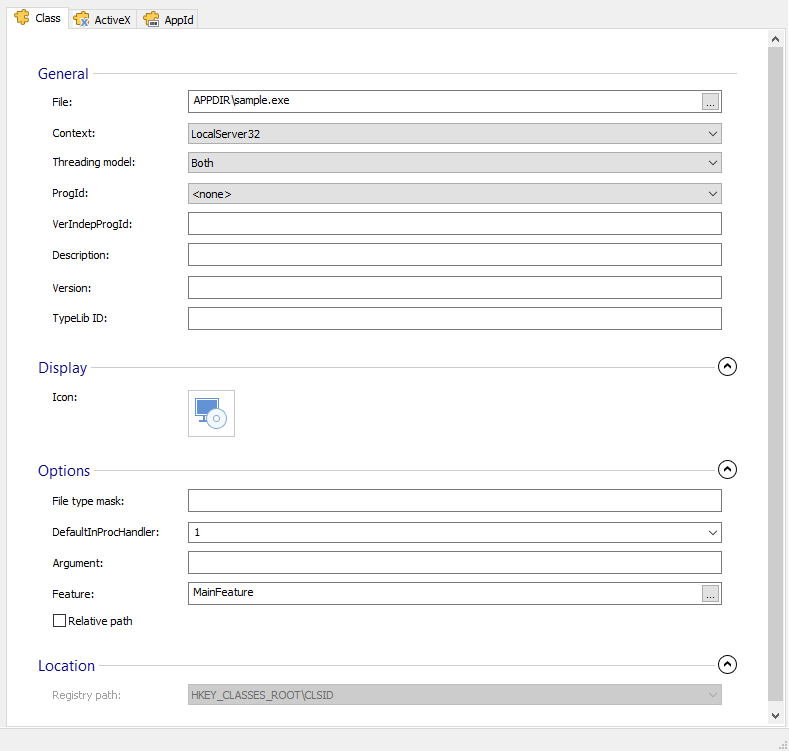
General
File
This field displays the COM file to be registered. Use the to change it.
Context
Select the server context from the drop-down list.
Threading Model
Registers a 32-bit in-process server and specifies the threading model of the apartment the server can run in. Detailed explanation of the registration information written is in the following MSDN article.
If you select the option “<Unspecified>” the installation package will not write any information in the registry about the threading model that should be used.
ProgId
Select the default Program ID associated with this Class ID. The Program IDs are defined in File Associations Page.
VerIndepProgId
Specify the version independent Program ID associated with this Class ID. The version independent Program IDs can be defined in File Associations Page or Registry Page - Installer Project.
Description
Specify a description for the Class ID.
Version
Specifies the version of this COM.
TypeLib Id
Specifies the ID of TypeLibrary describing this COM.
Display
Select an icon that will be associated with this CLSID. Use the and buttons to do that.
Options
File Type Mask
Specify information for this CLSID.
DefaultInProcHandler
Select the default in-process handler for the server context specified in the Context field.
 If a LocalServer or LocalServer32 CLSID key appears in the Context
field, the value in the DefInprocHandler field identifies the default
in-process handler.
If a LocalServer or LocalServer32 CLSID key appears in the Context
field, the value in the DefInprocHandler field identifies the default
in-process handler.
Argument
If a LocalServer or LocalServer32 CLSID key appears in the Context field, the text in this field is registered as the argument against the server and is used by COM to invoke the server. This field is of Formatted Type and can be edited using Smart Edit Control
Feature
Select the feature that provides the COM server. Use the to do that.
Relative path
Specify if the register path is relative or absolute.
Location
Registry path
The registry location where the COM is registered. For COMs defined through MSI Class table this location is read only.