


IIS Collection Item Dialog

This dialog allows you to configure IIS collection items.
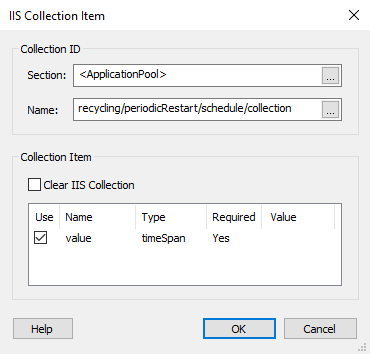
Property ID
Section
The collection you want to modify must be a member of this IIS configuration section.
<WebSite>, <VirtualDirectory> and <ApplicationPool> are section pseudonames used for grouping direct properties of the website/virtual directory/application pool.
Name
Specify a name for the collection in which the new item will be added.
Collection Item
Clear IIS Collection
Enabling this option will clear the entire collection.
The collection item's available fields are displayed in the list. Only those fields with the "Use" column checked will be set when creating the collection item, all others will be set to their default value.
 The "Value" column is of Formatted
Type; however, you need to insert the property references
manually, due to development implementation constraints.
The "Value" column is of Formatted
Type; however, you need to insert the property references
manually, due to development implementation constraints.